
Content security settings
Content security settings
Content security settings are used to control background login captcha, access source restriction, API interface switch, as well as captcha, frequency, and sensitive word filtering for message comments.
Entry Path
Top menu of the background → 'Settings' → 'Content Security Settings'. Actual address:/system/setting/saferequires administrative privileges(canAdmin)
Function description
The page is divided into two tabs: 'Basic Security' and 'Leave/Comment Security'. The former protects the background and API, and the latter reduces spam comments. Both tabs are saved as a whole package [source code].
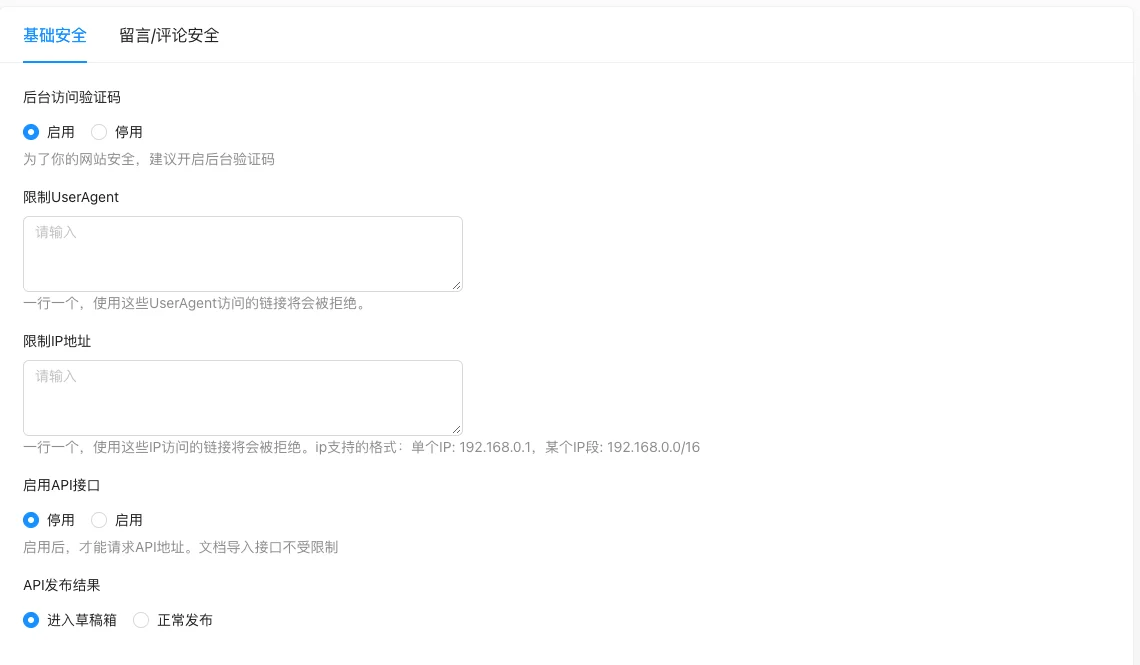
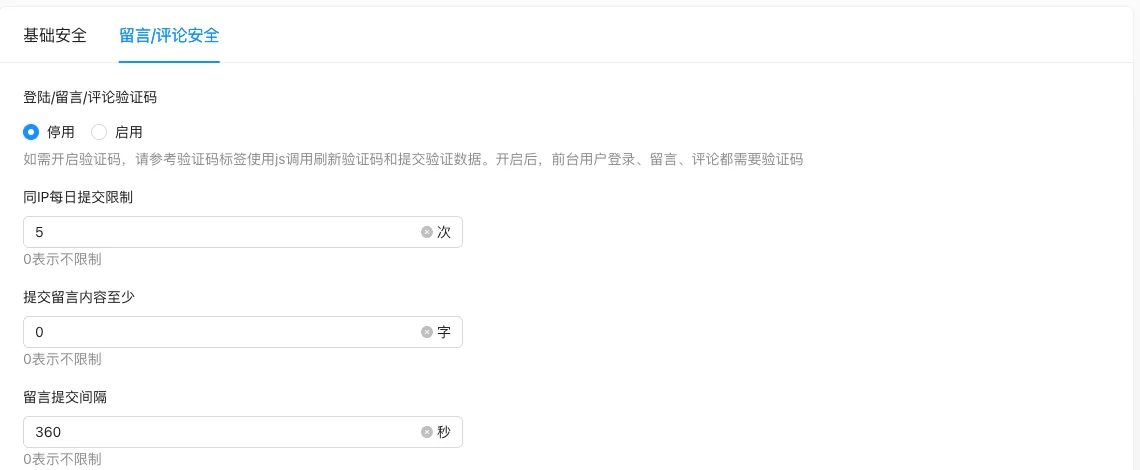
Screenshot of the interface
Basic Security:
Leave/Comment Security:
Setting item description
Basic Security
| Setting items | function | Value / Default | How to select / Fill in suggestions | Impact / Note |
|---|---|---|---|---|
| Background Access Verification Code | Do you need a graphic verification code when logging in to the background? | radio: 0 enable / 1 disable;实测默认 'enable' [实测] | Suggest to keep enabled | Source code Go comments '0=No, 1=Yes' mean 'whether to close', opposite to the interface 0=Enable, take the interface as the standard |
| Limit UserAgent | Deny access to specified UA | Multiple lines of text, one per line; default empty [source code] | Block known collection UA | Incorrect writing may hurt normal browsers |
| Limit IP address | Deny access to specified IP | Multiple lines of text, one per line, supports single IP or CIDR; default empty [source code] | As192.168.0.1or192.168.0.0/16 |
Be careful of typos, as they may keep you out |
| Enable API interface | Is the front desk API open? | Radio: 0 disable / 1 enable; default is 'disable' [实测] | Enable when API or mini-program is needed | The document import interface is not restricted |
| API release result | Where does the document released through API go? | Radio: 0 go to draft box / 1 normal release; default is 'go to draft box' [实测] | It is recommended to review the draft first | Select 'Normal Release' to directly go live with the API content |
留言/评论安全
| Setting items | function | Value / Default | How to select / Fill in suggestions | Impact / Note |
|---|---|---|---|---|
| Login/Comment/Verification code | Front-end submission needs verification code | Radio: 0/1; Source code does not specify default value | Enable when there are too many spam contents | After enabling, the template must render and verify the verification code, otherwise it cannot be submitted |
| Daily submission limit for the same IP | Daily submission limit per single IP | Number, 0 means no limit [i18n] | Set according to the normal user frequency | — |
| Content submitted at least | Minimum number of characters for a comment | Number, default 0 [i18n] | Set to 5-10 to filter spam | The interface prompt text reused '0 means no limit' [source code] |
| Comment submission interval | Minimum interval between two submissions in seconds | Number, default 0 [i18n] | Set to 30-60 to prevent刷 | The interface prompt text reused '0 means no limit' [source code] |
| Sensitivity word filtering for comments | The comment/reply containing the hit term has been rejected | Multiple lines of text, one per line; default empty [source code] | Maintain advertisements and illegal words | Independent configuration from the entire site sensitive word library |
Detailed explanation of configuration items
Backend access verification code (value semantics reversed)
Condition for occurrence: Always display [实测].
The interface radio is '0=enable / 1=disable', but GoSafeConfigComments should be written as 'Whether to close admin verification code: 0=no, 1=yes ('config/setting.go:101) [COMPUTED].
Understanding: Choose according to the interface text; the source code comments describe from the perspective of 'whether to close', but the two are opposite in semantics but point to the same switch.
Consequences of filling in incorrectly: Choosing 'disable' will reduce the backend security.
IP/UA blocking rules
Condition for occurrence: Always display [实测].
IP and UserAgent, sensitive words in comments are parsed line by line, one line per entry [source + i18n]. IP supports single addresses and CIDR network segments (such as192.168.0.0/16)
Recommended value: Only add explicitly malicious sources; broad whitelisted network segments may cause damage.
Consequences of filling in incorrectly: Incorrect CIDR writing may reject large sections of normal users or lock yourself out of the background.
Operation steps
- Enter 'Settings → Content Security Settings.'
- Configure access strategies for the background and API in 'Basic Security.'
- Switch to 'Comment/Review Security' configuration frequency and content filtering; note that the entire package covers.
- Click 'Submit' to save.
Applicable scenarios and suggestions
- The site open to the public: Keep the 'background access verification code' enabled and use IP restrictions to narrow the access range.
- Pure display site without API: Disable the API interface to reduce the attack surface.
- Sites troubled by spam comments: Enable captcha, IP restriction, and sensitive word filtering at the same time.
Points to note
- Before enabling the captcha, make sure the template has been correctly connected to the captcha tag, otherwise users will not be able to submit.
- Using CIDR notation to limit IP, a mistake may block yourself from the outside.
- When the API release result is set to 'enter the draft box', the content imported through the interface will not go online directly.
- The prompt text for 'submitting留言 content at least' and 'submitting interval' in the interface reused the prompt '0 means no limit', as understood from the field meaning.