
Management of Static Rule
Management of Static Rule
The static rules determine the URL format of documents, categories, single pages, tags, and other pages, which is a basic SEO configuration that must be confirmed before the site goes live.
Entry Path
Top menu of the background → 'Function' → 'SEO/GEO' → 'Static rules management'. Actual address:/system/plugin/seo/rewriterequires administrative privileges(canAdmin)
Function description
The system built-in 4 commonly used rules and supports custom mode. Switching rules will change the URL generation method of the entire site, and it is necessary to ensure that the server is configured with the corresponding rewrite rules.
Screenshot of the interface
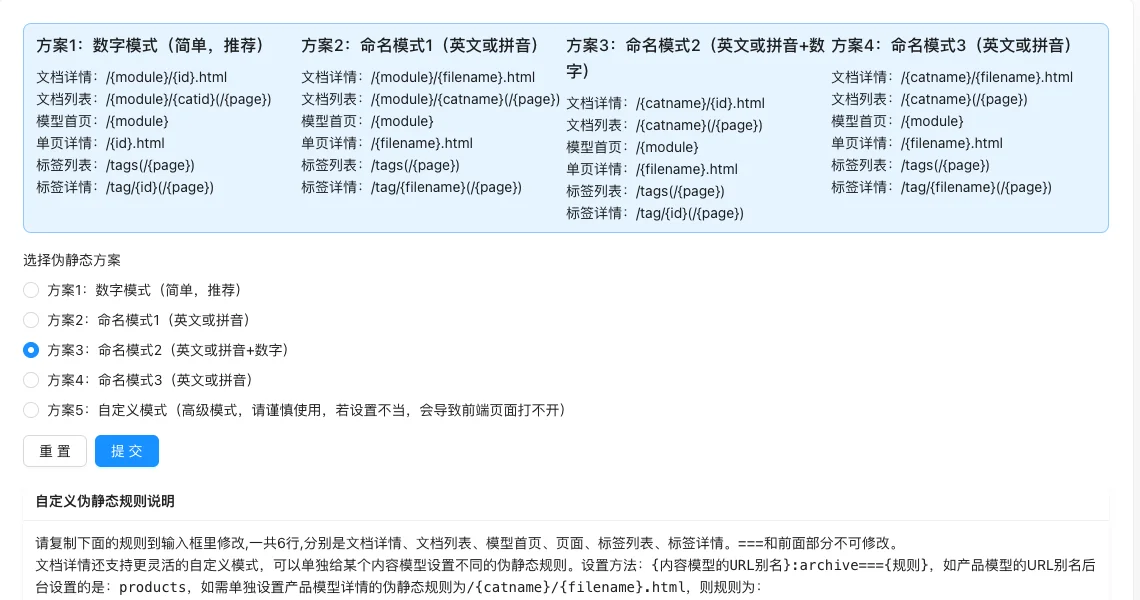
Setting item description
| Setting items | function | Value / Default | How to select / Fill in suggestions | Impact / Note |
|---|---|---|---|---|
| Choose the static rule scheme | Determines the composition of the entire site URL | radio: Plan 1 Number / Plan 2 Naming 1 / Plan 3 Naming 2 / Plan 4 Naming 3 / Plan 5 Custom; Default Plan 1 [Source Code +实测] | New site/Chinese site uses Plan 1; English or pinyin site uses Plan 2/4 | Switching will make old links invalid, need to be accompanied by 301 redirect |
| Custom static rules | Customize each page URL template | 6 lines of text, only Plan 5 displays | See details below | Improper settings will cause the front-end to not open at all |
Detailed explanation of configuration items
Built-in plan comparison
| Plan | Document details | Document List | Applicable scenarios |
|---|---|---|---|
| Plan 1: Numeric Mode | /{module}/{id}.html |
/{module}/{catid}(/{page}) |
Simple, recommended, commonly used in Chinese sites |
| Plan 2: Naming Pattern 1 | /{module}/{filename}.html |
/{module}/{catname}(/{page}) |
English or pinyin site, URL contains module name |
| Plan 3: Naming pattern 2 | /{catname}/{id}.html |
/{catname}(/{page}) |
Category name + Number ID |
| Plan 4: Naming pattern 3 | /{catname}/{filename}.html |
/{catname}(/{page}) |
Category name + Pinyin, URL shorter |
| Plan 5: Custom mode | Customized | Customized | Advanced usage, write rules by yourself |
Select suggestions: New site priority plan 1 (Compatibility**); Confirm that the document has set the URL alias before using the naming mode (filename), otherwise, an abnormal link will be generated.
Custom rules (Plan 5)
Condition for occurrence: Only displayed [Tested] when 'Choose pseudo-static scheme' is Plan 5
There are 6 rules, corresponding to document details, document list, model homepage, page, tag list, tag details,===The part in front cannot be modified [source code]. It can also be set separately for a single content model, formatted as{内容模型URL别名}:archive==={规则}(such asproducts:archive===/{catname}/{filename}.html)[source code].
Consequences of filling in incorrectly: Incorrect rules will cause all corresponding front-end pages to 404.
Operation steps
- Enter 「Function → SEO/GEO → Static Rule Management」.
- Read the examples of various plans, choose a suitable plan; if plan 5 is selected, 6 rules need to be filled in.
- Click 'Submit' to save.
- Visit various front-end pages (home page, list, detail, single page, tag), confirm that the links can be opened normally.
Applicable scenarios and suggestions
- New sites should prioritize plan 1, compatibility**.
- Before using the naming mode, confirm that the document has set the URL alias (filename), otherwise an exception link will be generated.
- After going live, do not switch rules arbitrarily; old links will become invalid; you must switch with a 301 redirect if necessary.
Points to note
- The custom mode requires server rewrite rules to work together; improper settings will cause the front-end to not open at all.
- After switching rules, it is recommended to clear the cache and check whether pages, tabs, single pages, and other elements can be accessed.
- For sites that have already been indexed by external links, switching rules may cause indexing loss, and proper redirection is required.