
Robots management
📅 November 21, 2026
👁️ 0
Robots management
Robots Management is used for maintenancerobots.txtContent, tells search engine spiders which pages can be crawled and which cannot be crawled.
Entry Path
Top menu of the background →「Function」→「SEO/GEO」→「Robots Management」. Actual address:/system/plugin/seo/robotsrequires administrative privileges(canAdmin)
Function description
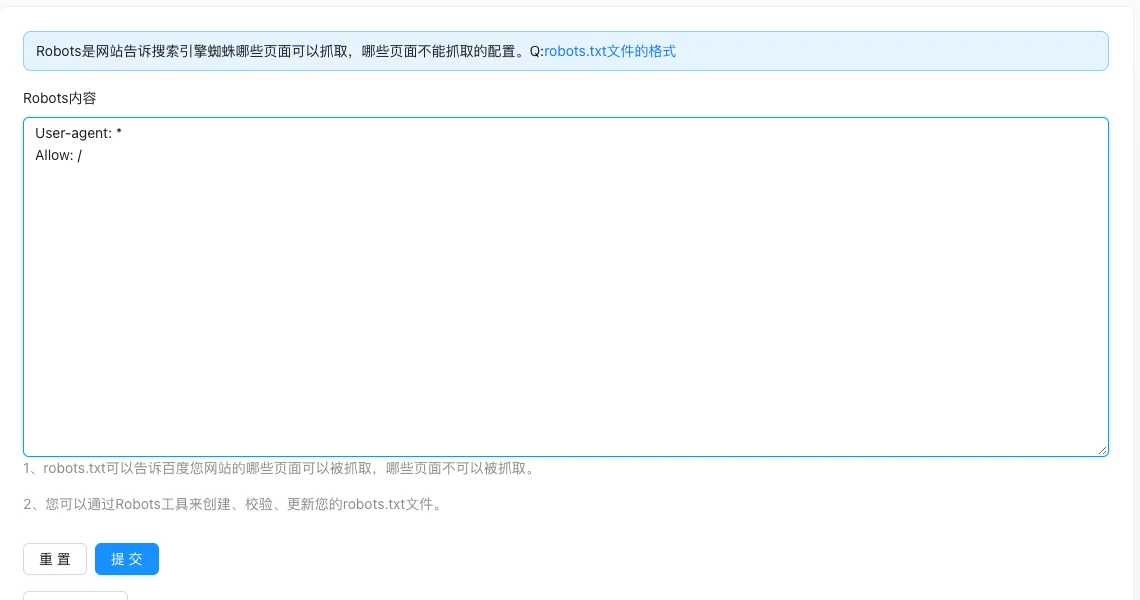
The page provides a Robots content editing box, save operation, and「View Robots」entry, and can check the currently effective robots.txt online.
Screenshot of the interface
Setting item description
| Setting items | function | Value / Default | How to select / Fill in suggestions | Impact / Note |
|---|---|---|---|---|
| Robots Content | robots.txt file content | Text field, one rule per line; default content can be found on the interface [source code] | Write according to the standard syntaxUser-agent/Allow/Disallow; You can declare the Sitemap address |
Writing it incorrectly may cause the entire site not to be indexed |
| View Robots | View the current effective content | Read-only entry | Click to verify after saving | — |
Operation steps
- Enter 「Function → SEO/GEO → Robots Management」.
- Write the robots.txt content in the input box.
- Click 'Submit' to save.
- Click 'View Robots' to confirm the content is correct.
Applicable scenarios and suggestions
- Block the background, search results page, and low-value parameter pages.
- Use in conjunction with Sitemap: Declare the Sitemap address in robots.txt.
Points to note
- robots.txt is just a 'recommendation' for search engines not to crawl, it is not mandatory; the real access control is in the 'Content Security Settings'.
- Incorrect rules may cause the entire site not to be indexed, check with 'View Robots' before saving.
- The search engine needs some time to refresh the cache after the modification, and it will not take effect immediately.