
Link Push Management
Link Push Management
Link push is used to actively notify search engines to crawl after document publication, accelerating the inclusion of new pages.
Entry Path
Top menu of the background → 'Function' → 'SEO/GEO' → 'Link Push Management'. Actual address:/system/plugin/seo/pushrequires administrative privileges(canAdmin)
Function description
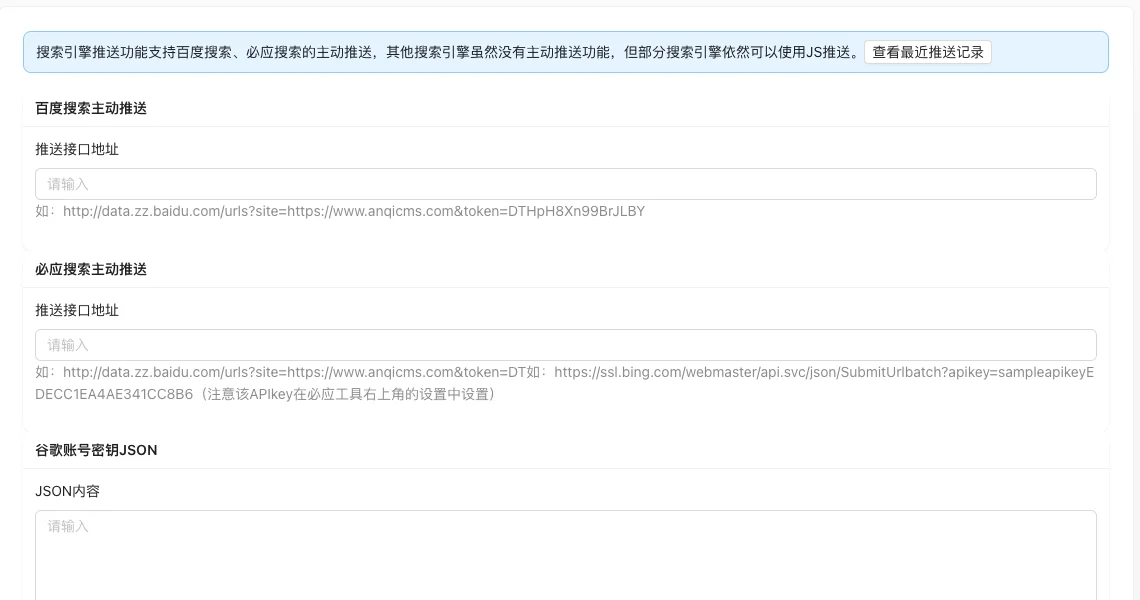
Supports active push interfaces for Baidu search, Bing search, as well as Google account key JSON configuration; you can also add JS automatic submission codes for Baidu, 360, Toutiao, and check the push results through 'View Recent Push Records'.
Screenshot of the interface
Setting item description
| Setting items | function | Value / Default | How to select / Fill in suggestions | Impact / Note |
|---|---|---|---|---|
| Baidu Search Push Interface Address | Baidu General Inclusion API Submission Address | Text, No Default [Source Code] | Obtain in Baidu Search Resource Platform 'General Inclusion → API Submission'. | Address contains Token, it is sensitive information |
| Bing search push interface address | Bing IndexNow or submission API address | Text, No Default [Source Code] | API Key can be obtained from the upper right corner of Bing tools settings | — |
| Google account key JSON | Google Indexing API credentials | Text field, no default [source code] | Obtained from Google Developer Console | Cannot be used directly in China |
| JS automatic submission of code | Baidu/360/Toutiao automatic inclusion script | Subtable: Name + JS code [source code] | The code must include<script>Starting with</script>ending |
Must be added at the end of the template{{- pluginJsCode|safe }}It will be outputted |
Detailed explanation of configuration items
JS automatic code submission integration
Condition for occurrence: After adding JS code [source code].
The source code requires the code to end with<script>starting with</script>And must be added at the end of the public template{{- pluginJsCode|safe }}In order to output to the page [source code+i18n]. Messages, comments, and pop-ups will automatically load these JS codes.
Consequences of filling in incorrectly:Not output in the template or code format is incorrect, automatic submission will not take effect.
Push records
Condition for occurrence「View recent push records」entry [source code].
The records include search engines, push results, and time, which can be used to verify whether the push was successful [source code].
Operation steps
- Go to the corresponding search engine webmaster platform to add a site and obtain the push interface.
- Go to「Function → SEO/GEO → Link Push Management」.
- Enter the interface address or JSON content and click「Submit」.
- Add code and output in the template when JS automatic submission is required.
- After publishing a document, view the push records to confirm that the push was successful.
Operation steps
- Go to the corresponding search engine webmaster platform to add a site and obtain the push interface.
- Go to「Function → SEO/GEO → Link Push Management」.
- Enter the interface address or JSON content and click「Submit」.
- When JS auto-submit is needed, click 'Add JS Code' to fill in the name and code.
- After publishing a document, view the push records to confirm that the push was successful.
Applicable scenarios and suggestions
- For sites with frequent content updates, prioritize Baidu and Bing automatic push settings.
- For scenarios where interface push cannot be used, use JS auto-submit as a supplement.
Front-end call example
JS auto-submit code will not be output automatically; it needs to be manually added at the end of the public template:
{{- pluginJsCode|safe }}
Messages, comments, and other pop-ups will automatically load these JS codes; no need to add them repeatedly.
Points to note
- The interface address contains sensitive information such as Token or API Key; do not publicly disseminate.
- The push interface has quota limits, pay attention to the remaining quota returned by the platform when bulk pushing.
- The Google Indexing API cannot be used in the domestic network environment, please confirm its accessibility before configuration.