
Sitemap management
Sitemap management
Sitemap management is used to generate sitemap files, making it easier for search engines to discover and crawl all site links.
Entry Path
Top menu of the back-end →「Function」→「SEO/GEO」→「Sitemap Management」. Actual address:/system/plugin/seo/sitemaprequires administrative privileges(canAdmin)
Function description
Supports txt and xml formats, manual and automatic generation methods, can be sliced by the number of links, and exclude specified models, categories, and single pages.
Screenshot of the interface
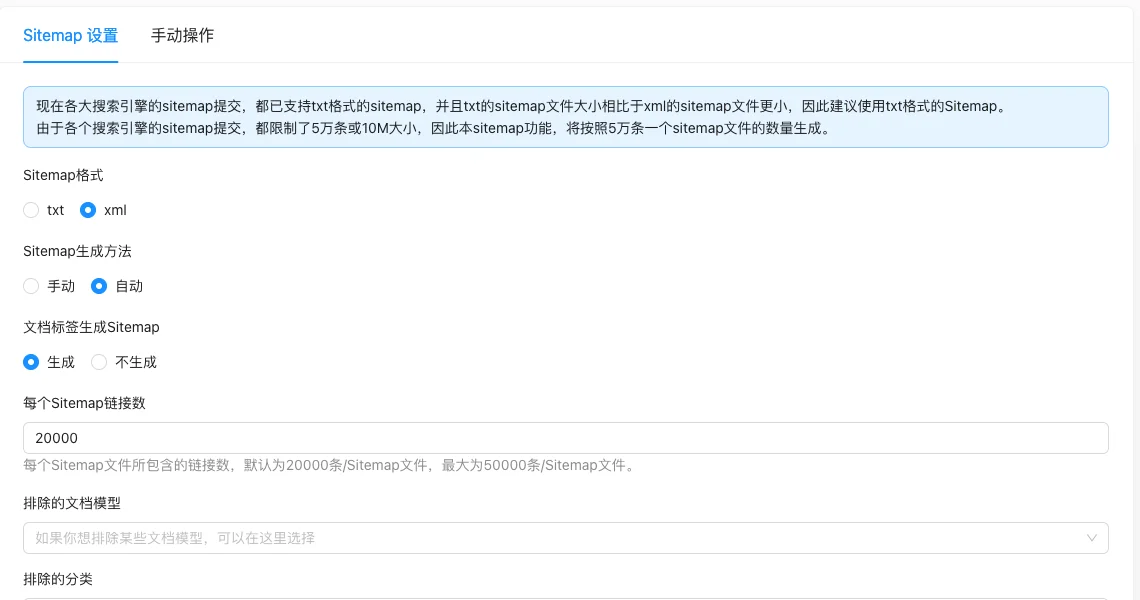
Setting item description
| Setting items | function | Value / Default | How to select / Fill in suggestions | Impact / Note |
|---|---|---|---|---|
| Sitemap Format | File format of generation | radio: txt (recommended) / xml [source code] | Large sites use txt, smaller in volume | Old search engines may only recognize xml |
| Sitemap Generation Method | Generation time | radio: 0 manual / 1 automatic [source code] | Select automatic for frequent updates | Update the automatic mode when the document is published |
| Generate Sitemap for document tags | Include tab page | radio: false generate / true do not generate [source code] | Select generate when the tab page has collection value | Field name and copywriting direction are opposite, follow the interface copywriting |
| Number of Sitemap links per | Link limit per file | Number, default 20000, ** 50000 [source code] | Default is fine | Exceeded the limit will be sliced; Search engine limits 50,000 items or 10MB |
| Excluded document model | Do not write documents for specified model | Multiple selection, no default [source code] | Exclude models that do not want to be indexed | — |
| Excluded categories | Do not write documents for specified category | Multiple selection, disable non-enabled categories [source code] | Exclude background or invalid categories | — |
| Excluded single page | Do not write to specified single page | Multiple selection, no default [source code] | Exclude single pages that do not want to be indexed | — |
Detailed explanation of configuration items
Generate and take effect
Condition for occurrence: 'Manual operation' tab [source code].
After modifying the Sitemap configuration, manual generation must be triggered to take effect [source code+i18n]; reconstruction is executed according to the saved configuration, without the current form values not saved [source code].
Recommended value: Use automatic mode daily; from the first configuration or structure change to the manual operation point 'Manual generation of Sitemap'.
Consequences of filling in incorrectly: If the configuration is changed, it will not regenerate, and the Sitemap will not output according to the new configuration.
Fragmentation and format
Condition for occurrenceAlways display [source code].
Each search engine has a limit of 50,000 entries or 10MB for Sitemap, the system automatically generates fragments based on 50,000 [source code+i18n].
Operation steps
- Go to 'Function → SEO/GEO → Sitemap Management.'
- Choose the format and generation method, set the number of links and exclusions.
- Click 'Submit' to save the configuration.
- Trigger generation in 'Manual Operation', confirm that the file has been updated.
- Submit the Sitemap address to the search engine webmaster platform.
Operation steps
- Go to 'Function → SEO/GEO → Sitemap Management.'
- Choose the format and generation method, set the number of links and exclusions.
- Click 'Submit' to save the configuration.
- Trigger generation in 'Manual Operation', confirm that the file has been updated.
Applicable scenarios and suggestions
- Use txt format for large sites to reduce file size.
- Pages that are not desired to be indexed (such as admin pages, event pages) should be removed through exclusion items rather than relying on robots.
Points to note
- Each search engine has a limit of 50,000 items or 10MB for Sitemap, and the system automatically generates slices based on 50,000 items.
- After modifying the number of links or exclusion items, a new generation is required; the old file will not be updated automatically.
- After generation, submit the Sitemap address to the webmaster platform; otherwise, search engines will not actively read it.