
Structured Data Tag
Structured Data Tag
Structured Data Tag is used to automatically insert structured data in JSON-LD format into pages, helping search engines understand the content of the website.
Entry Path
Top menu of the background →「Function」→「SEO/GEO」→「Structured Data Tag」。Actual address:/system/plugin/seo/jsonldrequires administrative privileges(canAdmin)
Function description
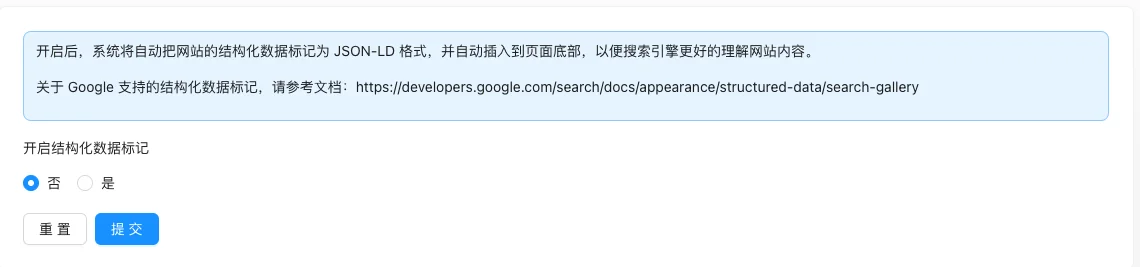
The page has only one switch. After turning it on, the system will automatically insert the website's structured data in JSON-LD format at the bottom of the page, without manually modifying the template.
Screenshot of the interface
Setting item description
| Setting items | function | Value / Default | How to select / Fill in suggestions | Impact / Note |
|---|---|---|---|---|
| Enable Structured Data Tag | Whether to automatically insert JSON-LD | Radio: No / Yes; the default value is not specified in the source code [source code] | Turn it on when you want the search engine to better understand the content | Automatically insert at the bottom of the page after turning it on, do not repeat in the template. |
Detailed explanation of configuration items
Selection of structured data types
Condition for occurrenceAfter enabling structured data tags, the model data structure and the data structure of each category can be configuredlist_typewithschema_type[Source code].
list_type3 items: CollectionPage (Category/Collections Page), ItemList (Simple Item List), DetailedItemList (Detailed Content Card List) [Source code].
schema_type20 items: Article, Product, ScholarlyArticle, BlogPosting, NewsArticle, WebPage, ItemPage, Recipe, Course, FAQPage, HowTo, Event, Person, Place, etc. [Source code].
Recommended value: Articles use Article, products use Product, frequently asked questions use FAQPage; non-VIP section types are not selectable.
Consequences of filling in incorrectlyThe type and content mismatch will affect the rich summary display of search engines, but will not cause any functional failure.
Data type and contact information
Condition for occurrence:data_typeDisplay corresponding fields [source code] when selecting an organization or individual.
data_type=1Organization: 15 types of organization types (including LocalBusiness local businesses, etc.), name, legal name, URL.data_type=2Individual: name, position, photo.- Both share: contact type 12 items, contact number (disabledPlease go to the contact information settings to modify, contact URL, Logo image (size must be 160x50 or 600x60) [source code].
- Local business (LocalBusiness) also requires business hours, price range, latitude and longitude, and address, etc. [source code, VIP].
Consequences of filling in incorrectly: Logo size does not match or contact information is missing, which will cause the structured data validation to fail.
Operation steps
- Go to 'Function → SEO/GEO → Structured Data Tagging'.
- Set the switch to 'Yes'.
- Click 'Submit' to save.
- View the front-end page source code and confirm that the JSON-LD script has been output.
Applicable scenarios and suggestions
- Recommend enabling the site to enhance search display effects through rich summaries (Rich Results).
- For specific supported markup types, refer to the Google structured data documentation.
Points to note
- The automatically inserted tags are generated by the system; to customize fields, use
jsonLdTags should cover the same field names, do not create a duplicate structured data set in the template. - If the JSON-LD is not visible in the front-end source code after enabling, clear the cache first and then check.
Front-end call example
After enabling the background feature, the page will default to inserting a namedjson-ldstructured data tag. When more freedom to control content is needed, you can usejsonLdLabel wrapping custom field; the custom field will override the default value if it has the same name:
{% jsonLd %}
{
  "author": { "@type": "Person", "name": "示例作者" },
  "images": ["{{ siteLogo }}"]
}
{% endjsonLd %}
The custom content must comply with JSON-LD syntax; see the template tag manual for field descriptions:jsonLd.
Related documents
- LLMs Configuration
- template tag manual.
jsonLdTag - Sitemap management
- Home page TDK settings