
Document Category
📅 November 21, 2026
👁️ 0
Document Category
Document classification is used to organize documents by model, maintain classification hierarchy, template, display status, and custom classification fields.
Entry Path
Top menu of backend → 'Content' → 'Document Classification'. Actual address:/system/archive/categoryrequires administrative privileges(canAdmin)
Function description
Categories are displayed by document model, supporting **category, subcategory, batch addition, template specification, sorting, display/hide, and custom category fields.
Screenshot of the interface
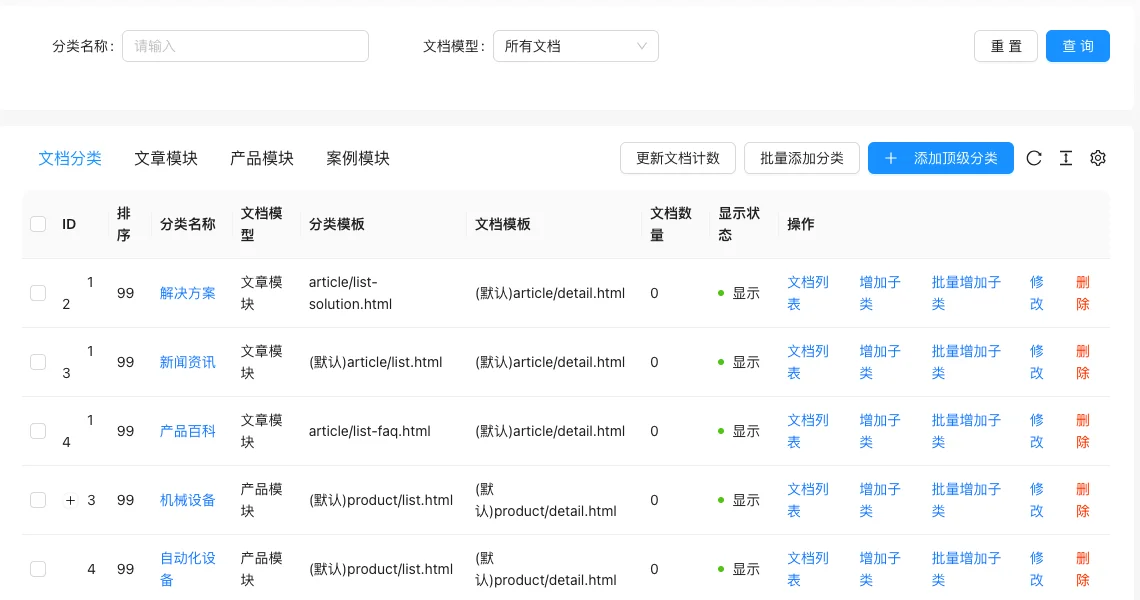
List field description
| field | Meaning | Value or source | Impact on the operation |
|---|---|---|---|
| ID / Sorting | Category number and sorting value | Back-end record, read-only | Used for identification and filtering, cannot be directly edited |
| Category Name | Front-end display name | Back-end record, read-only | Used for identification and filtering, cannot be directly edited |
| Document model | Category model | Back-end record, read-only | Used for identification and filtering, cannot be directly edited |
| category template | Template used on category page, defaults to inherited model | Back-end record, read-only | Used for identification and filtering, cannot be directly edited |
| Document Template | Template used for documents under the category | Back-end record, read-only | Used for identification and filtering, cannot be directly edited |
| Document count | Number of documents under the current category | Back-end record, read-only | Used for identification and filtering, cannot be directly edited |
| Display Status | Show / Hide | Back-end record, read-only | Used for identification and filtering, cannot be directly edited |
| Operation | Document list, add subclass, batch add subclass, modify, delete | Back-end record, read-only | Used for identification and filtering, cannot be directly edited |
| :— | :— | ||
| ID / Sorting | Category number and sorting value | ||
| Category Name | Front-end display name | ||
| Document model | Category model | ||
| category template | Template used on category page, defaults to inherited model | ||
| Document Template | Template used for documents under the category | ||
| Document count | Number of documents under the current category | ||
| Display Status | Show / Hide | ||
| Operation | Document list, add subclass, batch add subclass, modify, delete |
Operation steps
- Go to 'Content → Document Classification'.
- Click on 'Add **Category' or 'Batch Add Category' to create a category.
- Click on 'Add Subcategory' on an existing category to establish a hierarchy.
- Click 'Edit' to set the template, sorting, and display status.
- Click 'Update Document Count' if the document count is inaccurate.
Applicable scenarios and suggestions
- Category levels should not be too deep; three levels or more can complicate front-end filtering and template creation.
- For different list styles, specify an independent 'Category Template' for the category.
- The category field is used to store SEO copy, images, and other additional information; see the Custom Field tutorial for configuration methods.
Front-end call example
The category list passes.categoryListTag call:
{% categoryList categories with moduleId="1" parentId="0" %}
  {% for item in categories %}
    <a href="{{ item.Link }}">{{ item.Spacer|safe }}{{ item.Title }}</a>
  {% endfor %}
{% endcategoryList %}
The category detail field passes.categoryDetailRead the tag, the custom field also uses the tag according to the field name.
Points to note
- Before deleting the category, confirm that the documents under it have been transferred, otherwise the documents will lose their category affiliation.
- After changing the template file name, the template file must actually exist, otherwise the front-end list page will report an error.
- Hiding the category will not delete the document, but the front-end usually no longer displays the category entry.