
Content model
📅 November 21, 2026
👁️ 0
Content model
Content model defines the type, table name, title name, and custom fields of documents, and is the configuration entry for document and classification fields.
Entry Path
Top menu of the back end → 'Content' → 'Content Model'. Actual address:/system/archive/modulerequires administrative privileges(canAdmin)
Function description
The page lists the built-in models and custom models of the system. Each model can configure document custom fields and category custom fields; the table name of the model cannot be changed after creation.
Screenshot of the interface
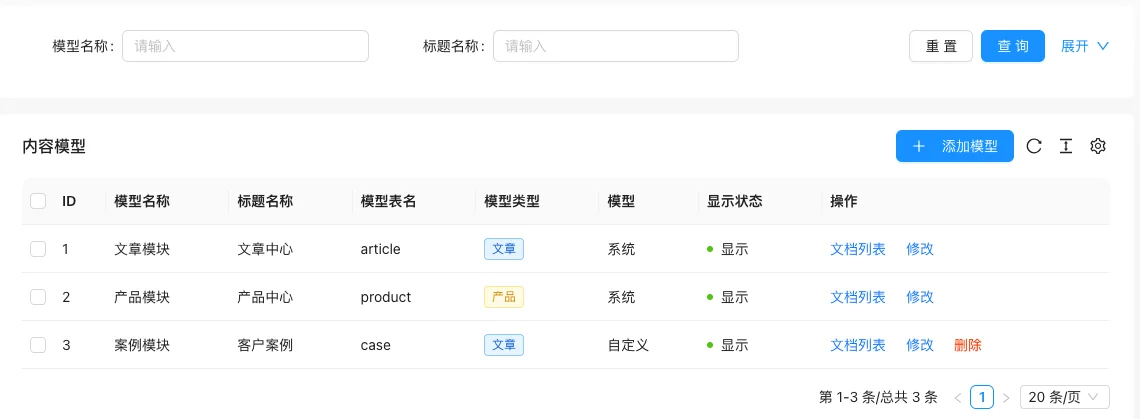
List field description
| field | Meaning | Value or source | Impact on the operation |
|---|---|---|---|
| ID | Model Number | Back-end record, read-only | Used for identification and filtering, cannot be directly edited |
| Model name | Back-end Identifier Name | Back-end record, read-only | Used for identification and filtering, cannot be directly edited |
| Title Name | Display name of the 'Title' field when publishing documents | Back-end record, read-only | Used for identification and filtering, cannot be directly edited |
| Model table name | The data table where the model documents are stored | Back-end record, read-only | Used for identification and filtering, cannot be directly edited |
| Model Type | Article / Product / Custom | Back-end record, read-only | Used for identification and filtering, cannot be directly edited |
| Model | System / Custom | Back-end record, read-only | Used for identification and filtering, cannot be directly edited |
| Display Status | Show / Hide | Back-end record, read-only | Used for identification and filtering, cannot be directly edited |
| Operation | Document list, modify, delete | Back-end record, read-only | Used for identification and filtering, cannot be directly edited |
| :— | :— | ||
| ID | Model Number | ||
| Model name | Back-end Identifier Name | ||
| Title Name | Display name of the 'Title' field when publishing documents | ||
| Model table name | The data table where the model documents are stored | ||
| Model Type | Article / Product / Custom | ||
| Model | System / Custom | ||
| Display Status | Show / Hide | ||
| Operation | Document list, modify, delete |
Operation steps
- Enter "Content → Content Model".
- Click "Add Model", fill in the model name, title name, and table name.
- Click "Modify" on an existing model to maintain "Document Custom Fields" and "Category Custom Fields".
- After saving, confirm the appearance of the new field on the document publishing page.
Applicable scenarios and suggestions
- Articles, products, cases, and other content types are different. It is recommended to split them into different models for separate template and field management.
- System-built models cannot be deleted; confirm that no documents are in use before deleting a custom model.
- Field types support 18 types, see the custom field tutorial for configuration details.
Front-end call example
{% moduleDetail with name="Title" id="1" %}

{% archiveList archives with moduleId="1" limit="10" %}
  {% for item in archives %}
    <a href="{{ item.Link }}">{{ item.Title }}</a>
  {% endfor %}
{% endarchiveList %}
Points to note
- Once the model table has data, do not modify it. Renaming it is equivalent to changing a table, and the old data will not be automatically migrated.
- The document field is a real database column, and the field cannot be modified after it is created in the background.
- Deleting a model will affect the documents and categories under it simultaneously, so please back up before performing the operation.