
Urban management
📅 November 21, 2026
👁️ 0
Urban management
Urban management is used to enable city stations, configure station formats, and maintain city stations and their custom fields.
Entry Path
Top menu of the background → 'Content' → 'City Management'. Actual address:/system/archive/placerequires administrative privileges(canAdmin)
Function description
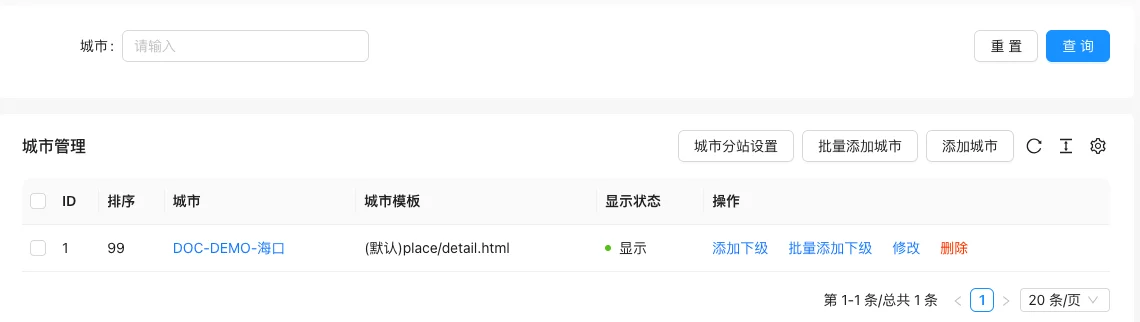
The city sub-station is disabled by default, you need to enable it first in the 'City Sub-station Settings'. After enabling, you can add cities, set city templates, maintain custom city fields, and batch add subordinate cities.
Screenshot of the interface
Setting item description
City Sub-station Settings
| Setting items | function | Value / Default | How to select / Fill in suggestions | Impact / Note |
|---|---|---|---|---|
| Enable city function | Whether to enable city sub-station | Default disable | Enable or disable according to business needs | Status change immediately affects availability |
| City sub-station form | Sub-station URL format | None / Subdomain / Subdirectory | Enter a complete accessible address | An incorrect address will cause access or call failure |
| Content form of city station | Content source of the station | Default / Site-wide reuse; when site-wide reuse is enabled, the URL is the station URL, use with caution | Brief description, avoid being vague | Whether to display is determined by the template |
| Custom field | Extended fields of city stations | Configuration method see the tutorial of custom fields | Fill in according to the page prompt and business requirements | Configure according to the actual performance in front |
city list
| Setting items | function | Value / Default | How to select / Fill in suggestions | Impact / Note |
|---|---|---|---|---|
| ID / Sorting | City number and sorting value | — | Set according to the display priority, the smaller the value, the closer to the front | Affects the front-end arrangement order |
| City | city name | — | Fill in a name that is easy to identify and consistent with the display on the front end | Name changes will affect display and calling, pay attention to synchronization |
| City template | Default station page templateplace/detail.html |
— | Fill in according to the page prompt and business requirements | Configure according to the actual performance in front |
| Display Status | Show / Hide | — | Enable or disable according to business needs | Status change immediately affects availability |
| Operation | Add subordinate, add subordinate in bulk, modify, delete | — | Click the corresponding operation as needed | Some operations are irreversible, please confirm before execution |
Operation steps
- Go to 'Content → City Management'.
- Click 'City Station Settings', enable 'City Function' and select subdomain or subdirectory format.
- After saving, return to the list and click 'Add City' to fill in the city name, alias, and template.
- Click 'Add Subordinate' on the target city when you need a more detailed station.
- If you need to expand fields, maintain custom fields in the station settings.
Applicable scenarios and suggestions
- Subdomain format requires domain name system configuration in advance; subdirectory deployment is simpler.
- Only use city stations when you need to display different content by city, otherwise use the general category.
Front-end call example
{% placeList places with parentId="0" %}
  {% for item in places %}
    <a href="{{ item.Link }}">{{ item.Title }}</a>
  {% endfor %}
{% endplaceList %}

{% placeDetail with name="Title" %}
City custom fields pass.placeDetailCall by field name.
Points to note
- When the city function is not enabled, the list displays 'City station function has not been enabled', and the add city button is not available.
- The subdomain form must first resolve the wildcard domain to the server, otherwise the station cannot be accessed.
- Using the whole site will make all stations display the same content, only the URL is different, confirm the requirements before enabling.
Related documents
- Document Category
- Custom field usage tutorial
- template tag manual.
placeList/placeDetail