
Document Tag
📅 November 21, 2026
👁️ 0
Document Tag
Document tags are used to maintain document tags, supporting classification ownership, index letters, introductions, and custom field management.
Entry Path
Top menu in the background → 'Content' → 'Document Tags'. Actual address:/system/archive/tagrequires administrative privileges(canAdmin)
Function description
The page provides filtering of tag names and their categories, supports adding tags, bulk adding tags, and maintaining custom tag fields.
Screenshot of the interface
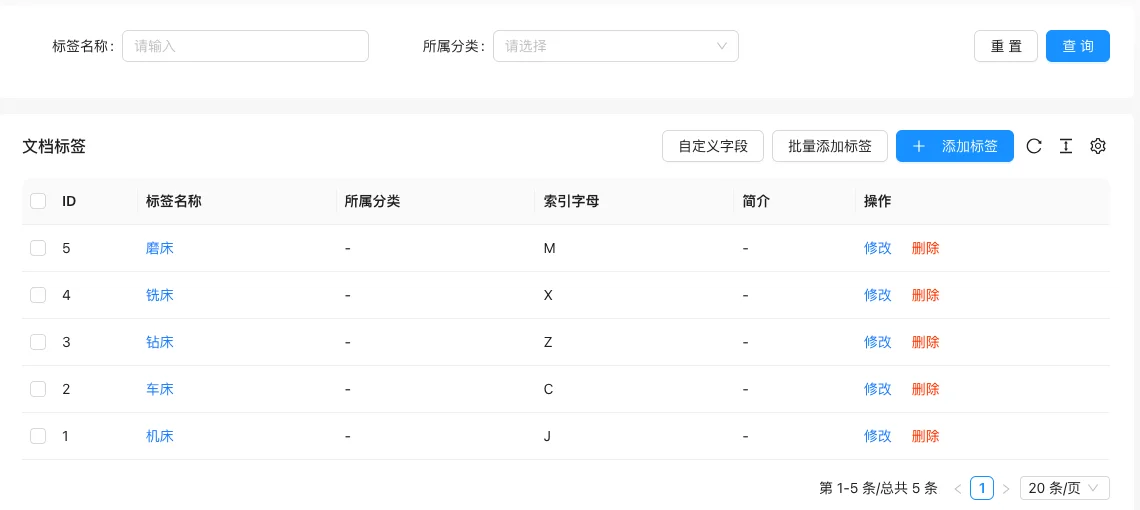
List field description
| field | Meaning | Value or source | Impact on the operation |
|---|---|---|---|
| ID | Tag number | Back-end record, read-only | Used for identification and filtering, cannot be directly edited |
| Tag Name | Front-end display name | Back-end record, read-only | Used for identification and filtering, cannot be directly edited |
| Category | Category to which the tag belongs,-Means not specified |
Back-end record, read-only | Used for identification and filtering, cannot be directly edited |
| Index letter | Used for alphabetic search of tags | Back-end record, read-only | Used for identification and filtering, cannot be directly edited |
| Introduction | Tag description | Back-end record, read-only | Used for identification and filtering, cannot be directly edited |
| Operation | Modify / Delete | Back-end record, read-only | Used for identification and filtering, cannot be directly edited |
| Meaning | |||
| :— | :— | ||
| ID | Tag number | ||
| Tag Name | Front-end display name | ||
| Category | Category to which the tag belongs,-Means not specified |
||
| Index letter | Used for alphabetic search of tags | ||
| Introduction | Tag description | ||
| Operation | Modify / Delete |
Operation steps
- Enter 'Content → Document Labels'.
- Click 'Add Tag' to fill in the name, category, index letter, and introduction.
- Use 'Bulk Add Tags' when batch creation of tags is needed.
- Click 'Custom Fields' to maintain the extended fields of tags.
Applicable scenarios and suggestions
- Tags are used for content aggregation across categories, the classification dimensions are different from the categories themselves, and they should not be mixed.
- Index letters are used for letter navigation on the tag page, and it is recommended to fill in the pinyin initial letters for Chinese tags.
Front-end call example
{% archiveTag tags with limit="20" %}
  {% for item in tags %}
    <a href="{{ item.Link }}">{{ item.Title }}</a>
  {% endfor %}
{% endarchiveTag %}

{% tagDataList archives with tagId="1" limit="10" %}
  {% for item in archives %}
    <a href="{{ item.Link }}">{{ item.Title }}</a>
  {% endfor %}
{% endtagDataList %}
The tag detail field passes through.tagDetailTags are read, and custom fields are called in the same way.
Points to note
- Deleting a tag will not delete the associated documents, but the documents will lose the tag.
- Duplicate tag names will cause multiple same-name entries on the front desk, and search and confirmation should be performed before adding.
- The values of custom fields are filled in on the tag editing page, and the configuration method can be found in the custom field tutorial.