
Global Settings
Global Settings
Global settings are used to configure the basic information, access address, running status, SEO status, and custom parameters of the entire site. This configuration will be called by template tags and affect the address generation, resource loading, and access methods of the front-end page.
Entry Path
Top menu of the background → 「Settings」→「Global Settings」.
Actual address:/system/setting/system. Requires administrator privileges (canAdmin)
Function description
Global settings are divided into four tabs:
- Basic information: Website name, Logo, Ico icon, filing number, copyright information, default language package.
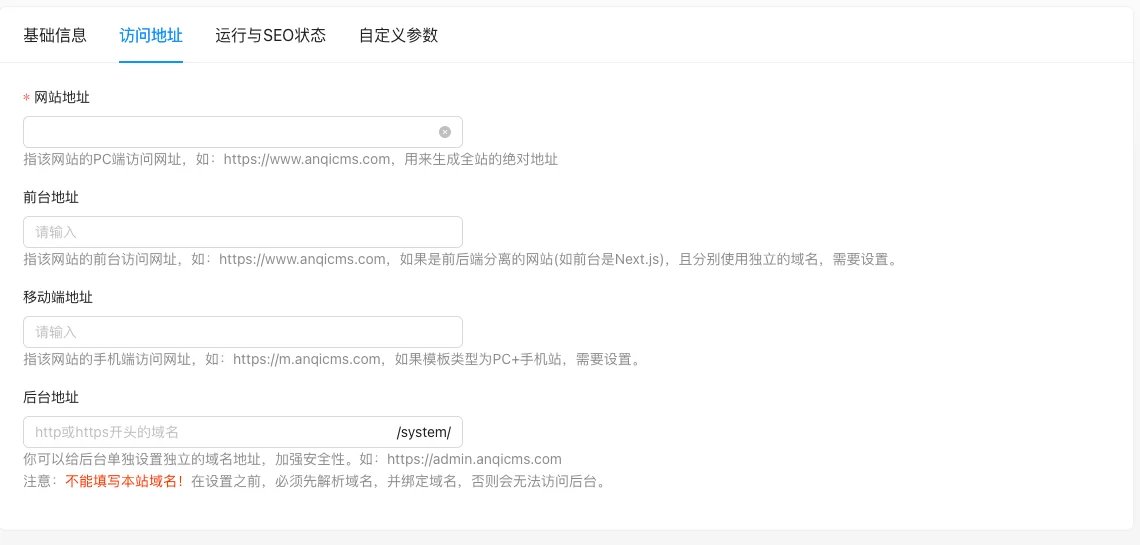
- Access address: Website address, front-end address, mobile end address, background address.
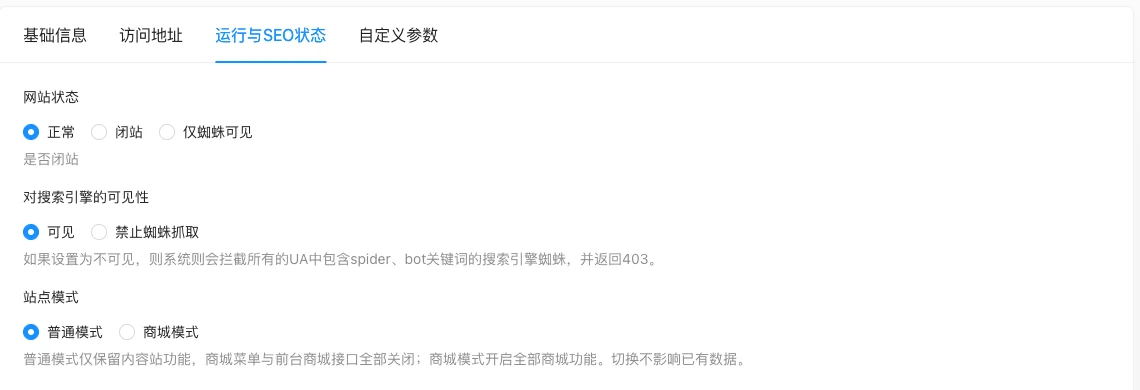
- Running and SEO status: Website status, visibility to search engines, site mode.
- Custom parameter: Supplement any key-value pairs for template name-based calling.
Screenshot of the interface
'Access Address' tab, used to configure the access address of the entire site:
'Running and SEO status' tab, used to control whether the site is accessible, whether search engines can crawl, and site mode:
Setting item description
Basic information
| Setting items | function | Value / Default | How to select / Fill in suggestions | Impact / Note |
|---|---|---|---|---|
| Website Name | Attached as a suffix to the web page title | Text, must be filled in, source code does not specify default value [source code] | It is recommended to fill in the brand name | Immediately affect the title of the front page after modification |
| Website Logo | Upload the site logo for template use | Image upload, no default [source code] | Upload according to the template size | Will be stretched and deformed if the size does not match |
| Ico icon | generatefavicon.icotopublicTable of contents |
Image upload, supports jpg/png/gif/webp/ico/bmp [source code] | Upload square icon | Browser cache old icon needs to be refreshed strongly |
| Record number | Provide template to generate record link | Text, No Default [Source Code] | As渝ICP备00000000号Fill in the main filing number only, do not add-1suffix |
Leave blank if no filing |
| Copyright information | Footer copyright text | Text field, supports HTML [source code] | Can be filled in<p>...</p> |
Output called by template |
| Default language package | Display language of front-end built-in text | Select dynamic language list, no default [source code] | Chinese site selectionzh |
Multi-language site requires multi-language function |
Access address
| Setting items | function | Value / Default | How to select / Fill in suggestions | Impact / Note |
|---|---|---|---|---|
| website address | Generate the base URL for the entire site** | Text is required, no default [source code] | Fill in the complete accessible URL, such ashttps://www.example.com |
Error will cause front-end CSS/JS/images to fail to load |
| Front-end address | Specify the front-end domain separately when front-end and back-end are separated | Text, leave blank to use the website address [source code] | Set when only the front-end independent domain (such as Next.js) is set | — |
| Mobile end address | Mobile end domain for PC + mobile double template mode | Text, No Default [Source Code] | Only required for PC + mobile station template | — |
| Back-end address | Back-end entry path | Text, suffix/system/, Default/system/[Source Code +实测] |
Need to resolve and bind before setting up an independent back-end domain | Do not fill in the site domain\n, Otherwise, you cannot access the back-end |
Running and SEO status
| Setting items | function | Value / Default | How to select / Fill in suggestions | Impact / Note |
|---|---|---|---|---|
| Website status | Control whether the site is accessible to the outside | radio: 0 normal / 1 closed site / 2 visible only to spiders [source code] | Maintenance 'closed site'; 'only visible to spiders' for users not to see but to retain inclusion | Go comments should only write 0/1, the front-end has an extra value of 2, follow the interface |
| Shut down prompt | The prompt displayed when the site is closed | Text field, supports HTML; displayed when the site status is closed or only visible to spiders [source code] | Write a brief maintenance description | Conditional display, not visible in normal state |
| Visibility to search engines | Whether to allow search engines to crawl | Radio: 0 visible / 1 block spider crawling [source code] | Generally keep 'visible' | Intercept UA containing when set to invisiblespider/botRequests and return 403 |
| Site mode | Control whether to enable the mall function | Radio: 0 normal mode / 1 mall mode [source code] | Keep the content site in normal mode; switch to mall when needed | Switch with double confirmation; only affects entry and interface, does not delete data |
Custom parameter
After clicking 'Add parameter', fill in items one by one:
| Setting items | function | Value / Default | How to select / Fill in suggestions | Impact / Note |
|---|---|---|---|---|
| Parameter Name | The name used when calling the template | Text, dynamic line, no default [source code] | Automatically convert to camel case after saving, template calls the converted name | Sync change of template call after name change |
| Parameter value | The content corresponding to the parameter | Text, No Default [Source Code] | Can be text, link, or a short piece of content required by the template | Bysystemtag output |
| Note | Only visible on the back-end | Text, No Default [Source Code] | Write the purpose of the parameter clearly | Do not output to the front |
Detailed explanation of configuration items
Website status (three values)
Condition for occurrence: The running and SEO status tab is always displayed [实测].
Three values:0Normal,1Shutdown,2Visible only to spiders (source code)SystemConfigComments should only be 0/1, an extra value 2 on the frontend) [COMPUTED].
Recommended value: Maintain 'normal' on a daily basis; use 'shutdown' for temporary maintenance; use 'visible only to spiders' to retain search engine crawling but not allow general user access.
Linkage: The 'shutdown prompt' input box will only display after selecting 'shutdown' or 'visible only to spiders'.
Consequences of filling in incorrectly: Choosing 'shutdown' by mistake will cause all visitors to see the maintenance page.
Site mode (two-factor confirmation)
Condition for occurrence: The running and SEO status tab is always displayed [实测].
Switching to mall mode in the source code will trigger a two-factor confirmation popup (system.tsx) [source code], indicating that the switch only affects entry display and does not delete data.
Select suggestionsKeep the site in 'Normal Mode'; switch to 'Store Mode' when you need product, order, and payment functions.
Consequences of filling in incorrectlyAll store menus and front-end store interfaces are closed in 'Normal Mode'; mistakenly switching may affect business.
Back-end address
Condition for occurrenceThe [Tested] tab is always displayed on the access address page.
The source code and interface clearly prompt 'Do not fill in the domain name of this site'——before setting an independent backend domain, you must first resolve and bind the domain [source code+i18n].
Consequences of filling in incorrectlyFilling in the site domain name or an unresolved domain name will cause the backend to be inaccessible; you need to restore it through database or server configuration.
Operation steps
- Go to 'Settings → Global Settings'.
- Modify the items that need to be adjusted in the corresponding tab.
- Click the 'Submit' button at the bottom of the page to save.
- Clear the site cache and visit the front desk to confirm that the modification has taken effect.
Applicable scenarios and suggestions
- Before going online: Prioritize checking the 'Website Address' and 'Backend Address', as these two items directly determine whether the front end can open normally.
- Temporary maintenance: Use 'Shutdown' instead of modifying the site files; change back to 'Normal' after maintenance.
- Only allow search engines to crawl, not for ordinary users to see: Use 'Only Spider Visible', do not manually judge UA.
- Switch the content site to a mall: Switch to 'Mall Mode' in 'Operation and SEO Status', existing document data will not be lost.
- Template requires global configurationUse 'custom parameters' to maintain phone numbers, statistics codes, etc., to avoid hardcoding in the template.
Front-end call example
Fields in global settings are throughsystemTag call, syntax is{% system 变量名 with name="字段名" %}. Variable names can be omitted, and omitted directly output the result.
{# 直接输出网站名称 #}
{% system with name="SiteName" %}

{# 赋值给变量后使用 #}
{% system siteName with name="SiteName" %}
<div>{{ siteName }}</div>

{# 网站 Logo 与备案号 #}
<img src="{% system with name="SiteLogo" %}" alt="{% system with name="SiteName" %}" />
<a href="https://beian.miit.gov.cn/" rel="nofollow">{% system with name="SiteIcp" %}</a>

{# 首页地址与版权信息 #}
<a href="{% system with name="BaseUrl" %}">首页</a>
<div>{% system with name="SiteCopyright" %}</div>
Common field names: website nameSiteNameWebsite LogoSiteLogo, Record numberSiteIcpCopyright contentSiteCopyright, home page addressBaseUrlmobile end addressMobileUrltemplate static file addressTemplateUrltemplate directory nameTemplateNameSite shutdown prompt contentSiteCloseTipsSite languageLanguage.
Use the camel case name after saving the custom parameter. For example, fill in the background parameter name.SitePhoneWrite in the template:
{% system with name="SitePhone" %}
Points to note
- The website address must be a complete, accessible URL. Filling in the wrong URL will cause the CSS, JS, and images on the front-end page to fail to load.
- Do not fill in the domain name of the site in the background address. If you cannot access the background after modification, you need to restore it through the database or server configuration file.
- Switching to mall mode will change the available features and menus on the front-end, but will not delete existing data.
- 'Prohibit spider crawling' is implemented through intercepting UA and cannot be replaced.
robots.txtand the configuration of the search engine site owner platform. - After the configuration is modified, the front-end is not changed. First, clear the cache, and then confirm whether the template has used the corresponding tag call.