
Payment settings
Payment settings
Payment settings are used to maintain the收款账户receiving account for mall payment methods, configure channel credentials, limits, and health status.
Entry Path
Top menu of the back-end → 'Settings' → 'Payment Settings'. Actual address:/system/setting/pay(Component locatedplugin/pay), requires administrator privileges (canAdmin)
Function description
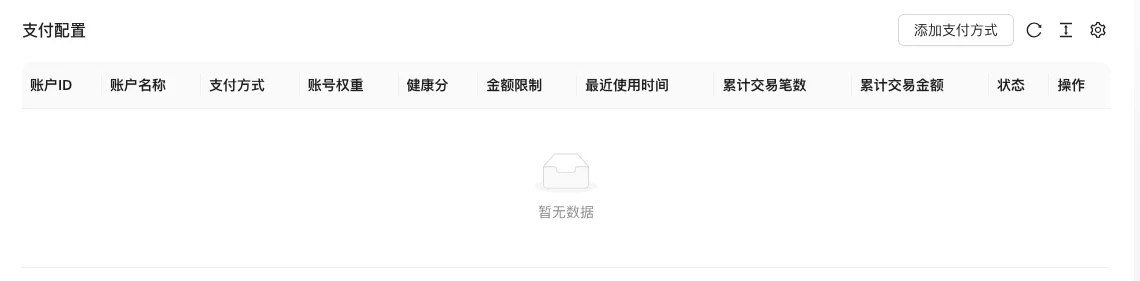
The page displays the list of payment accounts configured, supports adding payment methods. The main data is in the payment account table, and the payment method enumeration comes from the source code constants.
Screenshot of the interface
Setting item description
| Setting items | function | Value / Default | How to select / Fill in suggestions | Impact / Note |
|---|---|---|---|---|
| Account Name | Name used by the back-end | Text, No Default [Source Code] | Such as 'WeChat Main Account' | List display, can be marked as default |
| Status | Is the account available | radio: 1 normal / 0 disabled / 2 risk control pause [source code] | Set to 'normal' for new accounts; set to 'risk control pause' when abnormal | 2 is for risk control pause, not normal disable |
| Default | Is the default payment account | checkbox, default no [source code] | Select one default when multiple accounts | Affects the payment selection when no specified channel |
| Health score | Account health score | Number 0-100 [source code] | Fill according to the actual account status or evaluated by the system | Low score may trigger risk control reminder |
| Account weight | Priority of multiple accounts | Number, default 0 [source code] | The higher the weight, the higher the priority | — |
| Minimum amount / **amount | The amount of money the account can handle | Number (yuan), default 0 [source code] | Fill according to the channel quota | Amount submitted ×100 converted to cents for storage [source code] |
| Daily transaction limit | Maximum number of transactions per day | Number, default 0 [source code] | Set according to channel capacity | — |
| Daily / monthly limit | Daily / monthly amount limit | Number (yuan), default 0 [source code] | 0 usually means unlimited | Same amount ×100 stored |
| Payment method | Payment channel | Mandatory radio, see details below | Select by the channels already opened | Determine the form of credentials below |
| Gateway credentials | Channel authentication parameters | See below for details as the payment method changes | Obtained from the channel backend | Sensitive information, do not disclose |
| Sandbox | Whether to enable test mode | radio: On / Off [Source code] | The access test phase is enabled, and it should be closed before going online | There is no such option in Hu Pijiao payment [source code] |
Detailed explanation of configuration items
Payment method
Condition for occurrence[Source code] Must be filled in the pop-up window for adding/editing payment accounts
Optional channels(config/constant.go:91-99):
| Value | Channel |
|---|---|
wechat |
WeChat Payment (Service Number) |
weapp |
WeChat Mini Program Payment |
alipay |
Alipay payment |
paypal |
PayPal |
stripe |
Stripe |
xunhupay |
Hu Pijiao Payment |
nowpayment |
NOWPayments Cryptocurrency |
balance |
Balance payment |
offline |
Offline Payment |
Select suggestions: Commonly used in domestic stations - WeChat/Alipay; for foreign trade stations - PayPal/Stripe;balancewithofflineGenerally, no external credentials are required.
Consequences of filling in incorrectly: Choosing the wrong payment method will cause the entire set of credential fields to be mismatched, and payment cannot be completed.
Gateway Credentials (Linked by Channel)
Condition for occurrence: In the source code.payWay !== '' && payWay !== 'offline'The entire set of credential fields [source code] will be displayed when displayed. Fields differ by channel:
- WeChat Payment/Mini Program Payment: AppID, AppSecret, Merchant ID, APIKey, Merchant Certificate Cert/Key Upload.
- Alipay: AppID, PrivateKey, Application Public Key Certificate, Alipay Public Key Certificate, Root Certificate.
- PayPal: Client ID, Client Secret.
- Stripe: Private Key, Public Key, Webhook Secret.
- Hupijiao: AppID, AppSecret, Gateway Address (default)
https://api.xunhupay.com) - NOWPayments: API Key, IPN Secret, Currency (leave blank as per)
usd) Gateway Address (default)https://api.nowpayments.io)
Recommended value: Sandboxed mode should be tested in the channel test environment first, then switch to production.
Consequences of filling in incorrectly: Credential errors will directly lead to payment failure; certificate files must match the format required by the channel..crt/.pem)
Amount unit
Condition for occurrence: When filling in the minimum amount, daily limit, and monthly limit [source code].
The unit of input on the interface is 'Yuan', multiply by 100 when submitting the source code to convert to 'Fen' for storage; divide by 100 to restore when displayed in the list [source code].
Consequences of filling in incorrectly: If filled in by 'Fen', it will be magnified 100 times, causing a serious limit error.
Operation steps
- Enter 'Settings → Payment Settings.'
- Click 'Add Payment Method' and select the payment method.
- Enter the account name, status, and corresponding channel credentials.
- Expand the 'Show More' settings to set weights, limits, and health scores.
- First enable sandbox testing, and then disable the sandbox and enable the account after verification.
Applicable scenarios and suggestions
- Use account weights to control the priority order when there are multiple receiving accounts.
- After a new channel is connected, test with a small amount first, and then relax the amount limit.
Points to note
- Sensitive information such as payment keys, certificates, and merchant numbers should not be written into public documents or screenshots.
- Modifying the configuration will affect ongoing transactions, and it is recommended to perform operations during off-peak hours.
- The mall mode needs to be enabled in 'Global Settings → Operation and SEO Status'.