
order
📅 November 21, 2026
👁️ 0
order
The order page is used to view and process general product orders, and to advance the process of shipment, refund, and other procedures according to the status.
Entry Path
Top menu of the background → 「Order」→「Order」. Actual address:/system/order/indexrequires administrative privileges(canAdmin)
Function description
The page provides order ID, order user filtering, status tags include all, pending payment, pending shipment, pending receipt, successful, in refund, order closed, and provides order export and order settings.
Screenshot of the interface
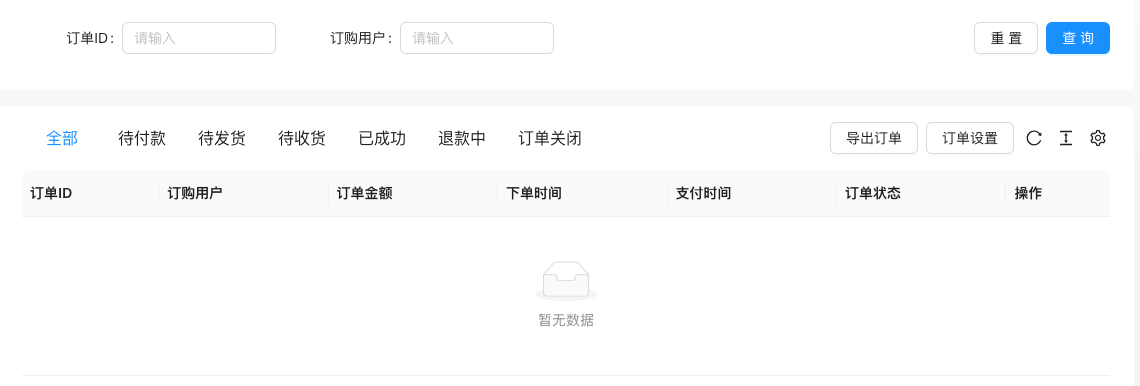
The screenshot is from the demonstration environment, the table may be in an empty data state; the position of the fields and the operation entry should be based on the current backend interface.
List field description
| field | Meaning | Value or source | Impact on the operation |
|---|---|---|---|
| Order ID | Order number | Back-end record, read-only | Used for identification and filtering, cannot be directly edited |
| Order user | Ordering user | Back-end record, read-only | Used for identification and filtering, cannot be directly edited |
| Order amount | Total order amount | Back-end record, read-only | Used for identification and filtering, cannot be directly edited |
| Order time / Payment time | Order timeline | Back-end record, read-only | Used for identification and filtering, cannot be directly edited |
| Order status | Pending payment / Shipment pending / Delivery pending / Successful / Refund pending / Order closed | Back-end record, read-only | Used for identification and filtering, cannot be directly edited |
| Operation | View details, shipment, refund, etc. | Back-end record, read-only | Used for identification and filtering, cannot be directly edited |
Filter Conditions
| Filter Options | Value | Description |
|---|---|---|
| Order ID | Order number | Accurate search |
| Order user | Username | Filter by user |
| Status tags | All / Pending payment / Shipment pending / Delivery pending / Successful / Refund pending / Order closed | Switch list by status |
Status transition
| Status | Meaning | Executable action |
|---|---|---|
| Pending payment | User has not paid | Waiting to pay or close |
| Pending shipment | Paid and waiting to ship | Shipped |
| Waiting for delivery | Shipped | Waiting for confirmation of delivery |
| Successful | Transaction completed | After-sales |
| Refund in progress | Refund processing | Processing refund |
| Order closed | Cancelled | Check |
Operation steps
- Enter the 'Order → Order' menu.
- Filter pending orders by status tags.
- Click on the order to view details and execute shipment or refund.
- Click 'Export Order' when statistics are needed.
- Click 'Order Settings' to maintain custom order fields.
Applicable scenarios and suggestions
- Daily fulfillment progresses by status tags, prioritize processing for shipment.
- Custom order fields are configured in Order Settings, see the custom field tutorial for configuration methods.
Points to note
- The order contains user shipping information, screenshot and export should be anonymized.
- Refund and closing orders will affect financial data, confirm the status before operation.