
Logistics Settings
📅 November 21, 2026
👁️ 0
Logistics Settings
Logistics Settings are used to configure measurement units, freight rules, and free shipping policies.
Entry Path
Top menu of the back end → 'Orders' → 'Logistics settings'. Actual address:/system/order/shippingrequires administrative privileges(canAdmin)
Function description
The page includes two parts: unit settings and basic settings: length/weight/volume unit conversion, volume weight conversion coefficient, free shipping method, shipping location, freight rules, designated area rules, and free shipping rules.
Screenshot of the interface
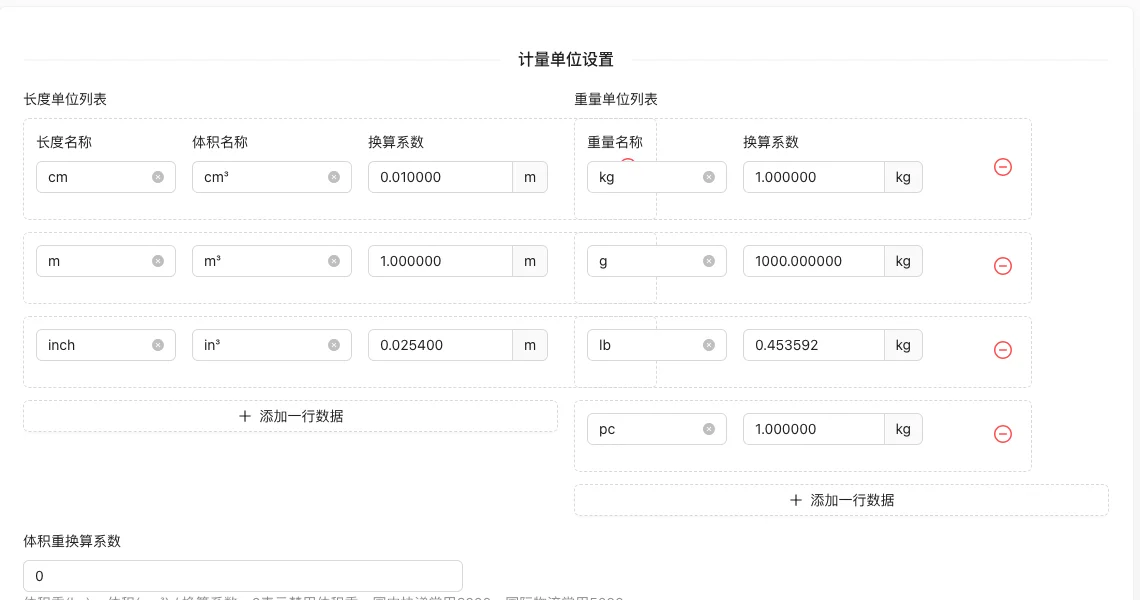
Setting item description
| Setting items | function | Value / Default | How to select / Fill in suggestions | Impact / Note |
|---|---|---|---|---|
| Length/weight/volume units | Define unit name and conversion coefficient | Can add multiple lines | Fill in a name that is easy to identify and consistent with the display on the front end | Name changes will affect display and calling, pay attention to synchronization |
| Volume weight conversion coefficient | 体积重(kg) = 体积(cm³) / 换算系数 |
0 means disabled; commonly used in domestic express delivery is 6000, and internationally commonly used is 5000 | Fill in according to the page prompt and business requirements | Configure according to the actual performance in front |
| Is Delivery Free | Free shipping method | Customized freight / free shipping | Fill in according to the page prompt and business requirements | Configure according to the actual performance in front |
| Shipment Location | Shipment Province and City Area | Used for Freight Calculation Display | Fill in according to the page prompt and business requirements | Configure according to the actual performance in front |
| Rule Type | Freight Calculation Method | Fixed Freight / Rule-Based Calculation | Set according to actual business and cost, pay attention to the unit | Amount errors will directly affect transactions and settlements |
| Default Area Freight | Freight for Non-Specified Areas | Yuan | Set according to actual business and cost, pay attention to the unit | Amount errors will directly affect transactions and settlements |
| Rule for Specified Areas | Set different shipping fees for different regions | Can add multiple entries | Set according to actual business and cost, pay attention to the unit | Amount errors will directly affect transactions and settlements |
| Free shipping rules | Free shipping on full amount/weight/volume/number of items | Disable / Amount / Weight / Volume / Quantity | Set according to actual business and cost, pay attention to the unit | Amount errors will directly affect transactions and settlements |
Operation steps
- Go to 'Order → Logistics Settings'.
- Configure measurement units and conversion coefficients.
- Select whether to enable free shipping and shipping rule type.
- Set default shipping fees, specific region rules, and free shipping conditions.
- Click 'Submit' to save and test shipping fee calculation on the frontend order page.
Applicable scenarios and suggestions
- Domestic express delivery uses a volume weight coefficient of 6000, and international logistics commonly uses 5000.
- Separately set transportation costs for remote areas to avoid losses.
Points to note
- Entering the wrong volume weight conversion coefficient will cause an abnormal freight calculation.
- Modifying the freight rules only affects new orders, and the amount of historical orders remains unchanged.