
Communication Order
📅 November 21, 2026
👁️ 0
Communication Order
Communication Order is used to manage business that requires communication on quotations before confirming the deal, which is different from standard product orders.
Entry Path
Top menu of the back-end → 'Order' → 'Communication Order'. Actual address:/system/order/communicationrequires administrative privileges(canAdmin)
Function description
The page can be filtered by order ID, order status, including order ID, title, purchasing user, quoted amount, order time, order status, and provide order management and order settings entry.
Screenshot of the interface
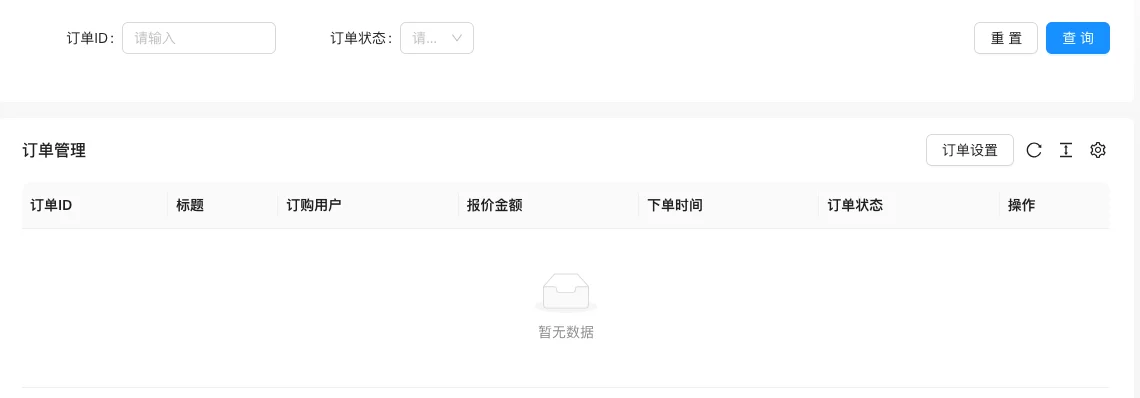
The screenshot is from the demonstration environment, the table may be in an empty data state; the position of the fields and the operation entry should be based on the current backend interface.
List field description
| field | Meaning | Value or source | Impact on the operation |
|---|---|---|---|
| Order ID / Title | Communication Order Identifier | Back-end record, read-only | Used for identification and filtering, cannot be directly edited |
| Order user | Initiator | Back-end record, read-only | Used for identification and filtering, cannot be directly edited |
| Quoted Amount | Quotation given by the back-end | Back-end record, read-only | Used for identification and filtering, cannot be directly edited |
| Order Time | Creation time | Back-end record, read-only | Used for identification and filtering, cannot be directly edited |
| Order status | Pending Communication / Pending Payment / Completed, etc. | Back-end record, read-only | Used for identification and filtering, cannot be directly edited |
| Operation | View details, quotes, replies, etc. | Back-end record, read-only | Used for identification and filtering, cannot be directly edited |
| Meaning | |||
| :— | :— | ||
| Order ID / Title | Communication Order Identifier | ||
| Order user | Initiator | ||
| Quoted Amount | Quotation given by the back-end | ||
| Order Time | Creation time | ||
| Order status | Pending Communication / Pending Payment / Completed, etc. | ||
| Operation | View details, quotes, replies, etc. |
Operation steps
- Enter 「Order → Communication Order」.
- Filter pending communication orders by status.
- Open the order to view customized information filled in by the user.
- Provide a quote and reply to the user, and proceed to the payment process after confirmation.
- Click 'Order Settings' to maintain custom fields for communication orders.
Applicable scenarios and suggestions
- Service and customized business is suitable for communication orders, not standard product orders.
- Communication order fields and general order fields are two independent entries, configuration can be found in the custom field tutorial.
Points to note
- Check the user's filled-in requirements information before making a quote.
- Order information contains user data, screenshot and export should be desensitized.