
Order Service
📅 November 21, 2026
👁️ 0
Order Service
The Order Service is used to maintain value-added services that can be attached to orders, such as installation, extended warranty, and more.
Entry Path
Top menu of the background → 'Order' → 'Order Service'. Actual address:/system/order/servicerequires administrative privileges(canAdmin)
Function description
The page supports adding services, listing service ID, service name, service code, service type, enabled status, service fee, creation time.
Screenshot of the interface
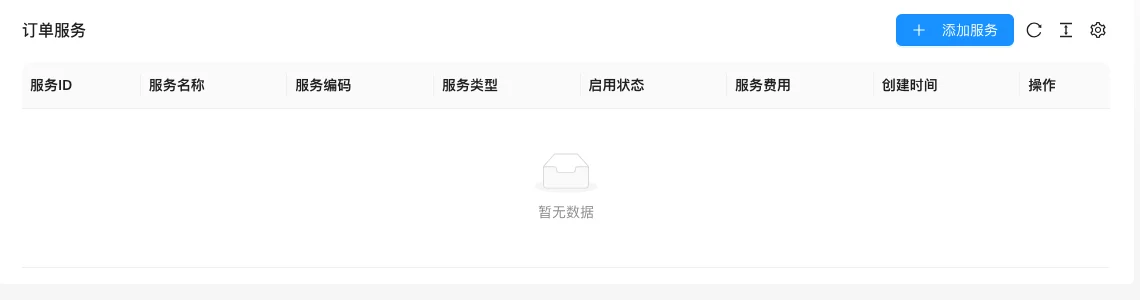
The screenshot is from the demonstration environment, the table may be in an empty data state; the position of the fields and the operation entry should be based on the current backend interface.
Setting item description
| Setting items | function | Value / Default | How to select / Fill in suggestions | Impact / Note |
|---|---|---|---|---|
| Service ID | Service Number | — | Generated by system or fill according to platform requirements | ID changes will affect related data |
| Service name | Front-end Display Name | — | Fill in a name that is easy to identify and consistent with the display on the front end | Name changes will affect display and calling, pay attention to synchronization |
| Service Code | Code used for system identification | — | Fill in according to the page prompt and business requirements | Configure according to the actual performance in front |
| Service Type | Service Category | — | Select according to the actual business scope, multiple selections are allowed | The selection range determines the content ownership and display. |
| enable status | Enable / Disable | — | Enable or disable according to business needs | Status change immediately affects availability |
| Service fee | Additional amount | — | Set according to actual business and cost, pay attention to the unit | Amount errors will directly affect transactions and settlements |
Operation steps
- Enter 「Order → Order Service」.
- Click 「Add Service」, fill in the name, code, type and cost.
- After saving, confirm the enable status.
- Confirm the service can be selected on the product or order page.
Applicable scenarios and suggestions
- Turn installation, delivery, extended warranty, and other value-added projects into services for easy unified pricing.
- Service codes must remain stable to avoid inconsistency with historical order data.
Points to note
- After the service is disabled, it will no longer be available for new orders, and historical orders will retain the original records.
- Service fees will affect the order amount, evaluate the impact on in-transit orders before modification.