
product
📅 November 21, 2026
👁️ 0
product
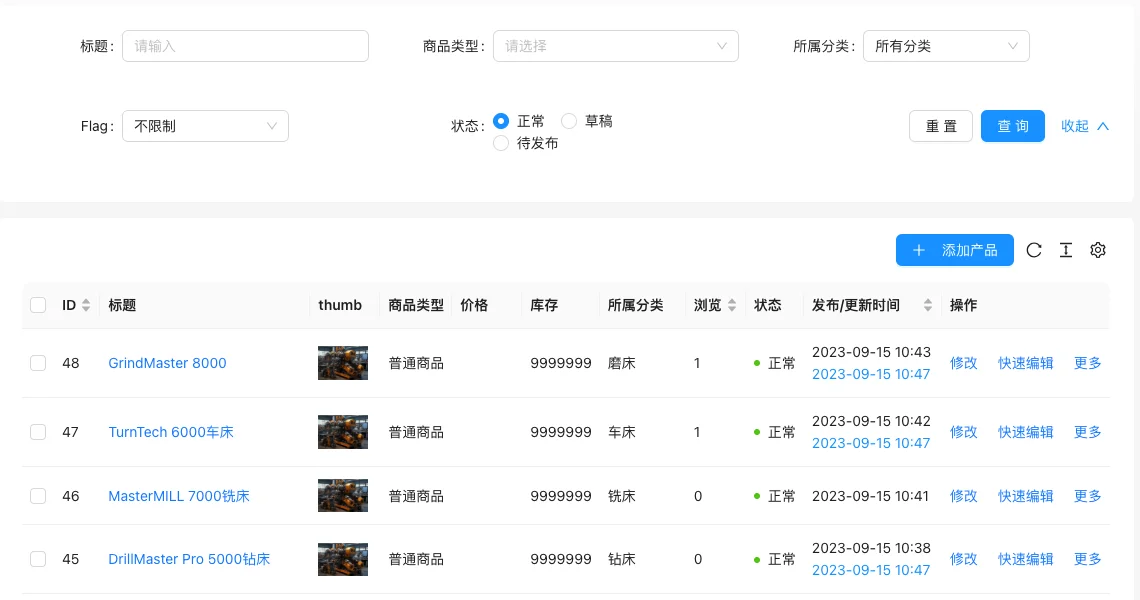
The product page is used to maintain mall products, supporting filtering by title, product type, category, Flag, status, and providing operations such as adding, quick editing, and more.
Entry Path
Top menu of the back end →「Product」→「Product」. Actual address:/system/product/indexrequires administrative privileges(canAdmin)
Function description
List displays product ID, title, thumbnail, product type, price, inventory, category, views, status, and publish time. Product types include general products, wholesale products, and customized products.
Screenshot of the interface
List field description
| field | Meaning | Value or source | Impact on the operation |
|---|---|---|---|
| ID / Title | Product Identifier | Back-end record, read-only | Used for identification and filtering, cannot be directly edited |
| Product Type | General Product / Wholesale Product / Customized Product | Back-end record, read-only | Used for identification and filtering, cannot be directly edited |
| Price / Inventory | Sale Price and Inventory Quantity | Back-end record, read-only | Used for identification and filtering, cannot be directly edited |
| Category | Product categories | Back-end record, read-only | Used for identification and filtering, cannot be directly edited |
| View | Number of views | Back-end record, read-only | Used for identification and filtering, cannot be directly edited |
| Status | Normal / Draft / Pending publication | Back-end record, read-only | Used for identification and filtering, cannot be directly edited |
| Publish/Update Time | Time information | Back-end record, read-only | Used for identification and filtering, cannot be directly edited |
| using | Value / Default | How to select / Fill in suggestions | Impact / Note |
| :— | :— | :— | :— |
| ID / Title | Product Identifier | — | Fill in a name that is easy to identify and consistent with the display on the front end |
| Product Type | General Product / Wholesale Product / Customized Product | — | Select the actual business object, pay attention to the effective scope |
| Price / Inventory | Sale Price and Inventory Quantity | — | Set according to actual business and cost, pay attention to the unit |
| Category | Product categories | — | Select according to the actual business scope, multiple selections are allowed |
| View | Number of views | — | Fill in according to the page prompt and business requirements |
| Status | Normal / Draft / Pending publication | — | Enable or disable according to business needs |
| Publish/Update Time | Time information | — | Set according to business rhythm, refer to default values |
Filter Conditions
| Filter Options | Value | Rule matching |
|---|---|---|
| Title | Keywords | Continuous matching |
| Product Type | Normal / Wholesale / Custom | Filter by type |
| Category | Each category | Contains subcategories |
| Flag | Unrestricted/each recommended attribute | Filter by recommended attributes |
| Status | Normal/Draft/Pending publication | Filter by status |
Status transition
| Status | Meaning | Executable action |
|---|---|---|
| Normal | Shelf-ready | Modify, quick edit, take down |
| draft | Not published | Publish after editing |
| Pending publication | Scheduled release pending | Automatic listing upon expiration |
Operation steps
- Enter 「Product → Product」.
- Locate products using filter conditions.
- Click 「Edit」 to enter the full editing page, or click 「Quick Edit」 to change inventory, price, and a few other fields.
- Click 「Add Product」 to create a new product.
Applicable scenarios and suggestions
- Normal products are sold at listed prices directly; wholesale products are配合 SKUs set step prices; customized products use custom order fields.
- Products with stock of 0 cannot usually be purchased on the front end, restock in a timely manner.
Front-end call example
Product SKUs and prices througharchiveSkuTag call:
{% archiveSku productSku with id=1 %}
  {{ productSku.Title }} - {{ productSku.Price }}
{% endarchiveSku %}
Price formatting is availablepriceFormatTags and currency symbols come from currency settings.
Points to note
- The switch of product type will affect the front-end purchase process and order fields, and products with existing sales records should be switched with caution.
- Custom products require configuration of custom order fields, see the tutorial on custom fields for the method.