
Review Management
📅 November 21, 2026
👁️ 0
Review Management
Review management is used to review and maintain user reviews of products, controlling display status and like data.
Entry Path
Top menu of the back end → 'Product' → 'Review Management'. Actual address:/system/product/reviewrequires administrative privileges(canAdmin)
Function description
Page filtered by product title and username, displaying a list of ID, product title, username, review content, Score, like count, status, review time, and operation.
Screenshot of the interface
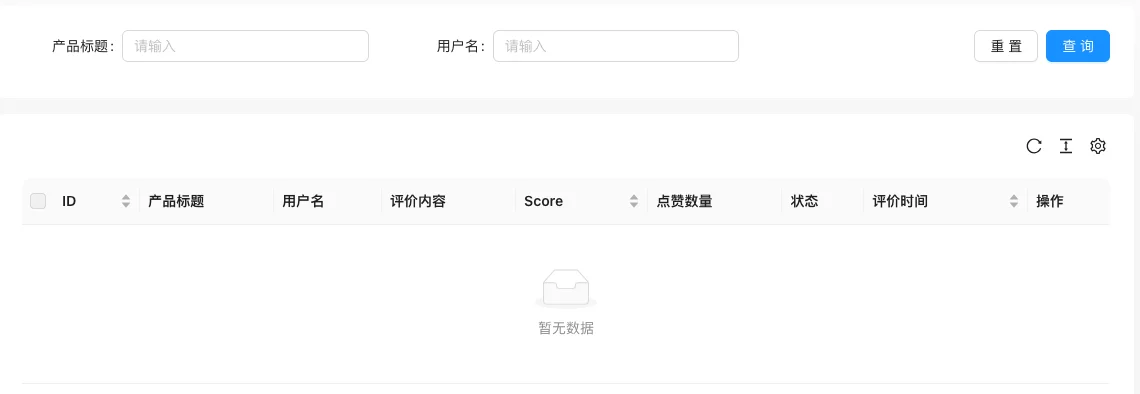
The screenshot is from the demonstration environment, the table may be in an empty data state; the position of the fields and the operation entry should be based on the current backend interface.
List field description
| field | Meaning | Value or source | Impact on the operation |
|---|---|---|---|
| ID | Review Number | Back-end record, read-only | Used for identification and filtering, cannot be directly edited |
| Product Title | Product of the Review | Back-end record, read-only | Used for identification and filtering, cannot be directly edited |
| Username | Reviewer | Back-end record, read-only | Used for identification and filtering, cannot be directly edited |
| Review Content | Review Content | Back-end record, read-only | Used for identification and filtering, cannot be directly edited |
| Score | rating | Back-end record, read-only | Used for identification and filtering, cannot be directly edited |
| like count | Number of User Likes | Back-end record, read-only | Used for identification and filtering, cannot be directly edited |
| Status | Pending / Approved / Denied | Back-end record, read-only | Used for identification and filtering, cannot be directly edited |
| Review Time | Submission time | Back-end record, read-only | Used for identification and filtering, cannot be directly edited |
| Operation | Review and delete | Back-end record, read-only | Used for identification and filtering, cannot be directly edited |
| ID | Review Number |
| Product Title | Product of the Review |
| Username | Reviewer |
| Review Content | Review Content |
| Score | rating |
| like count | Number of User Likes |
| Status | Pending / Approved / Denied |
| Review Time | Submission time |
| Operation | Review and delete |
Operation steps
- Enter 'Product → Review Management'.
- Filter reviews by product or user.
- Review the evaluation and decide whether to display it.
- Delete violations.
Applicable scenarios and suggestions
- Reviews should be reviewed before being displayed to avoid advertisements and violations.
- Highly rated reviews can enhance trust on the product details page.
Front-end call example
{% reviewList reviews with archiveId="1" type="list" limit="10" %}
  {% for item in reviews %}
    <div>{{ item.UserName }}({{ item.Score }}分):{{ item.Content }}</div>
  {% endfor %}
{% endreviewList %}
Points to note
- Reviews include usernames and content, screenshot privacy.
- Deleted reviews cannot be restored.