
Product categories
📅 November 21, 2026
👁️ 1
Product categories
Product categories are used to organize mall products, maintaining category hierarchy, templates, and document count.
Entry Path
Top menu of the back end → 'Product' → 'Product Category'. Actual address:/system/product/categoryrequires administrative privileges(canAdmin)
Function description
The page supports adding **categories, batch adding categories, adding subcategories, modifying and deleting, and displaying category templates, document templates, document quantities, and display status.
Screenshot of the interface
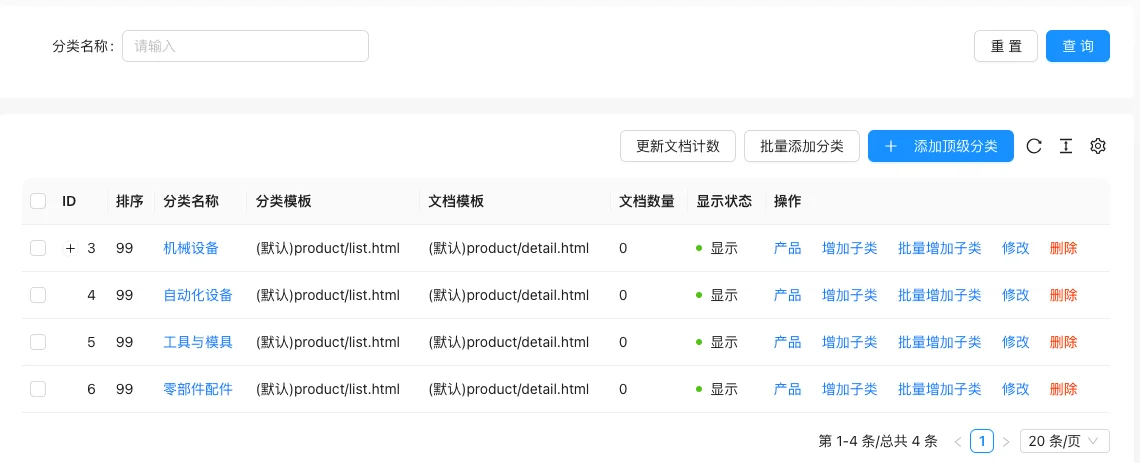
List field description
| field | Meaning | Value or source | Impact on the operation |
|---|---|---|---|
| ID / Sorting | Category number and sorting value | Back-end record, read-only | Used for identification and filtering, cannot be directly edited |
| Category Name | Front-end display name | Back-end record, read-only | Used for identification and filtering, cannot be directly edited |
| category template | List page template | Back-end record, read-only | Used for identification and filtering, cannot be directly edited |
| Document Template | Details page template | Back-end record, read-only | Used for identification and filtering, cannot be directly edited |
| Document count | Number of products under the category | Back-end record, read-only | Used for identification and filtering, cannot be directly edited |
| Display Status | Show / Hide | Back-end record, read-only | Used for identification and filtering, cannot be directly edited |
| Operation | Product, add subcategory, batch add subcategory, modify, delete | Back-end record, read-only | Used for identification and filtering, cannot be directly edited |
| :— | :— | ||
| ID / Sorting | Category number and sorting value | ||
| Category Name | Front-end display name | ||
| category template | List page template | ||
| Document Template | Details page template | ||
| Document count | Number of products under the category | ||
| Display Status | Show / Hide | ||
| Operation | Product, add subcategory, batch add subcategory, modify, delete |
Operation steps
- Enter 'Product → Product Category'.
- Click 'Add **Category' to create a primary category.
- Click 'Add Subcategory' on the category to establish a hierarchy.
- Modify the template and display status as needed.
- Click 'Update Document Count' when the document count is inaccurate.
Applicable scenarios and suggestions
- It is recommended to control the classification level to two to three levels for easy front-end filtering.
- Different categories can use different list templates to highlight their respective characteristics.
Points to note
- Before deleting a category, transfer the products under it first, otherwise the products will lose their classification.
- The template file name must exist in reality, otherwise an error will be reported on the front-end list page.