
Product details/edit
📅 November 21, 2026
👁️ 0
Product details/edit
The product details/edit page is used to create or modify products, maintaining the title, product type, price inventory, SEO, content, and custom parameters.
Entry Path
Top menu of the back-end → 'Product' → 'Product' → Click 'Edit' or 'Add Product'. Actual address:/system/product/detail?id=<产品ID>To hide the menu page, administrator privileges are required (canAdmin)
Function description
The page includes the main form and the right-hand column: product type, recommended attributes, keywords, synopsis, custom parameters, editor, and categories, URL aliases, publication time, Tag, author, etc.
Screenshot of the interface
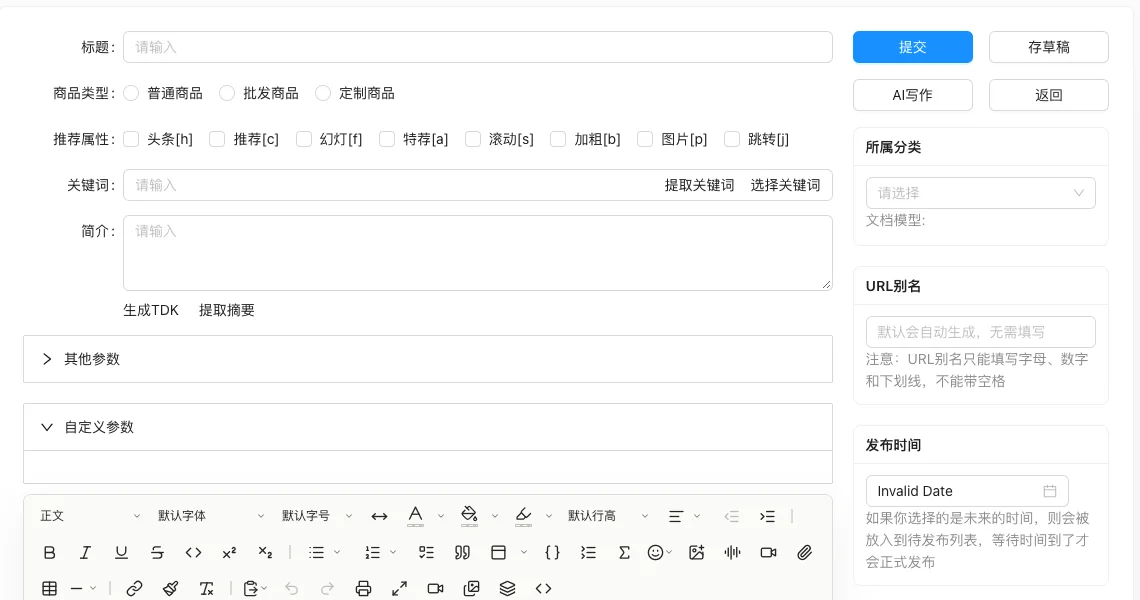
Setting item description
| Setting items | function | Value / Default | How to select / Fill in suggestions | Impact / Note |
|---|---|---|---|---|
| Title | Product Front-end Name | Required | Fill in a name that is easy to identify and consistent with the display on the front end | Name changes will affect display and calling, pay attention to synchronization |
| Product Type | General Product / Wholesale Product / Customized Product | Custom products will display the custom order field management entry | Select the actual business object, pay attention to the effective scope | Configuration errors will affect the front-end display and transactions |
| Recommended attribute | Headline, recommendation, slideshow, featured, scrolling, bold, image, jump | Display is determined by the template | Upload with size and proportion as required by template | Large images affect loading, pay attention to compression |
| Keywords / Summary | SEO information | Can extract summary or generate TDK | Fill in a name that is easy to identify and consistent with the display on the front end | Name changes will affect display and calling, pay attention to synchronization |
| Category | Product classification | Affects the front-end list and URL | Select according to the actual business scope, multiple selections are allowed | The selection range determines the content ownership and display. |
| URL alias | Link under naming pattern static | Only letters, numbers, and underscores can be filled in | Enter a complete accessible address | An incorrect address will cause access or call failure |
| Release Time | Can be set to a future time to enable scheduled publishing | — | Set according to business rhythm, refer to default values | Setting it too short may affect the experience, and it may fail if it's too long. |
| Custom parameter | Product expansion field | Called from a template | Select the actual business object, pay attention to the effective scope | Configuration errors will affect the front-end display and transactions |
Operation steps
- Click 'Edit' in the product list to enter the editing page.
- Maintain basic information such as title, product type, price, and inventory.
- Fill in categories, SEO information, and main text.
- When custom business is required, select 'Custom Product' and configure custom order fields.
- Click 'Submit' to save, or 'Save Draft' to temporarily save.
Applicable scenarios and suggestions
- Use 'Add Product' to create a new product; batch change prices and inventory can be done with 'Quick Edit' in the list.
- Custom products only need to configure custom order fields, do not mistakenly select for regular products.
Points to note
- The product type switch will affect the fields of existing orders, and products with existing sales records should be switched with caution.
- URL aliases cannot contain spaces, and the system will automatically handle duplicates.
- Not submitting on the edit page will not change the background data, and it can be safely viewed.