
Contact information settings
Contact information settings
Contact information settings are used to maintain contacts, phone numbers, addresses, email, WeChat, social media, and store information, provided for template calling and display on the front end.
Entry Path
Top menu of the backend →「Settings」→「Contact Information Settings」. Actual address:/system/setting/contactrequires administrative privileges(canAdmin)
Function description
The page is divided into four tabs: 「Basic Information」「Social Media Information」「Store Information」「Custom Parameters」. Basic information is the commonly used contact information for traditional enterprise websites; Social media information is used for overseas websites or social media marketing; Store information is used for the homepage of e-commerce mode stores.
Screenshot of the interface
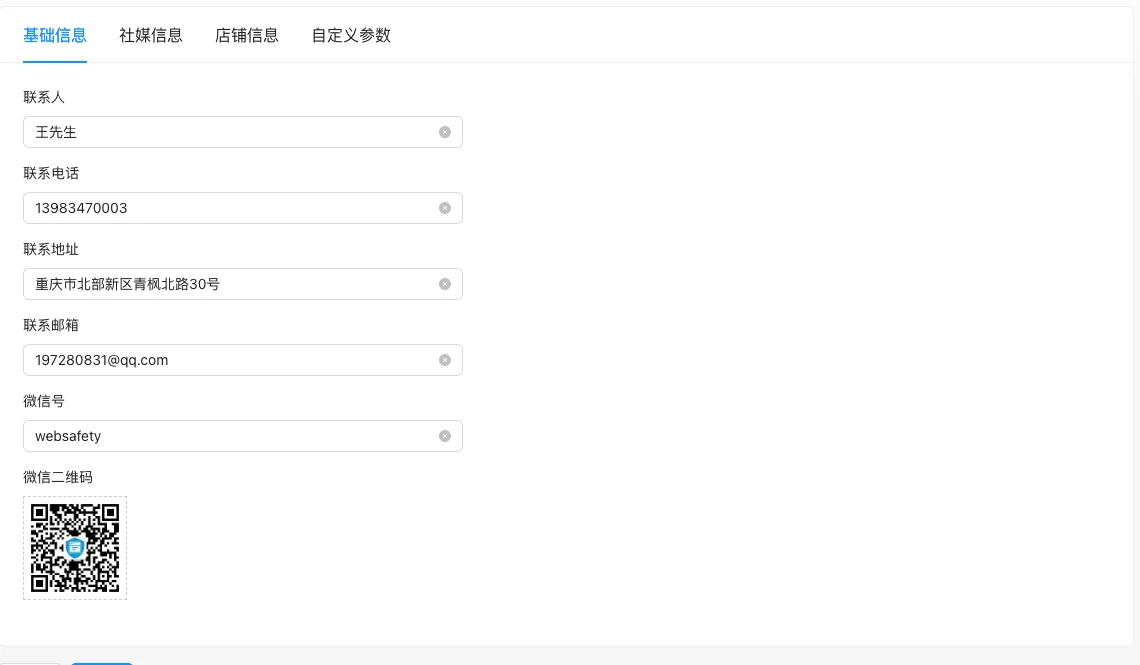
Setting item description
Basic information
| Setting items | function | Value / Default | How to select / Fill in suggestions | Impact / Note |
|---|---|---|---|---|
| Contact | Contact name displayed on the front end | Text, the default value is not noted in the source code [Source code] | Such as「Mr. Wang」 | Output called by template |
| Contact phone number | Phone number that customers can call | Text, No Default [Source Code] | Write clear separators for multiple numbers | Output called by template |
| Contact address | Contact address | Text, No Default [Source Code] | More credible if consistent with the filing information/business license | Commonly used in the footer and contact us page |
| Contact email | The target email address for customer emails | Text, No Default [Source Code] | Use an email that can receive mail normally | — |
| WeChat ID | Used to add WeChat friends | Text, No Default [Source Code] | — | — |
| WeChat QR code | QR code for scanning to add friends | Image upload, no default [source code] | Upload a clear QR code | Image address for template output |
Social media information
| Setting items | function | Value / Default | How to select / Fill in suggestions | Impact / Note |
|---|---|---|---|---|
| QQ / WhatsApp / Facebook / Twitter / Tiktok / Pinterest / Linkedin / Instagram / Youtube | Links to social media accounts or homepages | Text, all empty by default [source code] | Fill in the platform used by the site, leave the rest empty if not needed | Empty, the field will output empty content |
Store information (mall mode)
| Setting items | function | Value / Default | How to select / Fill in suggestions | Impact / Note |
|---|---|---|---|---|
| Store name | Store display name on the home page | Text, No Default [Source Code] | Consistent with the brand name | Only displayed in mall mode |
| Store Logo | Store header and home page Logo | Image upload, no default [source code] | Upload according to the template size | The same |
| Store Introduction | Store Home Introduction | Text field, no default [source code] | Brief introduction of main business | The same |
| Business Hours | Business hours | Text, free format [source code] | As 'Monday to Sunday 9:00-18:00' | Free text, no format check |
| Shipping location | Shipping city | Text, No Default [Source Code] | Enter the actual shipping city | The field exists on the front end, the Go configuration structure is not declared [COMPUTED] |
| Latitude / Longitude of shipping address | Shipping coordinates | Text, No Default [Source Code] | Obtained through the Tencent Map coordinate picker | Declared on the front end, not declared in Go [COMPUTED] |
| Estimated shipping time | Number of days for order shipping | Number, unit 'days' [Source code] | Enter the actual committed days | Used for front-end commitment display |
| Description of the estimated delivery time of the order | Description of delivery time | Text, No Default [Source Code] | As in 'Delivered within 48 hours after order placement' | Label text reused from description field [source code] |
Custom parameter
| Setting items | function | Value / Default | How to select / Fill in suggestions | Impact / Note |
|---|---|---|---|---|
| Parameter name / Parameter value / Remarks | Any extended field | Dynamic line, no default [source code] | Enter phone numbers, statistics codes, and other global content | Parameter name saved to camel case naming for template call |
Detailed explanation of configuration items
Shop information field gap
Condition for occurrence: Shop information tab [Tested].
In the source codedelivery_location/delivery_latitude/delivery_longitudeThree shipping-related fields exist on the front-end, butContactConfigNot declared in the Go structure [COMPUTED].
influence: The saving and reading of these fields may be inconsistent. It is recommended to check if they take effect on the front-end shop page after filling in
Operation steps
- Enter 'Settings → Contact Information Settings.'
- Fill in the content to be displayed on the corresponding tab
- Click 'Submit' to save (the configuration of separate tabs will be overwritten by the whole package, please confirm that it has been saved before switching).
- The front-end template calls the corresponding field to confirm that the output is correct.
Applicable scenarios and suggestions
- Company website: Only fill in basic information, avoid leaving social media fields blank to cause empty labels in template output.
- Foreign trade website: Focus on filling in social media information,配合模板的社交图标输出配合模板的社交图标输出.
- Mall mode: Be sure to fill in the store information, especially business hours and shipping locations.
Front-end call example
Contact information throughcontactTag call, syntax is{% contact 变量名 with name="字段名" %}.
{% contact with name="UserName" %}
{% contact with name="Cellphone" %}
{% contact with name="Email" %}
<img src="{% contact with name="Qrcode" %}" alt="微信二维码" />

{% contact userName with name="UserName" %}
<span>{{ userName }}</span>
Common field names:UserName(Contact),Cellphone(Contact phone),Address(Contact address),Email(Contact email),Wechat(WeChat ID),Qrcode(WeChat QR code),QQAs well as the names of various social media platforms. Custom parameters are called with the camel case name after saving.
Points to note
- Whether the field is displayed depends on whether the corresponding tag is called in the template; if there is no change on the front end after filling in the background, check the template first.
- If the social media field is left blank, the field will output empty content when called.
- After modifying, if the front-end is not updated, clear the cache and view again.
Related documents
- Global Settings
- Home page TDK settings
- Tutorial on using custom fields (Content → Content Model)