
AI Unified Configuration
AI Unified Configuration
AI Unified Configuration is used to centrally manage AI writing/translation interfaces, AI assistant interfaces, and the permissions and security strategies of the MCP open interfaces.
Entry Path
Top menu of the background →「Settings」→「AI Unified Configuration」. Actual address:/system/setting/airequires administrative privileges(canAdmin)
Function description
The page is divided into three tabs: 'AI Interface Configuration (Writing/Translation)', 'AI Interface Configuration (AI Assistant)', and 'MCP Open Interface'. After MCP is opened, third-party AI clients (such as Claude Desktop, Cursor, Cherry Studio, etc.) can call the intent tools on this site via the MCP protocol.
Screenshot of the interface
MCP Open Interface Configuration (including open range, calling identity, tool list):
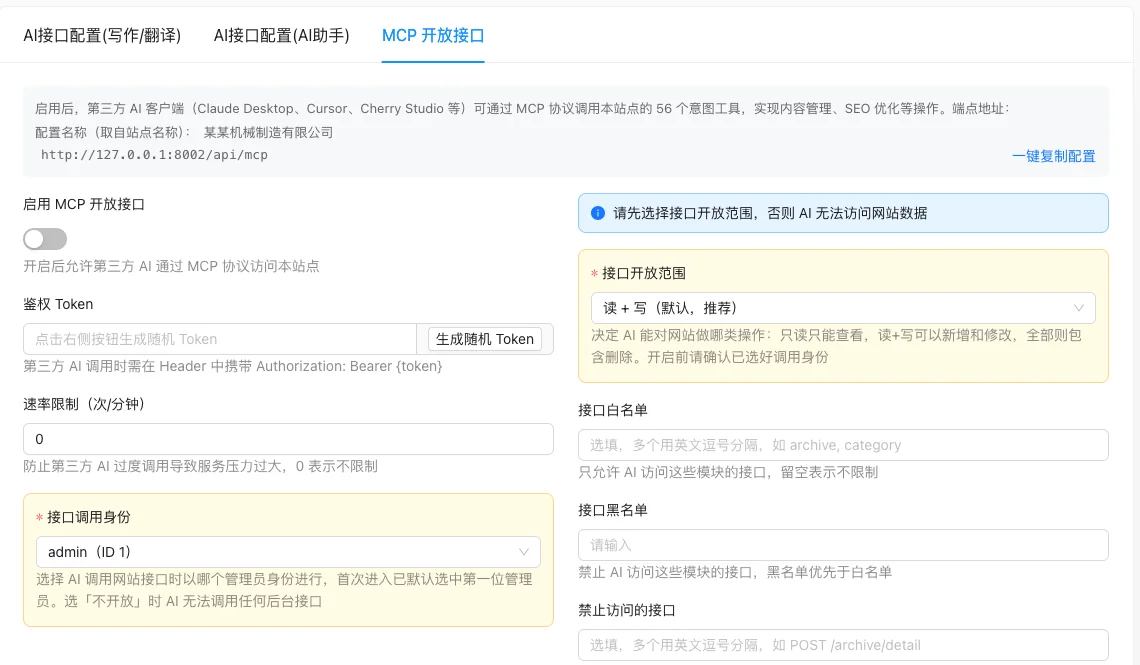
Setting item description
AI Interface Configuration (Writing/Translation)
| Setting items | function | Value / Default | How to select / Fill in suggestions | Impact / Note |
|---|---|---|---|---|
| AI writing source | Writing / Translation interface used | radio: Official website /openai/deepseek/spark(Xinghuo) |
Default to use the official website; select OpenAI/DeepSeek with your own key; choose Xinghuo in China | Non-official interface is a VIP feature; the server needs to be able to access the corresponding API |
| Custom API address | Custom OpenAI compatible endpoint | Text; OpenAI Defaulthttps://api.openai.com/v1DeepSeekhttps://api.deepseek.com[i18n] |
Fill according to engine default | Display only when the source is openai/deepseek |
| Custom Model | Name of the model called | Text; OpenAI Defaultgpt-3.5-turboDeepSeekdeepseek-chat[i18n] |
Fill according to the available models of the account | Linkage as above |
| API Keys | API key | Tags can be added multiple times,sk-Start [Source code+i18n] |
Randomly select a key each time | Sensitive information, please keep it safe |
| Starfire Large Model Version | Xunfei Starfire Version | radio: 1.5 / 3.0 / 3.5 / 4.0 [Source code] | Select according to the version opened | Only displayed when the source is spark |
| APPID / API Secret / API Key | Xunwu Authentication Parameters | Text, No Default [Source Code] | From iFLYTEK Open Platform | Linkage as above |
AI Interface Configuration (AI Assistant)
| Setting items | function | Value / Default | How to select / Fill in suggestions | Impact / Note |
|---|---|---|---|---|
| Interface Name | Custom Interface Identifier | Text, Required [Source Code] | As 'DeepSeek Production' | — |
| API Address | Interface base URL | Text, required, such ashttps://api.openai.com/v1[Source code] |
Enter an address compatible with the OpenAI protocol | — |
| API Key | API key | Text, required,sk-Start with [Source code] |
— | Sensitive information |
| Model | Model name | Text, required, such asdeepseek-v4-flash[Source code] |
— | — |
| Thinking mode | Whether to enable inference | radio: turn on / off; new default turn on [source code] | turn on when deep reasoning is needed | — |
| **reply length | max_tokens | number, default 8192 [source code] | set according to model limit | — |
| request timeout time | timeout seconds | number, default 120 [source code] | increase when network is slow | — |
MCP Open Interface
| Setting items | function | Value / Default | How to select / Fill in suggestions | Impact / Note |
|---|---|---|---|---|
| Enable MCP Open Interface | Master switch | switch, default closed [source code] | Enable when calling third-party AI | Available when Token is empty but authentication fails, see below |
| Authentication Token | Bearer token | Text, click 'Generate random Token' to generate 32 bits; empty to disable authentication [source code] | Click to generate, do not write manually | Third-party must include in HeaderAuthorization: Bearer {token} |
| Rate limit (times/minute) | API call limit per minute | Number, default 0 (unlimited) [source code + test] | Set according to the server's capabilities | 0 unlimited, be警惕滥用 |
| Interface call identity | Which administrator identity does AI call the interface | select, required, 0 = not open; default select ** administrator for the first time [source code + test] | Must select a dedicated administrator with controlled permissionsDo not rely on the default super administrator | Select 0 and AI cannot call any background interface |
| Scope of interface open | Data range accessible to AI | select: Off / Read-only / Read + write (default recommended) / All; frontend defaultread_write[Source Code +实测] |
Start with 'Read-only', upgrade to 'Read+Write' when writing is needed | 'All' includes deletion, use with caution; Go's zero value is off |
| Interface whitelist | Modules allowed to access | Text, multiple separated by English commas, unlimited if left blank [Source Code] | Asarchive, category |
Prefix matching; still subject to the open range constraint |
| Interface blacklist | Modules prohibited from accessing | Text, multiple separated by English commas [Source Code] | — | Priority higher than whitelist |
| Prohibited access interfaces | Specific interfaces strictly prohibited | Text, formatMETHOD /pathMay be omitted/system/apiPrefix [Source code] |
AsPOST /archive/detail |
Priority ** |
| Tools allowed to be used | Intention-based tool whitelist | Text, leave blank to open all default tools;*Open tools with high risk; can fill in domain names such ascontent/seo[Source code] |
Start with empty, authorize by domain name or specific intent when needed | Backup, upgrade, delete, etc. are not open by default, need to be added manually |
Detailed explanation of configuration items
Interface call identity (security critical)
Condition for occurrence: The MCP tab always displays [实测].
Source code is default in!token && !invoke_admin_idWhen selected automatically **admin (usually the super admin) [source code]. Go comments clearly warn: Implicit fallback to super admin is equivalent to issuing **keys, explicit permission-controlled dedicated admin should be specified [source code].
Recommended value: Create a low-privilege admin account specifically for AI calls, do not select super admin.
Consequences of filling in incorrectly: Open write permissions with admin privileges, AI may mistakenly delete or modify all site data.
Interface open range (four levels)
Condition for occurrence: Always display [实测].
| Value | Meaning |
|---|---|
off |
Closed, AI cannot access data |
read |
Read-only, only view |
read_write |
Read+write, can add/modify, but still refuse destructive operations (default on front-end, recommended to start) |
all |
All, including deletion, only open when explicitly needed |
Go zero value is closed (fail closed), default on front-endread_write[COMPUTED]
Consequences of filling in incorrectly:Incorrect selection of 'All' will give AI the delete permission, with extremely high risk.
Priority of the three lists
Condition for occurrence: Always display [实测].
Go judgment order(pkg/ai/eino/config.go):①Built-in hard rules (credential endpoints, administrator changes, etc.) cannot be configured; ②blacklistdeny_ns/deny_endpoints;③whitelistallow_ns;④Matching of open range and endpoint risk level [source code]. All fail closed, any failure will be rejected; the whitelist left blank means no namespace restrictions are applied, but still subject to the constraints of the open range.
Recommended value:First use the open range to control the general permissions, and then use the whitelist to narrow down to the necessary modules.
Consequences of filling in incorrectly: Misspelling the blacklist may allow modules that should be prohibited to be accessed; misspelling the whitelist may cause AI to be unable to access the required data.
Tools allowed to be used
Condition for occurrence: Always display; below is a clickable list of 'Available Tools on This Site' (grouped by domain, colored by risk level) [Tested].
Source code semantics: leaving blank opens all default visible tools (includingshell_exec/fs_*/weband host-level capabilities); fill*even the high-risk tools that are closed by default will be opened; fill in specific intent or domain to open only the corresponding tools, unknown intent defaults to refusal [Source code].
Recommended value: It is recommended to authorize by domain in the production environment (such ascontent,seo), do not fill*.
Consequences of filling in incorrectly: Fill*will open host-level high-risk capabilities, there is a risk of abuse.
Copy configuration with one click
Condition for occurrenceAvailable after configuring Token [实测]。
generatemcpServers.{name}.urlwithAuthorization: Bearer ${token}Configuration snippet; refuse to copy and prompt [source code] when Token is not generated。
Operation steps
- Enter 「Settings → AI unified configuration」。
- Configure the interfaces required for writing/translation and AI assistant (if needed).
- If you need to open MCP: generate Token first, then set the call identity and open range。
- Restrict permissions using whitelist/blacklist and tool list。
- Click「Copy configuration with one click」and paste the configuration into a third-party AI client。
Applicable scenarios and suggestions
- Only allow AI to read data: Select 'Read-only' in the open range, and limit the tool list by domain name.
- Need AI to write articles: Select 'Read+Write' in the open range, and narrow it down to the content module using the whitelist.
- In the production environment: Do not check backup, upgrade, delete,
shell_exec/fs_*and other tools, and do not select 'All'.
Points to note
- After MCP is opened, third parties holding Tokens can call the interface of this site, and Token leakage is equivalent to permission leakage.
- The 'All' open range includes delete operations, and misconfiguration may cause data loss.
- When the rate limit is 0, there is no upper limit, which may cause service pressure, and it is recommended to set it according to actual needs.
- The MCP configuration structure is located
pkg/ai/eino/config.go, different from the writing configurationconfig/aiGenerate.go[COMPUTED]. - After modifying the permission, the connected clients need to re-establish the connection for the changes to take effect.