
AI automatic writing
AI automatic writing
AI automatic writing is used to call the AI interface and automatically generate articles based on the keywords in the keyword library
Entry Path
Top menu of the background →「Function」→「Content Production」→「AI Automatic Writing」. Actual address:/system/plugin/contentops/aigeneraterequires administrative privileges(canAdmin)
Function description
The page provides writing settings, manual start writing entry, keyword library entry, and writing task list, including list fields such as ID, type, keywords, title, status, and time
Screenshot of the interface
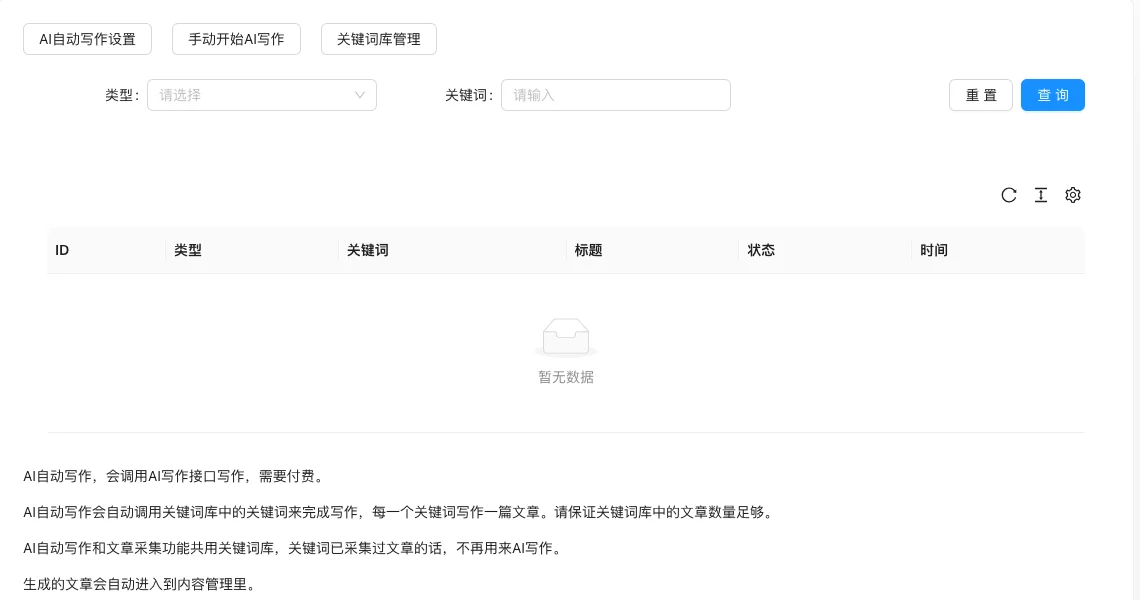
The screenshot is from the demonstration environment, the table may be in an empty data state; the position of the fields and the operation entry should be based on the current backend interface.
Setting item description
| Setting items | function | Value / Default | How to select / Fill in suggestions | Impact / Note |
|---|---|---|---|---|
| Is automatic writing | Master switch | radio: No / Automatic according to the plan [source code] | Turn on when bulk generation is needed | No generation after closing |
| Writing article language | Language of generated content | radio:enEnglish /zh-CNSimplified Chinese [source code] |
Select by target reader | — |
| Generate dual title | Generate main and subtitle | radio: No / Yes [source code] | Only Chinese supported | — |
| Dual title style | Connection form of main and subtitle | radio 6 options: 0 main title (sub title) / 1 horizontal line / 2 question mark / 3 comma / 4 colon / 5 random [source code] | default 0 | — |
| unified writing requirements | writing instructions shared by all articles | text area [source code] | writing style, word count, tone requirements | front-end input limit 1000 characters |
| AI writing source | interface used for writing | radio: official website / openai / deepseek / spark [source code] | default official website; select the corresponding interface with your own key | Non-official site is VIP feature |
| Custom API address / Model | Custom interface endpoint and model | Only openai/deepseek is displayed; OpenAI defaulthttps://api.openai.com/v1/gpt-3.5-turbo; DeepSeek defaulthttps://api.deepseek.com/deepseek-chat[i18n] |
Fill in according to the actual value of the service provider | — |
| API Keys | API key | Press Enter to add multiplesk-Start with [Source code] |
Can fill in multiple at random | Sensitive information |
| Spark parameters | Spark version and credentials | Only Spark display; version 1.5⁄3.0/3.5⁄4.0 [source code] | Select according to the version opened | — |
| Default article category published | Classification of generated articles | Multiple selection, must fill [source code] | Must be set, otherwise it cannot be written | — |
| Article processing method | Save as draft after generating or publish directly | radio: 0 draft / 1 normal release [source code] | It is recommended to review the draft first | — |
| Start/End time of each day | Allowed writing time period | Number 0-23, 0 = unlimited; default8⁄22[Source code] | Set by business period | — |
| Daily publishing volume | Maximum number of articles generated per day | Number, 0 = unlimited [source code] | Set according to demand and cost | AI writing requires payment |
| Article image processing | Method of generating images | radio: 0 remove / 2 custom insert / 3 image library classification (None 1) [source code] | Select by image strategy | — |
| Content replacement | Replace generated content | Dual input + tag list, supports regular expressions [source code] | Configure as needed | — |
Detailed explanation of configuration items
AI writing source联动
Condition for occurrenceAfter automatic writing is enabled, it will be displayed; API address/model/key is displayed only when openai or deepseek is selected, Spark parameters are displayed when spark is selected [source code].
Recommended valueIf there is no self-owned key, use the official website interface; if OpenAI/DeepSeek keys are available, select the corresponding interface and fill in the address and model when needed.
Consequences of filling in incorrectlyIncorrect interface address or key will cause the writing task to fail entirely; AI writing is paid by volume, please pay attention to the cost.
Image processing options
Condition for occurrenceAlways display [source code].
Different from content collection, AI writing image processingThere is no option 'Keep original image' (1)Only 0/2/3 [source code].
Consequences of filling in incorrectly: Cannot save when selecting an image library category without selecting a category.
Operation steps
- Configure the AI writing/translation interface in「Settings → AI Unified Configuration」.
- Add keywords in「Keyword Library Management」.
- Enter「Function → Content Production → AI Automatic Writing」to complete the writing settings (including default category).
- Click「Manual Start AI Writing」to view the results in the task list.
Operation steps
- Configure the AI writing/translation interface in「Settings → AI Unified Configuration」.
- Add keywords in「Keyword Library Management」.
- Enter「Function → Content Production → AI Automatic Writing」to complete the writing settings.
- Click「Manual Start AI Writing」to view the results in the task list.
Applicable scenarios and suggestions
- One keyword generates an article; the more comprehensive the vocabulary, the more stable the output.
- Keywords shared with content collection, keywords that have been collected will no longer be used for writing.
Points to note
- AI writing requires paid API calls, please confirm your account balance before execution.
- The generated articles will automatically enter content management, and it is recommended to review them manually before publishing externally.
- The quality of the generated results depends on keywords and interface models, and it cannot be expected to be completely free of human intervention.