
Website content migration
📅 November 21, 2026
👁️ 0
Website content migration
Website Content Migration is used to move data from other CMS to this site, supporting WordPress, DedeCMS, PbootCMS, EmpireCMS, XunruiCMS.
Entry Path
Top menu of the back end →「Function」→「Content production」→「Website content migration」。Actual address:/system/plugin/contentops/transferrequires administrative privileges(canAdmin)
Function description
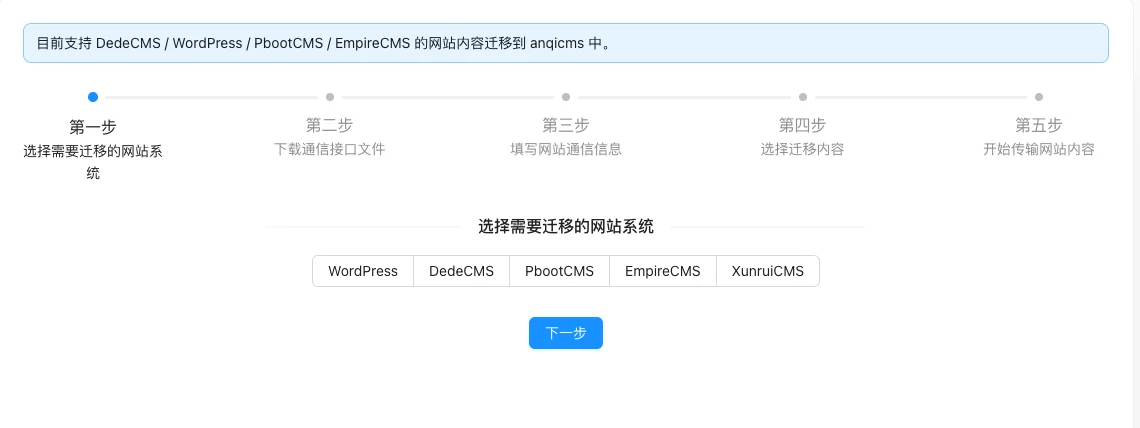
The migration is carried out in five steps: select the source system, download the communication interface file, fill in the website communication information, select the migration content, and start transmission.
Screenshot of the interface
Setting item description
| Setting items | function | Value / Default | How to select / Fill in suggestions | Impact / Note |
|---|---|---|---|---|
| Source system | Decide which migration process to use | WordPress / DedeCMS / PbootCMS / EmpireCMS / XunruiCMS | Fill in according to the page prompt and business requirements | Configure according to the actual performance in front |
| Communication interface file | Deployed on the source site, for the site to read data | Download according to the source system and upload to the source site | Enter a complete accessible address | An incorrect address will cause access or call failure |
| Website communication information | The address and credentials required to connect to the source site | Generated by the source station interface file | Enter real and valid information, the format must meet the platform requirements | Contains personal information, be careful to desensitize when exporting and screenshot |
| Content migration | Select the data type to be moved | Choose according to the source station's support | Brief description, avoid being vague | Whether to display is determined by the template |
Operation steps
- Enter 「Function → Content Production → Website Content Migration」.
- Select the CMS system used by the source station.
- Download the communication interface file and upload it to the source station.
- Fill in the communication address and key information of the source station.
- Select the content type to be migrated.
- Click Next to start the transfer.
Applicable scenarios and suggestions
- Used when changing the entire system of the site, configure the content model and categories on the new site first before migration.
- First, do a small batch migration to confirm the field mapping and content completeness before full-scale migration.
Points to note
- Migration will write a large amount of data, it is recommended to perform it during off-peak hours and back up the target site in advance.
- The field structure of different CMS is not completely consistent, some custom fields may need to be manually organized.
- The source site interface file contains communication keys, it is recommended to delete it from the source site after migration is completed.