
Content collection management
Content collection management
Content collection is used to fetch articles from external sources by keywords, and after rewriting, they will be published on the site.
Entry Path
Top menu of the background →「Function」→「Content Production」→「Content Collection Management」。Actual address:/system/plugin/contentops/collectorrequires administrative privileges(canAdmin)
Function description
Collection depends on the keyword library. The page provides the entry of 「Collection and AI Rewrite Settings」「Manual Start Collection」「Keyword Library Management」「Batch Replace Keywords」and displays the title, model, status, and publish time of the collection results.
Screenshot of the interface
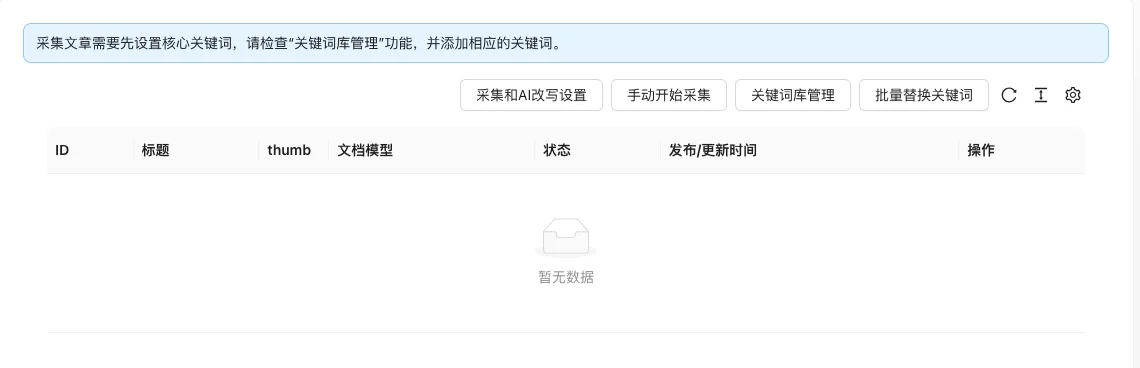
The screenshot is from the demonstration environment, the table may be in an empty data state; the position of the fields and the operation entry should be based on the current backend interface.
Setting item description
| Setting items | function | Value / Default | How to select / Fill in suggestions | Impact / Note |
|---|---|---|---|---|
| Whether to collect automatically | Master switch | radio: No / Automatic according to the plan [source code] | Turn on when batch collection is needed | No collection after turning off |
| Collection language of the article | Collection content language | radio:zh-CN/en[Source code] |
Select by source | — |
| Collection mode | Collection method | radio: 0Article collection / 1Q&A combination [source code] | Select article collection generally | — |
| Custom source | Search list of collection sites | Text, use keywords%sPlaceholder [source code] |
Only display in article collection mode | — |
| Default publishing category | Classification of collected articles | Multiple selection, must fill [source code] | Must be set | — |
| Whether to enable proxy | Whether to use proxy for collection | radio: No / Yes [source code] | Enable when IP is blocked | Proxy is a third-party service |
| Concurrent number / IP validity period | Proxy parameters | Number, default 10 / 0 [i18n] | Configure according to proxy service | — |
| Article processing method | Save as draft or publish after collection | radio: 0 draft / 1 formal release [source code] | It is recommended to review the draft first | — |
| Minimum title word count / Minimum content word count | Filter short content | Number, default 10 / 400 [Source code] | Adjust according to quality | Too small will collect low-quality content |
| Whether AI rewrite | Whether AI rewrite after collection | radio: No / Yes [source code] | Paid | Cannot be enabled with translation |
| Whether to translate / target language | Translate after collection | Radio + Language selection [source code] | Choose between AI rewrite | — |
| Start/End time of each day | Collection time | Number 0-23, 0 = unlimited; default8⁄20[Source code] | Business-based setting | — |
| Daily collection quantity | Daily limit | Number, default 1000, 0=unlimited [source code] | Customized according to demand | — |
| Collection image processing | Image processing method | radio: 0 remove/1 keep the original image/2 custom insert/3 image library classification [source code] | Attention to copyright | — |
| Title/title beginning/title ending exclusion words | Filter title by keyword | Tag input, has default value [source code] | Supplement as needed | Contains default 'Legal statement' '404' and so on |
| Ignore lines/content exclusion/ignore links/content exclusion | Filter by content | Tag input, has default value [source code] | Supplement as needed | — |
| Content replacement | Replace the collected content | Dual input + tag list, supports regular expressions [source code] | Configure as needed | — |
Detailed explanation of configuration items
AI rewrite and translation are mutually exclusive
Condition for occurrence[Source code]. Displayed in article collection mode:
「Whether AI rewrite」and「Whether translation」cannot be enabled at the same time [source code+i18n].
Recommended valueSelect one by content source; AI rewrite requires payment, and translation is selected according to the target language:
Consequences of filling in incorrectlyEnabling both may cause the content to be processed repeatedly or the task to fail:
Word filtering
Condition for occurrenceAlways display [source code].
Source code default values are available for title exclusion words, title beginning/end exclusion words, ignored lines in content, ignored links, and content exclusion (such as「Legal Statement」「Site Map」「404」「View More」, etc.) [source code].
Recommended valueKeep the default word, supplement according to the actual garbage content.
Consequences of filling in incorrectlyExcluding words too broadly will filter out normal content, causing the collection volume to drop sharply.
Operation steps
- First add keywords in the 'Keyword Library Management'.
- Configure the AI interface (such as enabling rewriting) in 'Settings → AI Unified Configuration'.
- Enter 'Function → Content Production → Content Collection Management' and configure collection and rewriting rules.
- Click 'Manual Start Collection' and check the results in the list.
Operation steps
- First add keywords in the 'Keyword Library Management'.
- Configure the writing/translation interface in 'Settings → AI Unified Configuration'.
- Enter 'Function → Content Production → Content Collection Management' and configure collection and rewriting rules.
- Click 'Manual Start Collection' to execute and check the results in the list.
Applicable scenarios and suggestions
- A news site suitable for quickly expanding the amount of content.
- The collected content should be rewritten and manually reviewed to avoid copyright and originality issues.
Points to note
- The collection depends on external interfaces, which may involve costs and network availability.
- It is recommended to enter the collected content into the draft first and then publish after review.
- Respect the copyright and robots rules of the source site and do not use it for improper purposes.