
Timing factor - scheduled publication
Timing factor - scheduled publication
The time factor is used to update the time of old documents, automatically publish drafts, and keep the site content active.
Entry Path
Top menu of the back-end → 'Function' → 'Content Production' → 'Time Factor - Scheduled Release'. Actual address:/system/plugin/contentops/timefactorrequires administrative privileges(canAdmin)
Function description
The program checks every hour, updating the time or publishing drafts of documents that meet the conditions. The page can be configured to enable two types of tasks, applicable models, random release, and excluded categories.
Screenshot of the interface
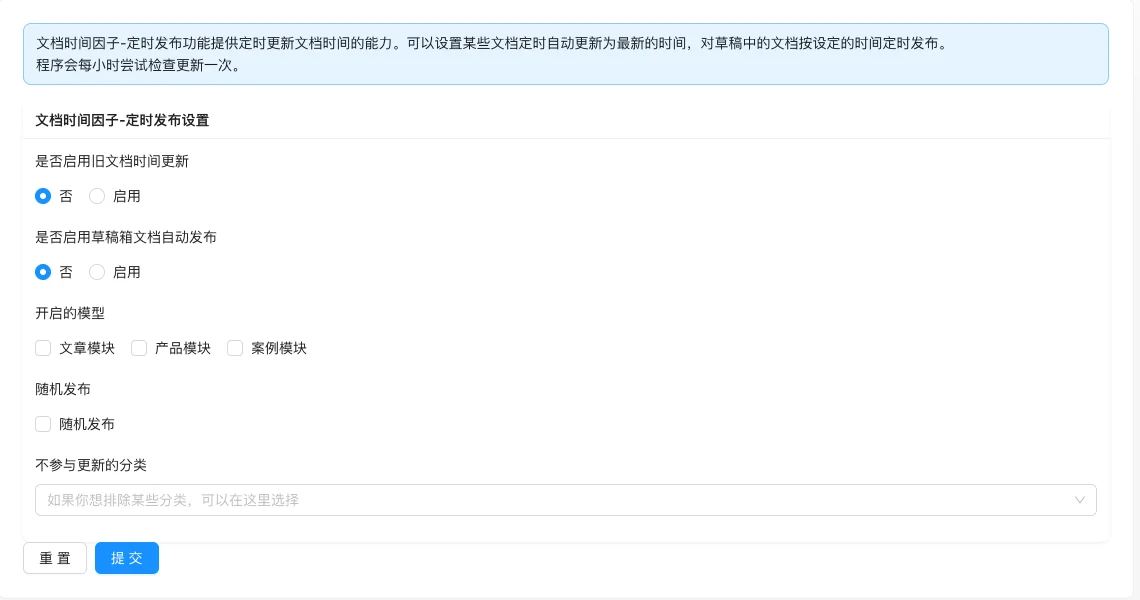
Setting item description
| Setting items | function | Value / Default | How to select / Fill in suggestions | Impact / Note |
|---|---|---|---|---|
| Enable old document time update | Scheduled to update the time of old documents to the latest | Radio: No (default measured) / Enable [measured] | Sites with infrequent content updates can be enabled | Affects document sorting and SEO judgment |
| Do you want to enable automatic publication of draft box documents? | Publish drafts at scheduled time | Radio: No (default measured) / Enable [measured] | Enable after preparing drafts in bulk | Drafts will be automatically converted to official publication |
| Enabled models | Only effective for selected models | Select multiple: Article module, Product module, Case module | Tick as needed | Unselected models will not be affected |
| Random publication | Randomly select documents to execute | radio: Random publish / Do not participate in updates [source code] | Keep the default setting | — |
| Categories not participating in updates | Exclude specified categories | Multi-select, test results are empty [test] | Add important columns to exclusion | Avoid updating important content by mistake |
Detailed explanation of configuration items
Execution time
Condition for occurrenceAlways display [source code].
The program checks every hour, not in real time [source code + i18n].
Consequences of filling in incorrectlyFor scenarios that require precise timing, use the document's own scheduled publishing instead of this feature; the setting will not take effect immediately and needs to wait for the next check cycle.
Operation steps
- Enter 「Feature → Content Production → Time Factor - Scheduled Publication」.
- Enable old document time update or draft automatic publication as needed.
- Select the appropriate content model.
- Set random publication and exclude categories.
- Click 「Submit」 to save, the system will check automatically every hour.
Operation steps
- Enter 「Feature → Content Production → Time Factor - Scheduled Publication」.
- Enable old document update time or draft automatic publication as needed.
- Select the appropriate content model.
- Set random publication and exclude categories.
- Click 「Submit」 to save, the system will check automatically every hour.
Applicable scenarios and suggestions
- For sites with infrequent content updates, old document time updates can be enabled to make the list more active.
- After preparing drafts in batches, use draft automatic publication to achieve scheduled online publishing.
Points to note
- The task is triggered by the program every hour, not executed in real-time; for scenarios requiring precise timing, use the document's own scheduled publishing.
- Batch update time will affect sorting and SEO judgment, enable after confirming the strategy.
- You can set the excluded categories first to avoid important columns being mistakenly updated.