
Keyword library management
Keyword library management
The keyword library is used to centrally manage core keywords, which are the data sources for content collection and AI automatic writing.
Entry Path
Top menu of the back end → 'Function' → 'Content Production' → 'Keyword Library Management'. Actual address:/system/plugin/contentops/keywordrequires administrative privileges(canAdmin)
Function description
The page supports adding, importing, exporting keywords, manual keyword expansion, and keyword expansion settings. The list displays keyword names, levels, document category ID, and the number of collected articles.
Screenshot of the interface
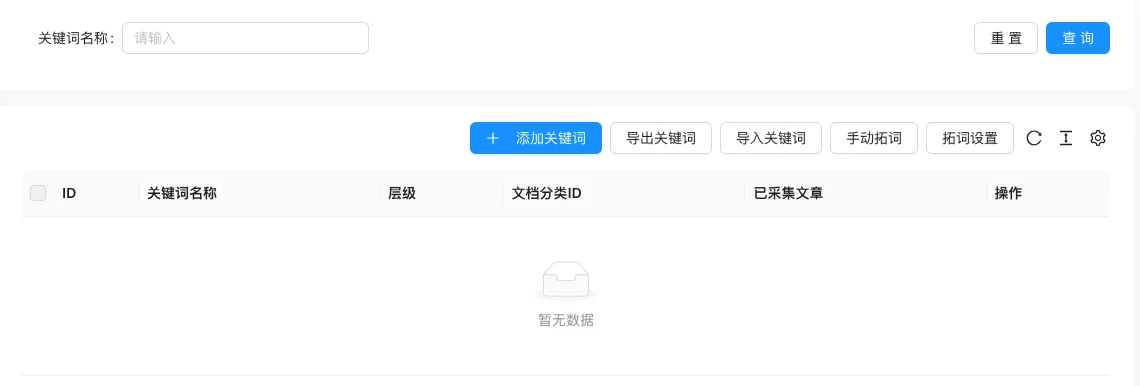
The screenshot is from the demonstration environment, the table may be in an empty data state; the position of the fields and the operation entry should be based on the current backend interface.
Setting item description
| Setting items | function | Value / Default | How to select / Fill in suggestions | Impact / Note |
|---|---|---|---|---|
| ID | Keyword Number | — | Fill in a name that is easy to identify and consistent with the display on the front end | Name changes will affect display and calling, pay attention to synchronization |
| Keyword Name | Core word for collection or writing | — | Fill in a name that is easy to identify and consistent with the display on the front end | Name changes will affect display and calling, pay attention to synchronization |
| Hierarchy | Hierarchical relationship of keywords | — | Fill in a name that is easy to identify and consistent with the display on the front end | Name changes will affect display and calling, pay attention to synchronization |
| Document Category ID | Classification into which content is generated | — | Select according to the actual business scope, multiple selections are allowed | The selection range determines the content ownership and display. |
| Collected Articles | Number of articles produced for this keyword | — | Fill in a name that is easy to identify and consistent with the display on the front end | Name changes will affect display and calling, pay attention to synchronization |
| Operation | Modify, delete, etc. | — | Click the corresponding operation as needed | Some operations are irreversible, please confirm before execution |
Detailed explanation of configuration items
Automatic word expansion and quantity limit
Condition for occurrence: Keyword library setting page [source code].
auto_digYes/no/automatic;max_countDefault 100000;languageSupports zh-CN/en [source code].
Recommended value: Use automatic word expansion when batch expanding the word library; the quantity is set according to the server's capabilities.
Consequences of filling in incorrectly: Too much quantity may consume more resources.
Attention to the fields to be replaced with content
Condition for occurrence: Configure keyword replacement rules [source code].
The Go structure field name is in the source codetitle_replacewhile the binding in the interface iscontent_replacethere is a discrepancy [COMPUTED] between the two
Recommended value: Check the actual effect after filling in the replacement rules
Consequences of filling in incorrectly: Inconsistent fields may cause the replacement rules not to be saved
Operation steps
- Enter 「Function → Content Production → Keyword Library Management」
- Click 「Add Keyword」 to fill in the name and category
- Use 「Manual Expansion」 or configure 「Expansion Settings」 when expanding the vocabulary
- Confirm that there are enough keywords in the vocabulary before collecting and AI writing
Applicable scenarios and suggestions
- Content collection and AI automatic writing share the same keyword library, and the same keyword will not be produced repeatedly.
- Import keywords in batches by business theme and then assign them to different document categories.
Points to note
- No content will be generated by collection and AI writing when the keyword library is empty.
- Keywords that have been collected will not be used again for AI writing. Clean the corresponding records first when you need to regenerate them.
Related documents
- Content collection management
- AI automatic writing
- Batch replace keywords