
Anchor text management
📅 November 21, 2026
👁️ 0
Anchor text management
Anchor text management is used to maintain the correspondence between keywords in the main text and links, and automatically add links to matching keywords when publishing content.
Entry Path
Top menu of the background → 'Function' → 'Content Production' → 'Anchor Text Management'. Actual address:/system/plugin/contentops/anchorrequires administrative privileges(canAdmin)
Function description
The page supports adding, importing, exporting anchor text, viewing anchor text name, link, weight, and replacement times, and can batch update the anchor text in existing content.
Screenshot of the interface
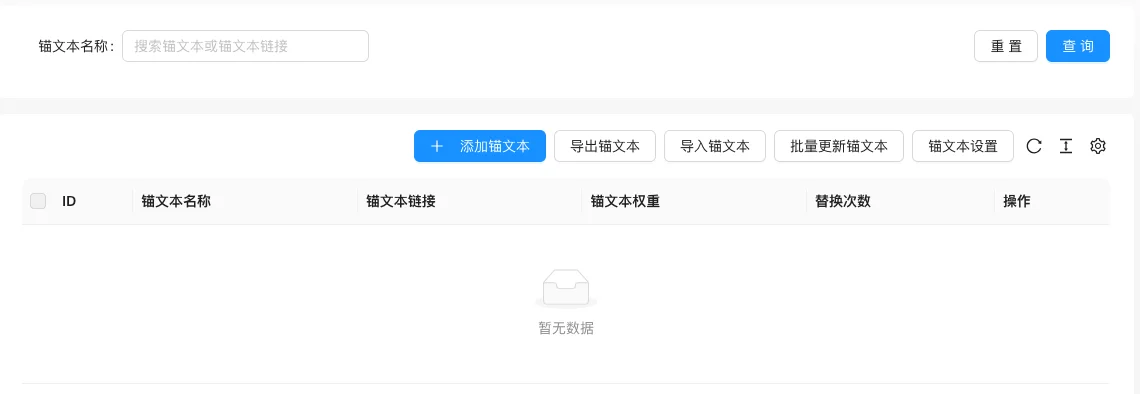
The screenshot is from the demonstration environment, the table may be in an empty data state; the position of the fields and the operation entry should be based on the current backend interface.
Setting item description
| Setting items | function | Value / Default | How to select / Fill in suggestions | Impact / Note |
|---|---|---|---|---|
| ID | Anchor Text Number | — | Generated by system or fill according to platform requirements | ID changes will affect related data |
| Anchor Text Name | Keyword to be matched in the text | — | Fill in a name that is easy to identify and consistent with the display on the front end | Name changes will affect display and calling, pay attention to synchronization |
| Anchor Text Link | URL pointed to after hit | — | Enter a complete accessible address | An incorrect address will cause access or call failure |
| Anchor Text Weight | Determines the replacement priority | — | Fill in according to the page prompt and business requirements | Configure according to the actual performance in front |
| Number of replacements | Number of replacements already executed | — | Fill in according to the page prompt and business requirements | Configure according to the actual performance in front |
| Operation | Modify, delete, etc. | — | Click the corresponding operation as needed | Some operations are irreversible, please confirm before execution |
Operation steps
- Enter「Function → Content Production → Anchor Text Management」.
- Click「Add Anchor Text」, fill in the name, link, and weight.
- Use「Import Anchor Text」「Export Anchor Text」when batch maintenance is needed.
- Perform「Batch Update Anchor Text」on existing content.
Applicable scenarios and suggestions
- Suitable for internal link building, pointing high-frequency words to important pages within the site.
- Keywords should not be too short or too general, to avoid mistakenly replacing a large number of normal words.
Points to note
- Batch update will rewrite the existing text, it is recommended to back up before operation.
- The number of anchor text replacements can be used to evaluate the effect, check if the keywords match when the replacement number is 0.
- Pay attention to encoding when importing and exporting to avoid Chinese garbled characters.