
Website comment management
Website comment management
Website留言管理is used to view and export the messages submitted by users, and to maintain the fields of the message form
Entry Path
Top menu of the back-end →「Function」→「Interactive/Message」→「Website留言管理」. Actual address:/system/plugin/interaction/guestbookrequires administrative privileges(canAdmin)
Function description
List displays the time of the message, username, contact phone number, Email, message content, IP, status and operation; provides two entries,「Export留言」and「Website留言管理Settings」
Screenshot of the interface
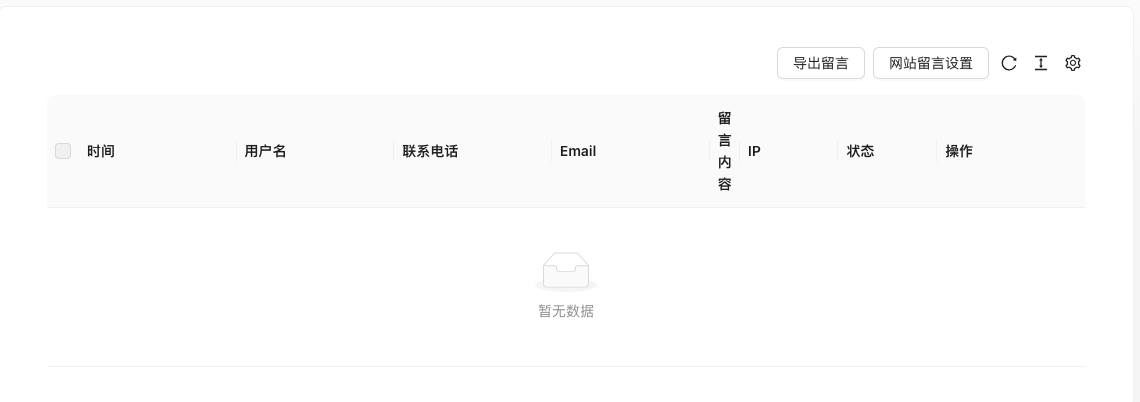
The screenshot is from the demonstration environment, the table may be in an empty data state; the position of the fields and the operation entry should be based on the current backend interface.
List field description
| field | Meaning | Value or source | Impact on the operation |
|---|---|---|---|
| Time | Submission time | Back-end record, read-only | Used for identification and filtering, cannot be directly edited |
| Username | Caller name | Back-end record, read-only | Used for identification and filtering, cannot be directly edited |
| Contact phone number | Caller phone | Back-end record, read-only | Used for identification and filtering, cannot be directly edited |
| Caller email | Back-end record, read-only | Used for identification and filtering, cannot be directly edited | |
| Message content | Message content | Back-end record, read-only | Used for identification and filtering, cannot be directly edited |
| IP | Submit IP | Back-end record, read-only | Used for identification and filtering, cannot be directly edited |
| Status | Unprocessed / Processed | Back-end record, read-only | Used for identification and filtering, cannot be directly edited |
| Operation | View details, delete, etc. | Back-end record, read-only | Used for identification and filtering, cannot be directly edited |
| Value / Default | How to select / Fill in suggestions | Impact / Note | |
| :— | :— | :— | :— |
| Time | Submission time | — | Set according to business rhythm, refer to default values |
| Username | Caller name | — | Fill in a name that is easy to identify and consistent with the display on the front end |
| Contact phone number | Caller phone | — | Enter real and valid information, the format must meet the platform requirements |
| Caller email | — | Enter real and valid information, the format must meet the platform requirements | |
| Message content | Message content | — | Brief description, avoid being vague |
| IP | Submit IP | — | Enter real and valid information, the format must meet the platform requirements |
| Status | Unprocessed / Processed | — | Enable or disable according to business needs |
| Operation | View details, delete, etc. | — | Click the corresponding operation as needed |
Setting item description (website message setting)
| Setting items | function | Value / Default | How to select / Fill in suggestions | Impact / Note |
|---|---|---|---|---|
| Message success prompt | The text displayed after successful submission | Text, default 'Thank you for your message!' [source code] | Adjust according to brand tone | — |
| Message push | Where to send the message | Radio (VIP): 0 Email (default) / 1 Site / 2 API interface [source code] | Select according to the actual reception mode | Non-default mode is VIP feature |
| Select site | Push to the target site within the station | Only show [source code] when push_way=1 | Exclude the current site | — |
| API address | API for receiving messages | Only show [source code] when push_way=2 | Fill in the complete address | — |
| Header Key/Value | API Authentication Header | Only show [source code] when push_way=2 | Fill according to the other party's requirements | Sensitive information |
| Submission method | API Request Format | radio: / formdata / query(GET) [source code] | Select according to the other party's API requirements | — |
| Message Field | Front-end form fields | ProTable Management: Name/Field/Type/Required/Default Value [source code] | Type supports text/number/textarea/radio/checkbox/select/image/file(Not includededitor/images/texts/date and others) [source code] | Renaming the field affects existing data |
Leave message push three-way联动
Condition for occurrence: The leave message settings page always displays [source code].
| Pushing method | Display content |
|---|---|
| 0 Email | Display the link to 'Go to email reminder settings' |
| 1 Site | Display site selection dropdown |
| 2 API interfaces | Display address, Header, and submission method configuration |
Recommended valueSingle site uses email; multi-site centralized management uses site push; interface with third-party systems uses API.
Consequences of filling in incorrectlyAPI configuration error will cause message loss; the front-end prompts success, but the back-end does not receive.
Message field type limit
Condition for occurrence[Source code] when adding/editing message fields.
Field type is only 8: text/number/textarea/radio/checkbox/select/image/file [source code], does not include rich text, group images, dates, etc. Choosing wrong will cause the data to be submitted incorrectly.
Operation steps
- Enter 「Function → Interaction/Message → Website Message Management」.
- View the message details and handle.
- Click 'Website Message Settings' to maintain the message form fields.
- Click 'Export Messages' when needed to preserve.
Applicable scenarios and suggestions
- The message fields determine which input boxes are displayed on the front-end form, add or delete according to actual needs.
- Coordinate with 'Content Safety Settings' to enable captcha and same IP submission restrictions to prevent spam messages.
Front-end call example
{% guestbook %}
  <input type="text" name="userName" placeholder="姓名" />
  <input type="text" name="cellphone" placeholder="电话" />
  <textarea name="content" placeholder="留言内容"></textarea>
  <button type="submit">提交</button>
{% endguestbook %}
Field name must match the call field in the background message setting.
Points to note
- Messages contain personal information such as phone numbers and email addresses. Pay attention to privacy protection when exporting and screenshotting.
- Deleted messages cannot be restored.
- If the front-end form does not receive messages, first check if the template is being used.
guestbookLabels, as well as whether the captcha is configured correctly.