
Document List Tags
Description: Used to obtain the document list, related document list, and document pagination list
Usage:{% archiveList 变量名称 with categoryId="1" order="id desc|views desc" type="page|list" q="搜索关键词" %}If the variable is defined as archives{% archiveList archives with type="page" %}...{% endarchiveList %}
Parameters supported by archiveList:
- Model ID
moduleId
moduleIdCan get the document list of a specified document model such asmoduleId="1"Get the document list of the article model. - Category ID
categoryId
categoryIdCan obtain document lists for specified categories such ascategoryId="1"Get the document category ID 1 document list. Multiple category IDs are available, separated by, such ascategoryId="1,2,3".
If not specified
categoryIdIt will try to read the category ID of the current page category, so if you want it not to automatically read the current category ID, you cancategoryId="0"specify it not to automatically read.
- Excluded category ID
excludeCategoryId
excludeCategoryIdDocuments such as specified categories can be excludedexcludeCategoryId="1"Exclude documents with category ID 1. Multiple category IDs can be used, separated by commas- Author ID
userId
userIdCan retrieve documents published by a specified user ID, such asuserId="1"Retrieve documents published by the user with ID 1.- Parent document ID
parentId
parentIdCan retrieve documents of a specified parent, such asparentId="1"Get the document with parent ID 1.- Recommended attribute
flag
flagThe supported attribute values are: [Headline[h]], [Recommended[c]], [Slideshow[f]], [Featured[a]], [Scroll[s]], [Bold[h]], [Image[p]], [Link[j]]. To display the flag attribute as recommended, the label should be:flag="c"- Excluded recommended attribute
excludeFlag
excludeFlagSupports excluded attribute values such as Headline[h], Recommended[c], Slide[f], Special Recommendation[a], Scroll[s], Bold[h], Image[p], Jump[j]. If the item list does not display the document with the specified flag attribute, the label isexcludeFlag="c"- Whether to list the document flag
showFlag
showFlagThe supported values aretrue|falseis set tofalse. If you need to display the document flag tag in the document list, set it toshowFlag=true- Whether to display the content
showContentshowContentDefault Value Isfalse, if set totrueIf so, the document content will be displayed in the list.- Whether to display the custom fields of the document
showExtraYou need to specify the category or specify the model ID to display the custom fields of the document. The default value isfalseIf you want to set the document custom field to be displayed in the document list, then set it toshowExtra=true.- (Product) Whether to display the product specification properties
showOptionsThis parameter is only effective in the product list, it can display product specifications including property values. The default value isfalse. If you want to display product specifications in the document list, set it toshowOptions=true.- (Product) Whether to display product specifications
showSkusThis parameter takes effect in the product list and can display the product specifications list. The default value isfalseIf you want to display the product specifications in the document list, set it toshowSkus=true.- (Product) Whether to display the product wholesale configuration
showWholesaleRulesThis parameter is effective in the product list, and can display the wholesale configuration. The default value isfalse. If you want to display the wholesale configuration in the document list, set it toshowWholesaleRules=true.- Whether to display subcategory content
child
childSupported attribute values includefalse|trueDefault is true. If you only want to display documents belonging to the current category and not include documents from subcategories, you need to specifychild=false- Sorting method
order
orderCan specify the document display sorting rules, supporting sorting by the latest documentsorder="id desc", Sorting by the most viewed documentsorder="views desc", Sorting by custom sorting in the backgroundorder="sort desc"Default sorting according to custom order, it can be left blank.- Show quantity
limit
limitYou can specify the number of items to display, such as how many items to divide the page by.limit="10"Then only 10 items will be displayed,limitSupport when it is not a paginated listoffsetmode, which is,delimiter mode, if you want to start from the second item and get 10 items, you can set it tolimit="2,10".- List type
type
typeSupport listing by page, list, related. The default value is list,type="list"If, only the specified limit of the specified quantity will be displayedtype="page"Available afterwardspaginationTo organize the pagination display{% pagination pages with show="5" %}.typeThe value is related, and supports the like parameter.like=“keywords|relation”,default no need for like parameter, it automatically retrieves the documents closest to the current document.If specified like="keywords", it will retrieve relevant documents based on the first keyword of the document.If specified like="relation", it will only display the related documents set in the background document editing interface.- Search keywords
q
qYou can specify the search content. If you need to search for content, you can pass parameters.qTo display the title search content containing the specified keywords such asq="seo"The results will only display titles containingseoList of keywords. It can also be unspecified if the URL containsq=关键词query parameters, it will be automatically read in the pagination listqkeywords content and used for search.- Filter parameters
自定义
In the additional automatic configuration of the document, fields that can be filtered are configured, which can be completed by attaching these fields to the url's query parameters to filter the document parameters. As your document is set to filter automatically by default,sex,默认值有 男,女,保密You can pass the url query parametersex=男Search for documents where the sex field is male. You can also get content that matches specific filtering criteria by adding custom filter parameters, such as{% archiveList archives with moduleId=2 sex="男" %}- Site ID
siteId
siteIdGenerally, it is not necessary to fill in, if you use the multi-site management on the backend to create multiple sites and want to call data from other sites, you can specifysiteIdTo call the data of the specified site.- Combined document ID
combineId
combineIdThis is a special field used to attach a document to a list, for example, one document is “Beijing”, and the combined document is “Shanghai”, you can use{{item.Title}}到{{combine.Title}}的旅游线路可以实现"from Beijing to Shanghai travel route" title generation, and the new link will also be added with the combination, such as Beijing ID is 1, Shanghai ID is 2, then the URL may be: "/tour/1/c-2.html".- Prefix combined document ID
combineFromId
combineFromIdThis is a special field used to attach a document to a list, for example, one document is “Beijing”, and the document in front is “Shanghai”, you can use{{combine.Title}}到{{item.Title}}的旅游线路, it can generate the title of the "Shanghai to Beijing travel route" and the new link will also be combined, such as Beijing ID is 1, Shanghai ID is 2, then the URL may be: "/tour/2/c-1.html".combineIdreverse order.
usedcombineIdorcombineFromIdAvailable after{{combine.文档字段}}To call the field content of the composite document. Under the composite document URL, there is{{combineArchive.文档字段}}Can be used to call the field content of the composite document.
archives is an array object, so it needs to be usedforloop to output
item is the variable within the for loop, the available fields are:
- Document ID
Id - Document title
Title - Document SEO Title
SeoTitle - Document link
Link - Document keyword
Keywords - Document description
Description - Document Model ID
ModuleId - Document Category ID
CategoryId - Documentation specification link
CanonicalUrl - Documentation user ID
UserId - Parent ID
ParentId - Price
Price - Inventory
Stock - Document Reading Level
ReadLevel - Original Document Link
OriginUrl - Document Views
Views - Document cover image
Images - Document cover first image
Logo - Document cover thumbnail
Thumb - Document comment count
CommentCount - Document add time
CreatedTimeTimestamp, needs to be formatted as a date{{stampToDate(item.CreatedTime, "2006-01-02")}} - Document Update Time
UpdatedTimeTimestamp, needs to be formatted as a date{{stampToDate(item.UpdatedTime, "2006-01-02 15:04:05")}} - Document's Flag
FlagTo display the flag attribute of the document, it needs to be specified when querying the listshowFlag=true - Document Tag
- Other field parameters set for document model
产品Video addressVideoUrl产品Number of favoritesFavoriteCount产品Number of reviewsReviewCount产品Whether favoritedIsFavorite产品Whether need logisticsNeedLogistics产品Whether free shippingIsFreeShipping产品SalesSoldCount产品SKU modeOptionType产品weightWeight产品Weight unitWeightUnit产品Whether support wholesaleIsWholesale产品Are there overselling allowedAllowOversold产品Does it have order extension fieldsHasOrderFields产品Order extension fieldsOrderFields产品Specification propertiesOptionsNeed to useshowOptions=true产品Spec ListSkusNeed to useshowSkus=true产品Wholesale ConfigurationWholesaleRulesNeed to useshowWholesaleRules=true
Code example
{# list 列表展示 #}
<div>
{% archiveList archives with type="list" limit="10" %}
    {% for item in archives %}
    <li>
        {#  如需判断当前是否是循环中的第一条,可以这么写: #}
        {% if forloop.Counter == 1 %}这是第一条{% endif %}
        {# 比如需要给第一条添加额外class="active",可以这么写: #}
        <a class="{% if forloop.Counter == 1 %}active{% endif %}" href="{{item.Link}}">{{item.Title}}</a>

        <span>当前第{{ forloop.Counter }}篇,剩余{{ forloop.Revcounter}}篇</span>
        <span>文档ID:{{item.Id}}</span>
        <span>上级ID:{{item.ParentId}}</span>
        <span>文档标题:{{item.Title}}</span>
        <span>文档链接:{{item.Link}}</span>
        <span>文档关键词:{{item.Keywords}}</span>
        <span>文档描述:{{item.Description}}</span>
        <span>文档分类ID:{{item.CategoryId}}</span>
        <span>文档浏览量:{{item.Views}}</span>
        <span>文档的Flag属性:{{item.Flag}}</span>
        <span>文档发布日期:{{stampToDate(item.CreatedTime, "2006-01-02")}}</span>
        <span>文档发布月日:{{stampToDate(item.CreatedTime, "01-02")}}</span>
        <span>文档发布时间:{{stampToDate(item.CreatedTime, "15:04:05")}}</span>
        <span>文档发布时分:{{stampToDate(item.CreatedTime, "15:04")}}</span>
        <span>文档发布日期时间:{{stampToDate(item.CreatedTime, "2006-01-02 15:04:05")}}</span>
        <div>封面首图<img src="{{item.Logo}}" alt="{{item.Title}}" /></div>
        <div>封面缩略图<img src="{{item.Thumb}}" alt="{{item.Title}}" /></div>
        封面组图图片
        <ul>
        {% for inner in item.Images %}
        <li>
            <img src="{{inner}}" alt="{{item.Title}}" />
        </li>
        {% endfor %}
        </ul>

        文档标签:
        {% tagList tags with itemId=item.Id limit="10" %}
        {% for item in tags %}
        <a href="{{item.Link}}">{{item.Title}}</a>
        {% endfor %}
        {% endtagList %}

        文档额外字段
        {% archiveParams params with id=item.Id %}
        <div>
            {% for item in params %}
            <div>
                <span>{{item.Name}}:</span>
                <span>{{item.Value}}</span>
            </div>
            {% endfor %}
        </div>
        {% endarchiveParams %}
    </li>
    {% empty %}
    <li>
        该列表没有任何内容
    </li>
    {% endfor %}
{% endarchiveList %}
</div>
List Display Document
{# list 列表展示 #}
<div>
{% archiveList archives with type="list" categoryId="1" limit="10" %}
    {% for item in archives %}
    <li>
        <a href="{{item.Link}}">
            <h5>{{item.Title}}</h5>
            <div>{{item.Description}}</div>
            <div>
                <span>{% categoryDetail with name="Title" id=item.CategoryId %}</span>
                <span>{{stampToDate(item.CreatedTime, "2006-01-02")}}</span>
                <span>{{item.Views}} 阅读</span>
            </div>
        </a>
        {% if item.Thumb %}
        <a href="{{item.Link}}">
            <img alt="{{item.Title}}" src="{{item.Thumb}}">
        </a>
        {% endif %}
    </li>
    {% empty %}
    <li>
        该列表没有任何内容
    </li>
    {% endfor %}
{% endarchiveList %}
</div>
Get the sub-documents of the current document
Get sub-documents by parentId, available on the document detail page
{# 获取当前文档的下级文档 #}
{# 先获取当前文档的ID #}
{% archiveDetail archiveId with name="Id" %}
<div>
{# 再通过 指定 parentId 获取下级文档 #}
{% archiveList archives with type="list" parentId=archiveId limit="10" %}
    {% for item in archives %}
    <li>
        <a href="{{item.Link}}">
            <h5>{{item.Title}}</h5>
            <div>{{item.Description}}</div>
            <div>
                <span>{% categoryDetail with name="Title" id=item.CategoryId %}</span>
                <span>{{stampToDate(item.CreatedTime, "2006-01-02")}}</span>
                <span>{{item.Views}} 阅读</span>
            </div>
        </a>
        {% if item.Thumb %}
        <a href="{{item.Link}}">
            <img alt="{{item.Title}}" src="{{item.Thumb}}">
        </a>
        {% endif %}
    </li>
    {% empty %}
    <li>
        该列表没有任何内容
    </li>
    {% endfor %}
{% endarchiveList %}
</div>
Display related documents
{# related 相关文档列表展示 #}
<div>
{% archiveList archives with type="related" limit="10" %}
    {% for item in archives %}
    <li>
        <a href="{{item.Link}}">
            <h5>{{item.Title}}</h5>
            <div>{{item.Description}}</div>
            <div>
                <span>{% categoryDetail with name="Title" id=item.CategoryId %}</span>
                <span>{{stampToDate(item.CreatedTime, "2006-01-02")}}</span>
                <span>{{item.Views}} 阅读</span>
            </div>
        </a>
        {% if item.Thumb %}
        <a href="{{item.Link}}">
            <img alt="{{item.Title}}" src="{{item.Thumb}}">
        </a>
        {% endif %}
    </li>
    {% empty %}
    <li>
        该列表没有任何内容
    </li>
    {% endfor %}
{% endarchiveList %}
</div>
Display documents with pagination
{# page 分页列表展示 #}
<div>
{% archiveList archives with type="page" limit="10" %}
    {% for item in archives %}
    <li>
        <a href="{{item.Link}}">
            <h5>{{item.Title}}</h5>
            <div>{{item.Description}}</div>
            <div>
                <span>{% categoryDetail with name="Title" id=item.CategoryId %}</span>
                <span>{{stampToDate(item.CreatedTime, "2006-01-02")}}</span>
                <span>{{item.Views}} 阅读</span>
            </div>
        </a>
        {% if item.Thumb %}
        <a href="{{item.Link}}">
            <img alt="{{item.Title}}" src="{{item.Thumb}}">
        </a>
        {% endif %}
    </li>
    {% empty %}
    <li>
        该列表没有任何内容
    </li>
    {% endfor %}
{% endarchiveList %}

    {# 分页代码 #}
    <div >
        {% pagination pages with show="5" %}
            {# 首页 #}
            <a class="{% if pages.FirstPage.IsCurrent %}active{% endif %}" href="{{pages.FirstPage.Link}}">{{pages.FirstPage.Name}}</a>
            {# 上一页 #}
            {% if pages.PrevPage %}
            <a href="{{pages.PrevPage.Link}}">{{pages.PrevPage.Name}}</a>
            {% endif %}
            {# 中间多页 #}
            {% for item in pages.Pages %}
            <a class="{% if item.IsCurrent %}active{% endif %}" href="{{item.Link}}">{{item.Name}}</a>
            {% endfor %}
            {# 下一页 #}
            {% if pages.NextPage %}
            <a href="{{pages.NextPage.Link}}">{{pages.NextPage.Name}}</a>
            {% endif %}
            {# 尾页 #}
            <a class="{% if pages.LastPage.IsCurrent %}active{% endif %}" href="{{pages.LastPage.Link}}">{{pages.LastPage.Name}}</a>
        {% endpagination %}
    </div>
</div>
Search document pagination display
Search receives default path:/search
Search form example code:
<form method="get" action="/search">
    <div>
        <input type="text" name="q" placeholder="请输入搜索关键词" value="{{urlParams.q}}">
        <button type="submit">搜索</button>
    </div>
</form>
Note: The q here can be unspecified and can be dynamically obtained through the browser's url query parameters such as: https://www.kandaoni.com/search?q=seo
{# page 搜索指定关键词分页列表展示 #}
<div>
{% archiveList archives with type="page" q="seo" limit="10" %}
    {% for item in archives %}
    <li>
        <a href="{{item.Link}}">
            <h5>{{item.Title}}</h5>
            <div>{{item.Description}}</div>
            <div>
                <span>{% categoryDetail with name="Title" id=item.CategoryId %}</span>
                <span>{{stampToDate(item.CreatedTime, "2006-01-02")}}</span>
                <span>{{item.Views}} 阅读</span>
            </div>
        </a>
        {% if item.Thumb %}
        <a href="{{item.Link}}">
            <img alt="{{item.Title}}" src="{{item.Thumb}}">
        </a>
        {% endif %}
    </li>
    {% empty %}
    <li>
        该列表没有任何内容
    </li>
    {% endfor %}
{% endarchiveList %}

    {# 分页代码 #}
    <div>
        {% pagination pages with show="5" %}
            {# 首页 #}
            <a class="{% if pages.FirstPage.IsCurrent %}active{% endif %}" href="{{pages.FirstPage.Link}}">{{pages.FirstPage.Name}}</a>
            {# 上一页 #}
            {% if pages.PrevPage %}
            <a href="{{pages.PrevPage.Link}}">{{pages.PrevPage.Name}}</a>
            {% endif %}
            {# 中间多页 #}
            {% for item in pages.Pages %}
            <a class="{% if item.IsCurrent %}active{% endif %}" href="{{item.Link}}">{{item.Name}}</a>
            {% endfor %}
            {# 下一页 #}
            {% if pages.NextPage %}
            <a href="{{pages.NextPage.Link}}">{{pages.NextPage.Name}}</a>
            {% endif %}
            {# 尾页 #}
            <a class="{% if pages.LastPage.IsCurrent %}active{% endif %}" href="{{pages.LastPage.Link}}">{{pages.LastPage.Name}}</a>
        {% endpagination %}
    </div>
</div>
Common usage examples
- Displaying documents under categories in a loop. As shown in the figure:
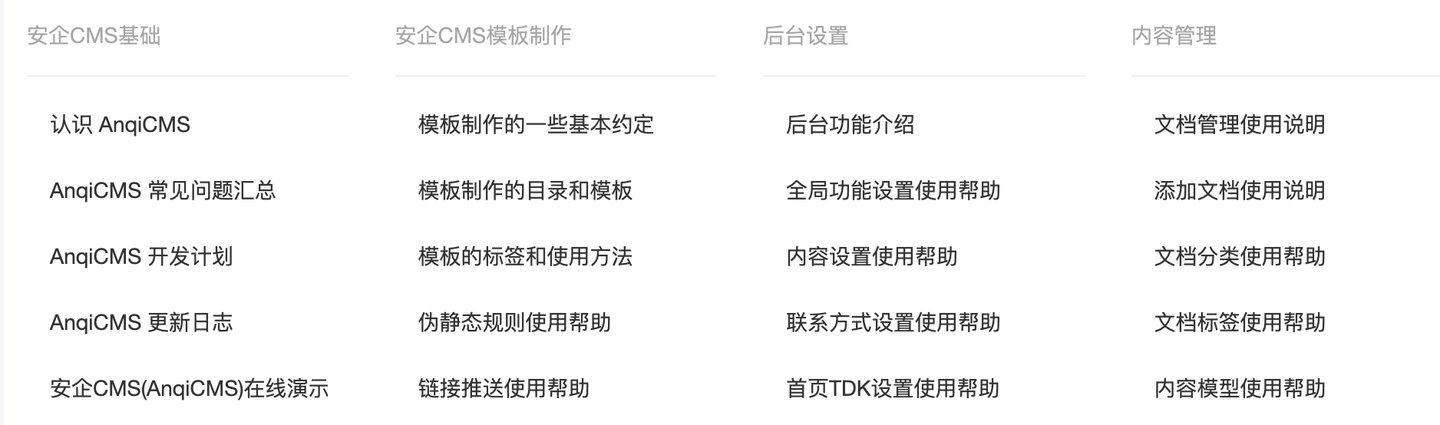
Call code example (code does not include css style control)
{% categoryList categories with moduleId="1" parentId="0" %}
<div>
    {% for item in categories %}
    <div>
        <h3><a href="{{ item.Link }}">{{item.Title}}</a></h3>
        <ul>
            {% archiveList archives with type="list" categoryId=item.Id limit="6" %}
            {% for archive in archives %}
            <li>
                <a href="{{archive.Link}}">
                    <h5>{{archive.Title}}</h5>
                    <div>{{archive.Description}}</div>
                    <div>
                        <span>{{stampToDate(archive.CreatedTime, "2006-01-02")}}</span>
                        <span>{{archive.Views}} 阅读</span>
                    </div>
                </a>
                {% if archive.Thumb %}
                <a href="{{archive.Link}}">
                    <img alt="{{archive.Title}}" src="{{archive.Thumb}}">
                </a>
                {% endif %}
            </li>
            {% empty %}
            <li>
                该列表没有任何内容
            </li>
            {% endfor %}
        {% endarchiveList %}
        </ul>
    </div>
    {% endfor %}
</div>
{% endcategoryList %}
- Display the subcategories of the category in a loop, and if there are no subcategories, display the category's document. As shown in the figure:
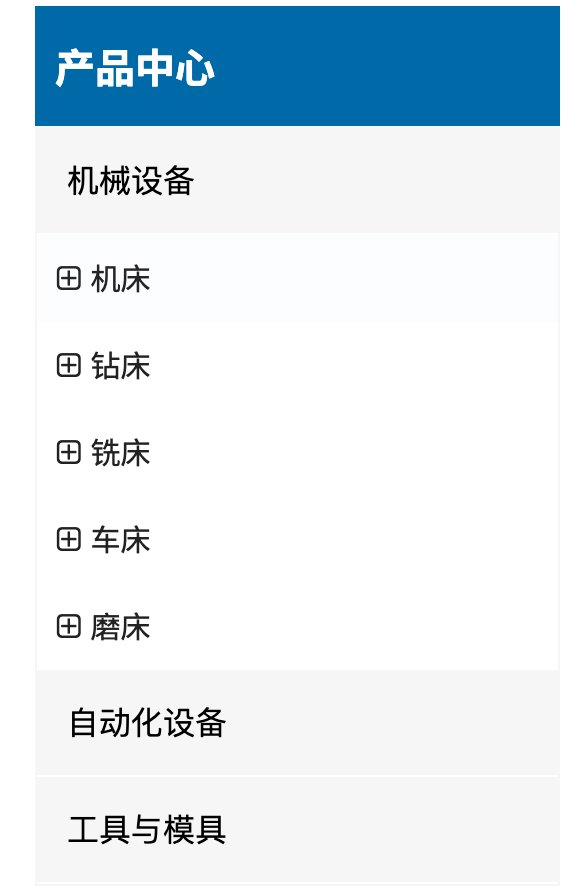
Call code example (code does not include css style control)
<div>
    {% categoryList productCategories with moduleId="2" parentId="0" %}
    {% for item in productCategories %}
    <a href="{{item.Link}}">{{item.Title}}</a>
    <ul class="ind-pro-nav-ul">
        {% if item.HasChildren %}
            {% categoryList subCategories with parentId=item.Id %}
            {% for inner in subCategories %}
            <li><a href="{{inner.Link}}" title="">{{inner.Title}}</a></li>
            {% endfor %}
            {% endcategoryList %}
        {% else %}
            {% archiveList products with type="list" categoryId=item.Id limit="8" %}
            {% for inner in products %}
            <li><a href="{{inner.Link}}" title="">{{inner.Title}}</a></li>
            {% endfor %}
            {% endarchiveList %}
        {% endif %}
    </ul>
    {% endfor %}
    {% endcategoryList %}
</div>