
Full-text Search
Full-text Search
Full-text search is used to make the front-end search cover the document body, categories, and tags, not just the title. The page itself is a conditional联动 multiple configuration form, and after it is enabled, the engine needs to be selected and the index range needs to be configured.
Entry Path
Back-end top menu →「Function」→「System Function」→「Full-text Search」。Actual address:/system/plugin/system/fulltextrequires administrative privileges(canAdmin)
Function description
The page consists of three parts:
- Top prompt area: explains the current index count, the entry for rebuilding indexes, and the configuration method for the token dictionary。
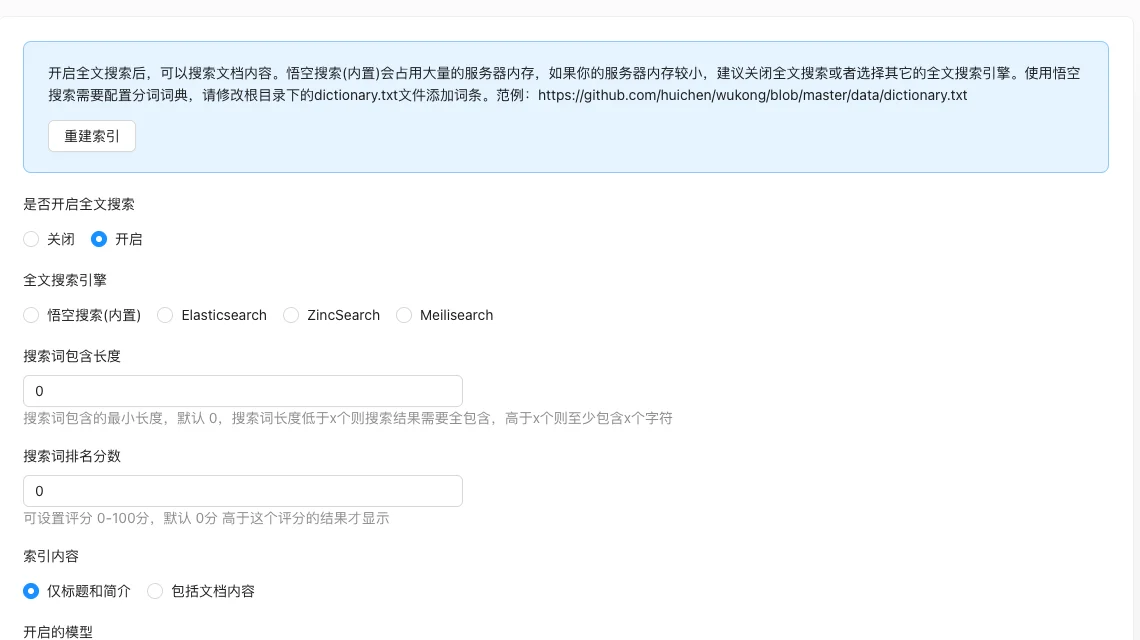
- Configuration form: switches, engines, numerical parameters, index content, models, and search types. The last four items appear only after「Enabled」, and engine-related fields appear only when the engine is not built-in。
- Rebuild index: after enabling, the system will build indexes and can manually trigger a full rebuild。
Screenshot of the interface
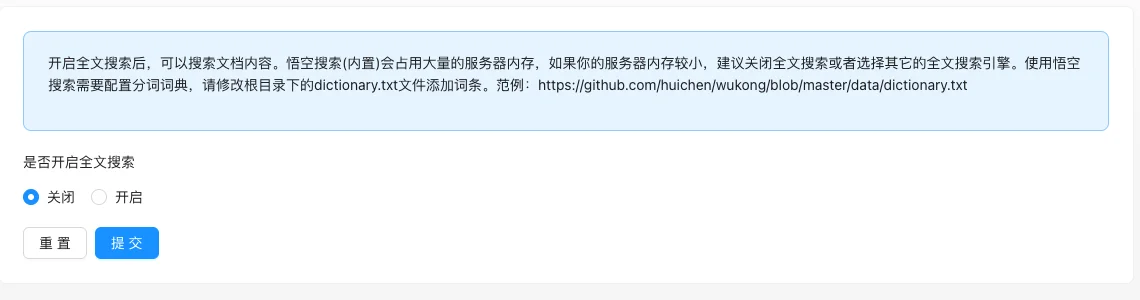
Closed state (only switch):
All configuration items expanded after enabling:
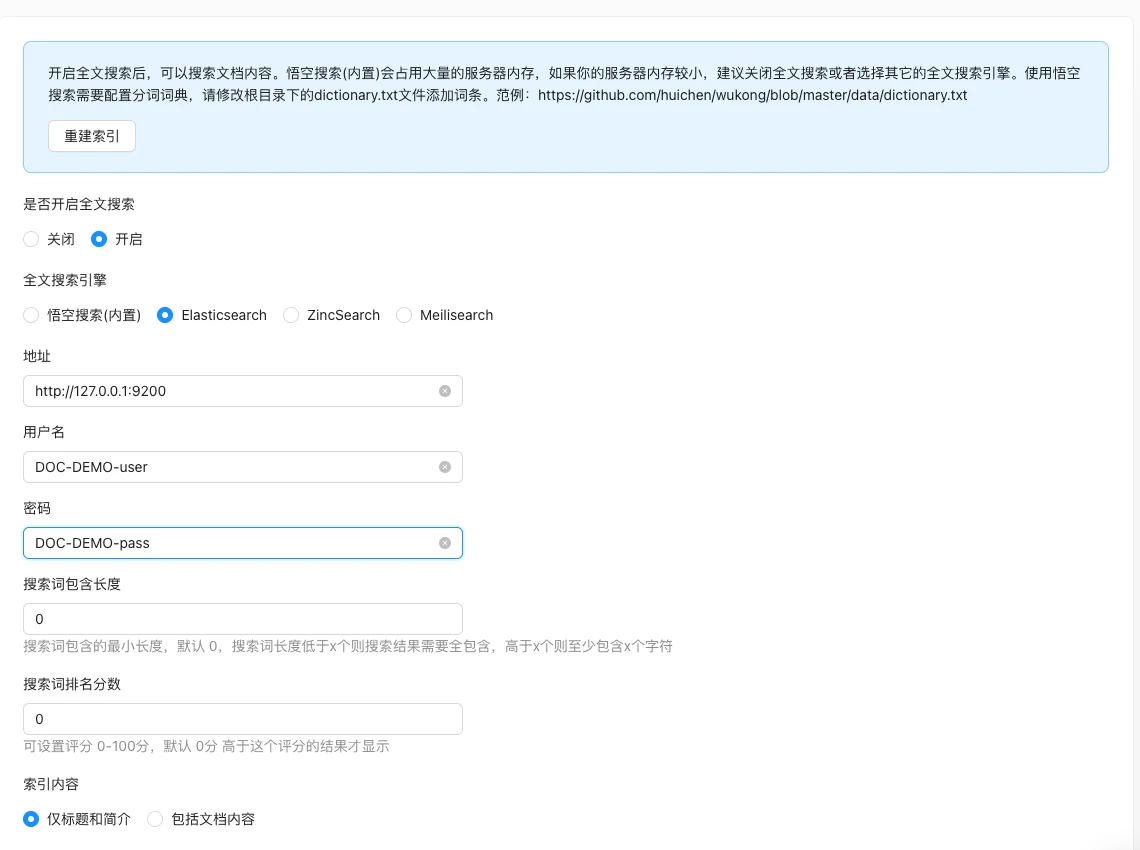
Select the address, username, and password fields that appear after selecting Elasticsearch (credentials are fictional placeholders):
Setting item description
| Setting items | function | Value / Default | How to select / Fill in suggestions | Impact / Note |
|---|---|---|---|---|
| Whether to enable full-text search | Master switch, controls whether to enable full-text indexing | Off / On; default is off [source code +实测] | Enable only if full text search is required; for small memory servers, it is recommended to disable or use an external engine | After disabling, the front-end only searches for titles and summaries; after enabling, the configuration items below will be displayed |
| Full-text search engine | Determine which engine to use to build indexes | Wukong Search (built-in)default/ Elasticsearch / ZincSearch / Meilisearch; source code defaultdefault[Source code], actually four radio buttons are not pre-selected, it is recommended to select explicitly |
For small stations/memories less than 2G, use built-in Wukong; for existing ES clusters or large stations, choose Elasticsearch; for lightweight, you can choose ZincSearch or Meilisearch | The last three are VIP features, not available if not subscribed; the index needs to be rebuilt after switching engines |
| address | Access address of the external engine | Only the engine is notdefaultDisplay when available; no default [source code] |
Enter the complete URL, such ashttp://127.0.0.1:9200; Fill in the actual domain name or IP address of the remote engine |
Address error will cause index failure; Built-in Wukong search does not have this item |
| Username | External engine authentication account | Display only when the engine is Elasticsearch/ZincSearch; no default [source code] | Fill in the actual engine account | Meilisearch does not have this item; credentials are sensitive information, please keep them safe |
| Password | External engine authentication password | Only the engine is notdefaultDisplay when available; no default [source code] |
Fill in the actual engine password | Re-index and resubmit after modification |
| Search term length included | Control the minimum match length of the search term | Integer, default 0 [source code +实测],no explicit upper and lower bounds | Suggested by Chinese site 2; set to 0 to include short words entirely, and long words at least include n characters | Set too large can cause short words not to be found; set 0 to match loosely |
| Search term ranking score | Filter low-score results | 0-100, default 0 [source code +实测] | Default 0 to display all results; set to 30-50 when results are too miscellaneous | Results are displayed only above this score; setting it too high will result in a large number of missed results |
| Indexed content | Determine whether the index range includes the main text | Only title and summaryfalse(Default [实测]) / Include document contenttrue |
Select 'Include document content' for full-text search; keep the default for searching by title only | Including the main text will significantly increase the index volume and memory usage |
| Enabled models | Select which models' documents enter the index | Multi-select: Article module, Product module, Case module; check all three for [实测] | Only select the actual search models required to reduce the index quantity | Documents of unchecked models will not be matched by full-text search |
| Document search | Index and search documents | Default checked and disabled [Source code +实测] | No operation required, always enabled | Fixed by the system, cannot be closed |
| Category search | Whether to index and search categories | Unchecked / Checked; default unchecked [实测] | Select when searching by category name | The category page will enter the search range after selection |
| Tag search | Whether to index and search tags | Unchecked / Checked; default unchecked [实测] | Select when searching by tag name | The tag page will enter the search range after selection |
| Rebuild index | Full重建 search engine index | Button, click to pop up confirmation box [source code] | Execute after first launch, switch engine, change index content or model | There is a progress prompt during the reconstruction period, large data volume will take a long time; the search results on the front end may be incomplete during execution |
Detailed explanation of configuration items
Full-text search engine
Condition for occurrence[Source code] is displayed only when "Turn on full-text search" is "Turn on".
Meaning and selection of four engines:
| Engine value | name | Applicable | Limit |
|---|---|---|---|
default |
Wukong Search (built-in) | Small station, no external search service | Large server memory usage; manual maintenance is requireddictionary.txtToken dictionary |
elasticsearch |
Elasticsearch | Existing ES cluster, large station | VIP feature; address, username, and password must be filled in |
zincsearch |
ZincSearch | Lightweight alternative to ES | VIP feature; address, username, and password must be filled in |
meilisearch |
Meilisearch | Lightweight and easy to use | VIP feature; address and password must be filled inNo username[Source code] |
VIP restriction: In the source code.engineSingle selection inisVip === falseDisable at this time, non-VIP users will pop up a prompt to open.实测本环境四种选项均可见 [COMPUTED].
LinkageEngine is notdefault「Address」「Username」「Password」will be displayed only when...;meilisearch「Username」will not be displayed («engine !== 'meilisearch'Judgment) [Source code].
Consequences of filling in incorrectlyEngine address or credential error will cause index building failure and no search results on the front desk. The index must be rebuilt after switching the engine.
Search term length included
Condition for occurrenceAfter enabling full-text search, [Source code] will be displayed.
Source code comments and interface prompts: The minimum length of the search term included, default is 0; if the length of the search term is less than x, the search results need to be fully contained, and if it is more than x, it must contain at least x characters [Source code+i18n].
Recommended valueChinese site set 2-3; when set to 0, the matching rules are the most lenient, short words can also be matched, but the results may be too many.
Consequences of filling in incorrectlySetting it too large (such as 10) will make common short queries unable to find any results.
Search term ranking score
Condition for occurrenceAfter enabling full-text search, [Source code] will be displayed.
Source code comments: can be set to 0-100 points, default 0 points, only results with a score higher than this are displayed [source code+i18n].
Recommended valueDefault 0 to display all results; if the search results are too chaotic, gradually increase to 30-50 to observe the effect.
Consequences of filling in incorrectlySetting it to 100 will filter out almost all results; setting it to a negative number or decimal is not within the valid range.
Indexed content
Condition for occurrenceAfter enabling full-text search, [Source code] will be displayed.
The meaning of the two values:
- (Title and summary only
false[实测] Default): Small index volume, low memory usage, but cannot search for content in the main text. - Include document content
true[实测] Full-text search of the main text is possible, but the index volume and memory usage increase significantly.
Select suggestionsContent sites (articles, knowledge bases) select 'Include document content'; product display sites search only by name by default.
Consequences of filling in incorrectlyIf the index is not rebuilt after changing to 'Include document content', the main text content will not be searchable.
Search type
Condition for occurrenceAfter enabling full-text search, [Source code] will be displayed.
The 'Document search' checkbox is set by the source code in the three checkboxes.disabledandinitialValue={true}Always enabled, cannot be disabled [Source code +实测]; 'Category search' and 'Tag search' can be selected freely, not selected by default [实测].
Select suggestions: Check the corresponding item if the user needs to find content by category name or tag name; otherwise, keep the default to reduce the index amount.
Consequences of filling in incorrectly: After closing category/tag search, related pages will not appear in the search results.
Operation steps
- Enter 'Function → System Function → Full-text Search'.
- Set 'Full-text Search Enabled' to 'Enabled', expand the configuration items.
- Select a search engine; if an external engine is selected, fill in the address and credentials (内置悟空搜索跳过).
- Set 'search word inclusion length', 'search word ranking score', 'indexed content', 'enabled model', 'type of search' as needed.
- Click 'Submit' to save.
- After the first launch or modification of the engine/index range, click 'Rebuild Index' in the top prompt area and wait for the progress to complete.
- Go to the front-end to verify the search keyword results.
Applicable scenarios and suggestions
- Small site / Limited memoryUse the built-in Wukong search, select 'Only title and summary' for indexed content, set search word inclusion length to 2.
- Existing ES cluster / Large siteSelect Elasticsearch, fill in the address and credentials, select 'Include document content' for indexed content, and enable category/tag search as needed.
- Poor Chinese word segmentation effect: Edit the root directory of the site
dictionary.txtAdd business terms (format referencegithub.com/huichen/wukongof dictionary.txt).
Points to note
- The built-in Wukong search will occupy a large amount of server memory, it is recommended to turn off full-text search or use an external engine when memory is insufficient.
- Engine-related fields are only displayed when the engine is
defaultDisplay, 'Username' is not displayed in Meilisearch - check the filled content after switching engines. - The default value is taken from source code comments and actual measurements: including length 0, ranking score 0, index content 'only title and summary', all three models selected, and document search always enabled [COMPUTED].
- The account password of the external engine is sensitive information and should not be written in public documents or screenshots.
- If the front-end does not take effect after modifying the configuration, first confirm whether the index has been rebuilt, and then clear the cache.