
Backup and restore
📅 November 21, 2026
👁️ 0
Backup and restore
Backup and recovery are used to create site backups, download backup files, restore from backups, and clear website data.
Entry Path
Top menu →「Function」→「System Function」→「Backup and Restore」. Actual address:/system/plugin/system/backuprequires administrative privileges(canAdmin)
Function description
The page provides options for adding new backups, importing local backups, and clearing website data. The list displays backup time, name, format, remarks, size, and operations (restore, download, remarks, delete). Supports ZIP and SQL formats.
Screenshot of the interface
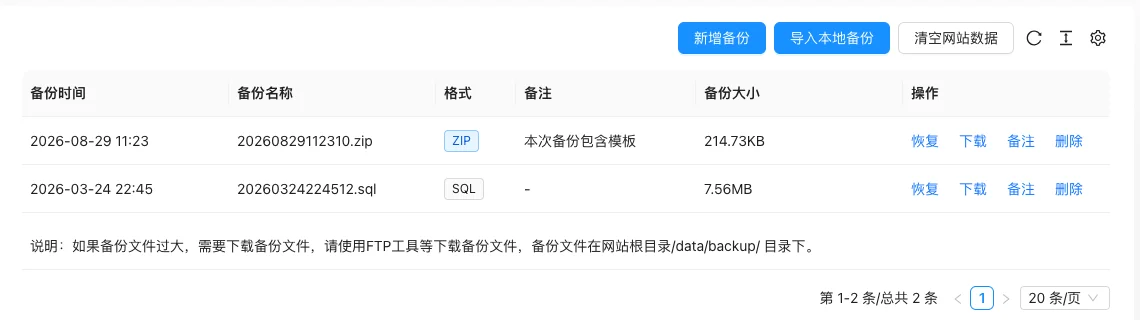
Setting item description
| Setting items | function | Value / Default | How to select / Fill in suggestions | Impact / Note |
|---|---|---|---|---|
| Backup time / Name | Backup creation time and filename | Automatically generated, no default [Source code] | Identify backup versions by time | — |
| Format | Backup file format | ZIP (including templates and files) / SQL (only database) [Source code] | Complete migration select ZIP; only backup data select SQL | Large files require FTP download |
| Note | Instructions for background maintenance | Text, No Default [Source Code] | Write the backup reason and version clearly | — |
| Backup size | File occupied space | Read-only | — | — |
| Operation | Restore / Download / Notes / Delete | — | Restore will overwrite the current data, confirm before operation | Restore and clear cannot be restored |
Operation steps
- Go to 'Function → System Function → Backup and Restore.'
- Click 'Add backup', select whether to include the template and fill in the remarks.
- When the backup file is large, download it via FTP from
/data/backup/the directory. - Click 'Restore' for the corresponding backup when a rollback is needed.
- Use 'Import local backup' when importing external backups.
Applicable scenarios and suggestions
- Backup before system upgrade, batch replacement, or large-scale data modification.
- Regularly download backups to local storage to avoid relying solely on server files.
Points to note
- Restoring backups will overwrite the current data, it is an irreversible operation, confirm the backup time point before execution.
- 'Clear website data' cannot be restored, unless there is a specific need, do not use it.
- Backup files contain site data, pay attention to security when downloading and saving.