
Static page caching
Static page caching
Static page caching is used to cache the home page, list page, and detail page as static files, to accelerate access speed, and to support pushing to a static site server.
Entry Path
Top menu of the background → Function → System Function → Static Page Cache. Actual address:/system/plugin/system/htmlcacherequires administrative privileges(canAdmin)
Function description
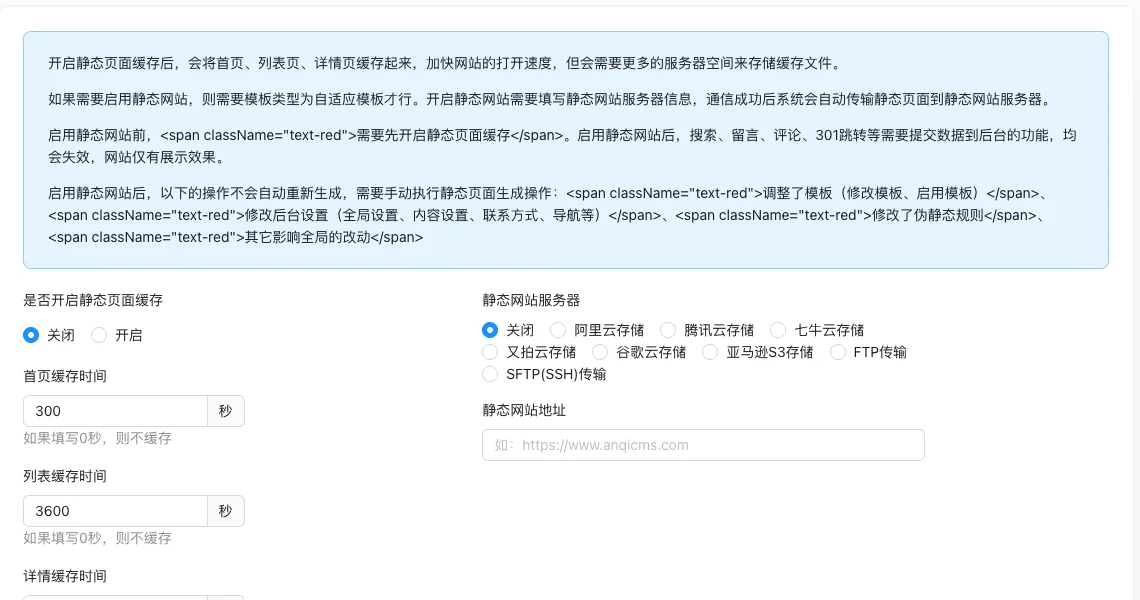
The page can set the total cache switch, home/list/detail cache time, static website server and static website address, and provide generation and push operations.
Screenshot of the interface
Setting item description
| Setting items | function | Value / Default | How to select / Fill in suggestions | Impact / Note |
|---|---|---|---|---|
| Whether to enable static page cache | Cache switch | radio: Off (default) / On [实测] | Turn on when there is a large amount of traffic and infrequent updates | The following cache settings will not take effect after turning off |
| Home page cache time | Home page cache seconds | Number, measured 300 seconds [measured]; 0 means no cache | Home page update few can be set 300-3600 | — |
| List cache time | List page cache seconds | Number, measured 3600 seconds [measured]; 0 means no cache | List update medium set 3600 | — |
| Detail cache time | Detail page cache seconds | Number, measured 86400 seconds [measured]; 0 means no cache | Detail almost unchanged can be set 86400 | — |
| Static website server | Static file push target | Single choice of 9 items: Off (default, tested) / Alibaba Cloud / Tencent Cloud / Qiniu Cloud / UCloud / Google Cloud / Amazon S3 / FTP / SFTP [Source code + tested] | Select when you need a pure static site | Non-VIP cannot be selected; no local options |
| Static website address | Static site access address | Text, No Default [Source Code] | Fill in the static site domain | — |
Detailed explanation of configuration items
Impact of static website mode
Condition for occurrence[Source code] when the static website server is not 'Off'.
After enabling the static website, functions that require submitting data to the background, such as search, messages, comments, and 301 redirects, will all be disabled, and the website will degrade to a pure display [source code + i18n].
Prerequisites: It requires an adaptive template and must be enabled before static page caching.
Consequences of filling in incorrectly: Mistakenly enabling it will cause all interactive functions to be unavailable.
Manually generate cache
Condition for occurrenceAlways display [source code].
Provide operations such as 'Clear all cache' and 'Manually generate all cache/home/column/document/tag cache' [source code].
NoteAdjust the template, modify the global/content/contact/navigation settings, and modify the pseudo-static rules after, static pages will not be automatically regenerated, and must be manually generated [source+i18n]. 'Clear all caches' only clears the local cache on the server, and cannot clear the static server files [source].
Operation steps
- Enter 'Function → System Function → Static Page Cache.'
- Enable caching and set the cache time for various pages.
- Click 'Submit' to save.
- Use 'Generate Operation' to manually generate the cache or 'Clear All Caches'.
- Configure the server and execute the push when a static site is needed.
Operation steps
- Enter 'Function → System Function → Static Page Cache.'
- Enable caching and set the cache time for various pages.
- Click 'Submit' to save.
- Use 'Generate Operation' to manually generate the cache or 'Clear All Caches'.
- Configure the server and execute the push when a static site is needed.
Applicable scenarios and suggestions
- Sites with high traffic and infrequent content updates are suitable for enabling caching.
- Support for generating operations can be performed separately for the homepage, column, document, and tag, which is convenient for local updates.
Points to note
- After enabling the static website, functions that require data submission such as search, comments, comments, and 301 redirects will be disabled, and the site will only have display capabilities.
- After modifying the template, global settings, content settings, navigation, and pseudo-static rules, static pages will not be generated automatically, and they need to be manually regenerated.
- Static websites need to adapt to the template and must enable static page caching first.
Related documents
- Resource Storage Configuration
- Management of Static Rule
- Update Cache