
Resource Storage Configuration
Resource Storage Configuration
Resource storage configuration is used to select the storage location for uploading images and files, supporting local storage and multiple cloud storage options.
Entry Path
Back-end top menu →「Function」→「System Function」→「Resource Storage Configuration」. Actual address:/system/plugin/system/storagerequires administrative privileges(canAdmin)
Function description
The page provides storage method selection and「Resource Address」configuration, supporting local storage, Alibaba Cloud, Tencent Cloud, Qiniu Cloud, UCloud, Google Cloud, Amazon S3, Cloudflare R2, FTP, SFTP.
Screenshot of the interface
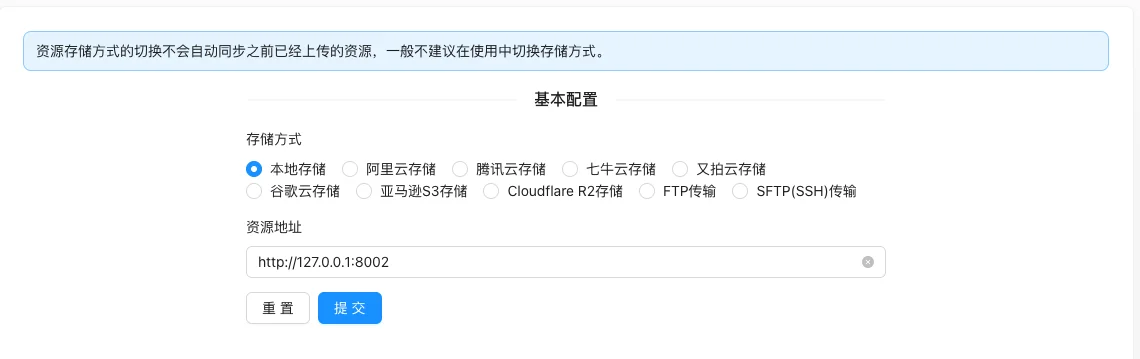
Setting item description
| Setting items | function | Value / Default | How to select / Fill in suggestions | Impact / Note |
|---|---|---|---|---|
| Storage method | Determine the storage location of new uploaded resources | Single selection of 10 items: Local storage (default [source code]), Alibaba Cloud, Tencent Cloud, Qiniu Cloud, UCloud, Google Cloud, Amazon S3, Cloudflare R2, FTP, SFTP | Use local for single-machine small stations; object storage for multiple machines or high traffic | Non-VIP cannot be selected; switching will not migrate old resources and is not recommended to switch in the middle |
| Resource address | Resource domain name for external access | Text, pre-filled with the local site address [实测] | Enter the corresponding CDN/Bucket domain name when using cloud storage | Incorrect filling will cause all front-end images to be inaccessible |
| Local archive | Whether to retain local copies when using cloud storage | Single choice: Do not retain / Retain;实测「Do not retain」[实测] | Select to retain when local backup is needed | Display only when the storage method is not local |
| Each cloud storage credential | Parameters for connecting to cloud services | Linked with the storage method, see the details below | Obtained from the cloud vendor's console | The key is sensitive information |
Detailed explanation of configuration items
Storage method and condition fields
Condition for occurrence: The storage method is always displayed; local archive is displayed only when non-local storage is used [source code].
The corresponding credential field appears below according to the selected storage method:
| Storage method | Required Field |
|---|---|
| Local storage | None (Default) |
| Alibaba Cloud | Node Endpoint, AccessKeyId, AccessKeySecret, Bucket Name |
| Tencent Cloud | SecretId, SecretKey, Bucket Address |
| Qiniu Cloud | AccessKey, SecretKey, Bucket Name, Storage Area (7 items: East China z0/North China z1/South China z2/North America na0/Southeast Asia as0/East China-Zhejiang 2/Fog Storage East China Area) |
| UpYun | Operator, Password, Storage Service Name |
| Google Cloud | Project ID, Bucket Name, Key JSON |
| Amazon S3 | Region (such as us-east-1), AccessKey, SecretKey, Bucket |
| Cloudflare R2 | Endpoint, AccessKey, SecretKey, Bucket |
| FTP | IP, Port, Username, Password, Upload Root Directory |
| SFTP(SSH) | IP, Port, Username, Password or Private Key (.crt/.pem/.key), Upload Root Directory |
Recommended value: Use Alibaba Cloud/Tencent Cloud OSS + CDN for domestic sites; use S3/R2 for overseas sites.
Consequences of filling in incorrectly: Authentication or area errors will cause the upload to fail; switching the storage method does not automatically synchronize the uploaded resources, which will cause scattered old and new resources.
FTP Precautions
Source code提示: The PureFtp built into the Baota panel cannot be used normally, other FTP services need to be installed manually [source code].
Operation steps
- Enter 'Function → System Function → Resource Storage Configuration'.
- Select the storage method and fill in the corresponding credentials and resource address.
- Click 'Submit' to save.
- Upload a test image to confirm that the front-end can load normally.
Operation steps
- Enter 'Function → System Function → Resource Storage Configuration'.
- Select the storage method and fill in the corresponding credentials and resource address.
- Click 'Submit' to save.
- Upload a test image to confirm that the front-end can load normally.
Applicable scenarios and suggestions
- For single-machine stations, local storage can be used.
- Use object storage + CDN when deploying on multiple machines or when traffic is high.
Points to note
- Switching storage methods will not automatically migrate uploaded resources, and switching while in use will cause scattered old and new resources.
- Cloud storage keys are sensitive information and should not be written into public documents or screenshots.
- Entering the wrong resource address will cause all front-end images to be inaccessible.