
Replace site-wide
Replace site-wide
Full-site replacement is used to batch replace the specified text in multiple types of data, supporting plain text and regular expressions.
Entry Path
Top menu →「Function」→「System Function」→「Full Site Replacement」。Actual address:/system/plugin/system/replacerequires administrative privileges(canAdmin)
Function description
The page can select the replacement location (backend settings, documents, categories, tags, anchor text, keywords, comments, image resources, navigation, friend links, jump links, regions, message boards, template files, etc.), whether to replace tag content, and whether to backup before replacing and add replacement rules.
Screenshot of the interface
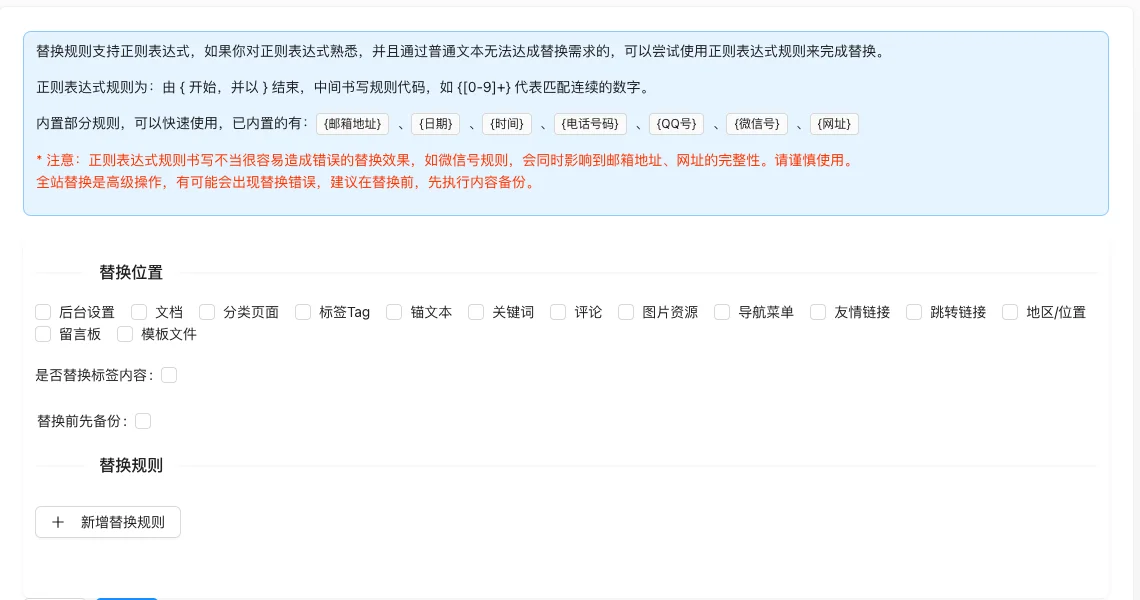
Setting item description
| Setting items | function | Value / Default | How to select / Fill in suggestions | Impact / Note |
|---|---|---|---|---|
| Replacement location | Decide which data to scan | 14 multiple choice items: Back-end settings, documents, categories, tags, anchor text, keywords, comments, image resources, navigation, friend links, jump links, regions, message boards, template files; mandatory [source code] | Check as needed, the larger the range, the higher the risk | Not selecting will result in an error 'Please select the replacement position' |
| Replace tag content | Process tag data | checkbox [source code] | Turn on as needed | — |
| Backup before replacement | Automatically create a backup before execution | checkbox [source code] | Strongly recommended to check | After checking, the full site backup containing the template will be executed first before replacing |
| Replace rule | Original text and replacement text | Custom from → to rule, from is required, to is optional [source code] | Replace using plain text accurately first | Error if no rule is filled in 'Please add a replacement rule' |
Detailed explanation of configuration items
Built-in regular expression rules
Condition for occurrence: Available when filling in replacement rules [source code].
Regular expression syntax: by{Start,}End, as{[0-9]+}Match consecutive numbers [source code]. Built-in 7 items:{邮箱地址}/{日期}/{时间}/{电话号码}/{QQ号}/{微信号}/{网址}[Source code].
Common mistakesThe WeChat ID rule will affect the integrity of email addresses and URLs at the same time. Improper regular expression writing can cause extensive error replacement [source code+i18n].
Consequences of filling in incorrectlyFull-site replacement is irreversible. Incorrect rules can contaminate a large amount of data——make sure to backup and check the results before execution.
Operation steps
- Enter “Function → System Function → Full-site Replacement”.
- Select the positions to be replaced.
- Add replacement rules, confirm the original text and replacement text.
- Check “Backup before replacement”.
- Click “Submit” to execute, and then check the replacement results afterwards.
Operation steps
- Enter “Function → System Function → Full-site Replacement”.
- Select the positions to be replaced.
- Add replacement rules, confirm the original text and replacement text.
- Check “Backup before replacement”.
- Click “Submit” to execute, and then check the replacement results afterwards.
Applicable scenarios and suggestions
- Use it when replacing brand names, domain names, and contact phone numbers in bulk.
- First use exact text replacement, and use regular expressions when a pattern match is truly needed.
Points to note
- Full site replacement is an advanced operation, incorrect rules can cause widespread incorrect replacements.
- Regular expression rules may affect unrelated content, for example, WeChat ID rules can destroy the integrity of email addresses and URLs.
- Always back up before execution, and check documents and template files after replacement.
Related documents
- Backup and restore
- Batch replace keywords
- Document List