
Akismet/reCAPTCHA
Akismet/reCAPTCHA
Akismet/reCAPTCHA is used to intercept spam comments and posts, and to prevent automated attacks with human verification.
Entry Path
Top menu of background → 'Function' → 'Touch Channel' → 'Akismet/reCAPTCHA'. Actual address:/system/plugin/channel/akismetrequires administrative privileges(canAdmin)
Function description
The page is divided into two parts: Akismet and reCAPTCHA. Akismet filters posts or comments by detection type, and reCAPTCHA provides human-machine verification.
Screenshot of the interface
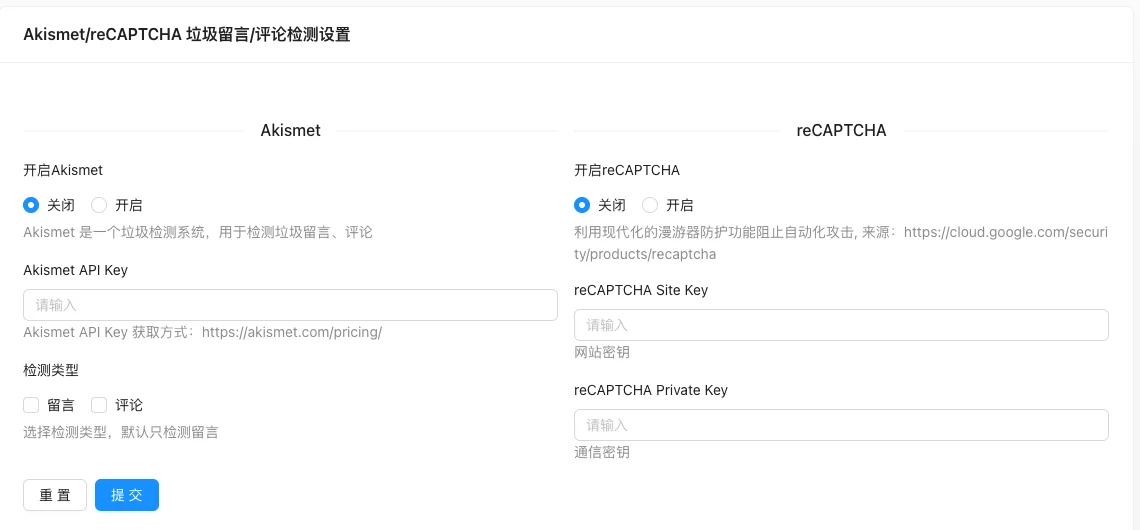
Setting item description
| Setting items | function | Value / Default | How to select / Fill in suggestions | Impact / Note |
|---|---|---|---|---|
| Enable Akismet | Whether to enable spam detection | Close / Open | Enable or disable according to business needs | Status change immediately affects availability |
| Akismet API Key | Service Key | Get from Akismet official website | Obtained from the corresponding platform, do not use real values for demonstration | Sensitive information, leaking is equivalent to leaking privileges |
| Check type | Check what content | Leave a message / comment; default only check messages | Brief description, avoid being vague | Whether to display is determined by the template |
| Enable reCAPTCHA | Enable human verification | Close / Open | Enable or disable according to business needs | Status change immediately affects availability |
| reCAPTCHA Site Key | Website key | Get Google reCAPTCHA | Obtained from the corresponding platform, do not use real values for demonstration | Sensitive information, leaking is equivalent to leaking privileges |
| reCAPTCHA Private Key | Communication key | Sensitive information | Obtained from the corresponding platform, do not use real values for demonstration | Sensitive information, leaking is equivalent to leaking privileges |
Detailed explanation of configuration items
Akismet Spam Detection
Condition for occurrence: Becomes effective after enabling Akismet; API Key can be obtained from the Akismet official website [source code].
check_typeFor multiple selection: 1=Messages, 2=Comments, default only detects messages [source code].
Recommended value: Check both options when both messages and comments are easily attacked by spam content.
Consequences of filling in incorrectly: Detection does not work when the API Key is invalid; the key is sensitive information, do not disclose it.
reCAPTCHA Human Verification
Condition for occurrence: After enabling reCAPTCHA, you need to fill in the Site Key and Private Key (obtained from Google reCAPTCHA) [source code].
Recommended value: Enable Akismet at the same time when spam comments are serious.
Consequences of filling in incorrectly: Incorrect keys or unrendered front-end validation components will cause users to be unable to submit comments or reviews.
Operation steps
- Apply for keys on the Akismet and Google reCAPTCHA official websites.
- Go to 「Function → Channels → Akismet/reCAPTCHA」.
- Enter the corresponding key and select the detection type.
- Click 'Submit' to save.
- Submit a test comment on the front end to confirm that the blocking has taken effect.
Applicable scenarios and suggestions
- Sites with serious spam can enable Akismet and reCAPTCHA at the same time.
- If you only want to filter comments, switch the detection type to 'Comments'.
Points to note
- Keys are sensitive information and should not be written into public documents or screenshots.
- reCAPTCHA depends on Google services, and the front-end verification will fail if the network is down.
- After enabling, the front-end template must correctly render the captcha component; otherwise, the user will not be able to submit.