
SMS Service
SMS Service
SMS Service is used to configure SMS verification code vendors and throttling strategies, covering scenarios such as login, registration, password recovery, and changing mobile phone numbers.
Entry Path
Top menu of the back end →「Function」→「Touch Channels」→「SMS Service」. Actual address:/system/plugin/channel/smsrequires administrative privileges(canAdmin)
Function description
The page supports three vendors: Alibaba Cloud, Tencent Cloud, and Twilio. It configures the effective vendor, enabled scenario, captcha parameters, traffic throttling threshold, and reverse proxy trusted network segment, and provides send test and send record.
Screenshot of the interface
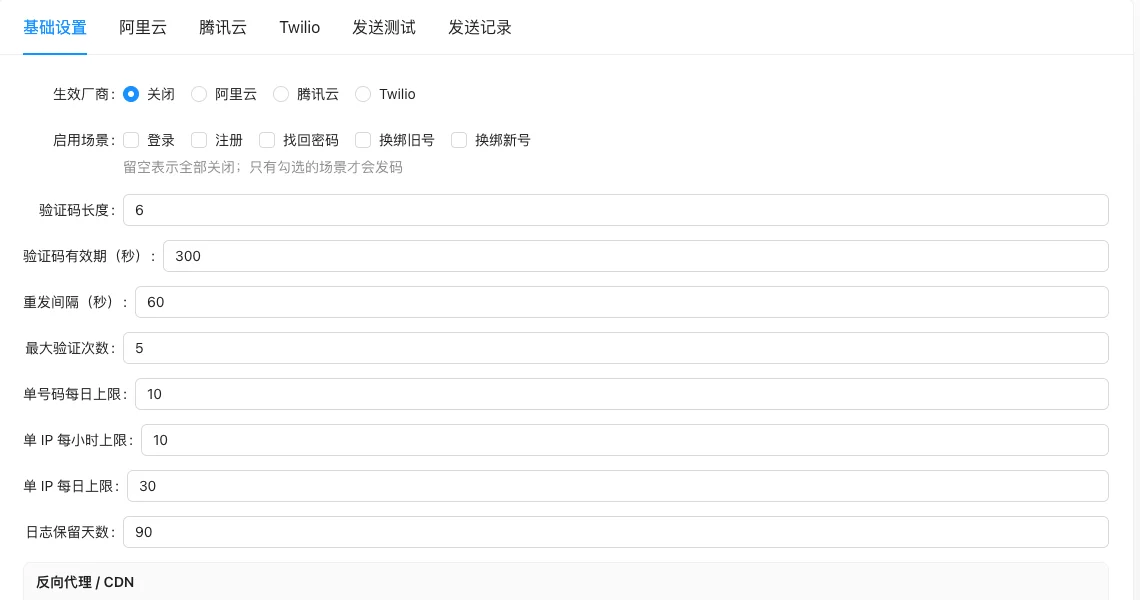
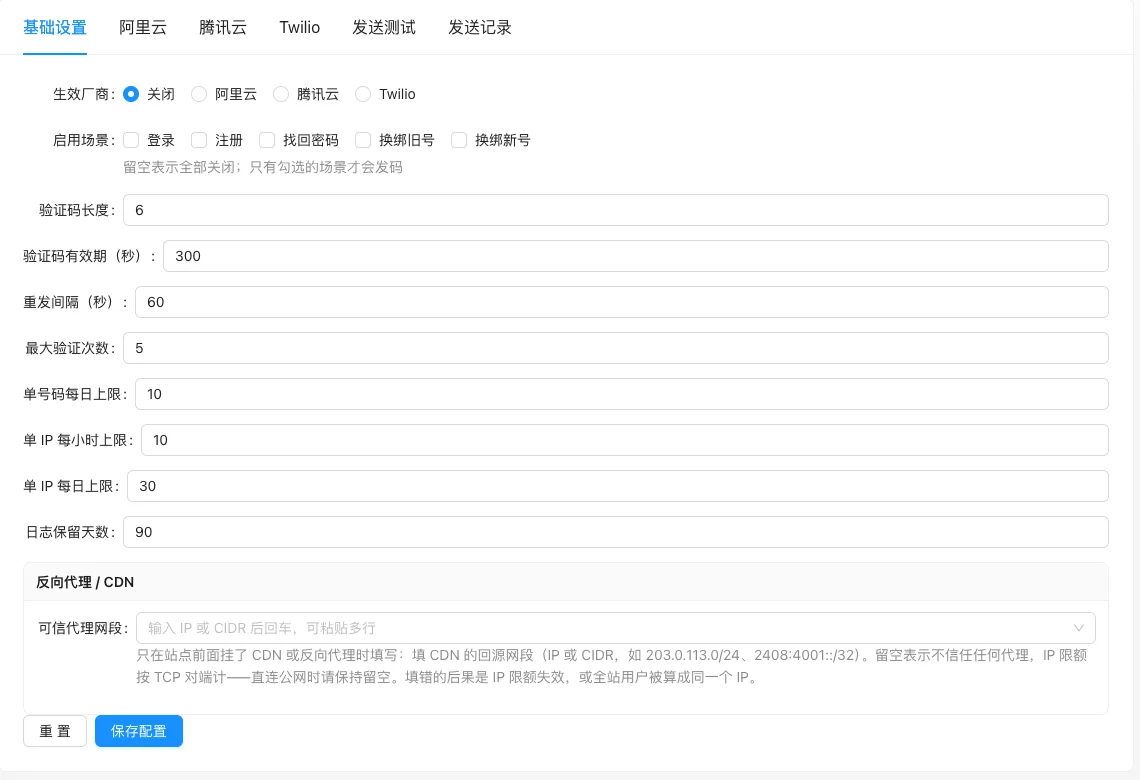
SMS Service Configuration (including default values for each item):
Setting item description
| Setting items | function | Value / Default | How to select / Fill in suggestions | Impact / Note |
|---|---|---|---|---|
| Effective Vendor | Select the actual SMS service provider in use | radio: Off (default measured) / Alibaba Cloud / Tencent Cloud / Twilio [measured] | Select by the manufacturers already enabled | Select 'Disable' to not send any SMS |
| Enable scenarios | Which services send verification codes | Multiple selection: login, registration, password recovery, change old number binding, change new number binding [Source code] | Only select the actual scenarios needed | Leave blank to disable all |
| Verification code length | Number of digits in verification code | Number, default is 6 in actual testing [Actual testing] | Keep it 6 digits at least | Too short, security is low |
| Verification code validity period (seconds) | How long does the verification code expire | Number, default 300 (5 minutes) measured [measured] | 5-10 minutes is reasonable | Too short, poor user experience |
| Resend interval (seconds) | Minimum interval between two sends | Number, default 60 [measured] | 60 seconds anti-fraud | Too short will be misused |
| **Verification times | Maximum number of attempts for verification code | Number, default 5 in actual test [Actual] | 5 times is enough | Need to resend after using up |
| Daily limit for single number | Daily sending limit for the same phone number | Number, default 10 in actual test [Actual] | Adjust by business volume | Prevent malicious order刷单numbers |
| Single IP hourly limit | Same IP hourly send limit | Number, default 10 in actual test [Actual] | — | Dependent on trusted proxy segment configuration |
| Single IP daily limit | Same IP daily send limit | Number, default 30 in actual measurement [measured] | — | The same |
| Log retention days | Record retention time | The number, default measured 90 [measured] | Set according to compliance requirements | — |
| Trusted proxy segment | Return source segment for CDN/reverse proxy | Text, one IP or CIDR per line [source code] | Fill in the return source segment when hanging CDN; leave blank for direct internet connection | Incorrect entry will cause IP limit to fail, or all site users to be counted as the same IP |
Detailed explanation of configuration items
Effective manufacturer and certificate
Condition for occurrence: Display corresponding certificate field after selecting a specific manufacturer [source code].
Alibaba Cloud, Tencent Cloud, Twilio each need AccessKey/Secret and other certificates, obtain them according to the manufacturer console.
Recommended value:Domestic sites select Alibaba Cloud or Tencent Cloud; Twilio is available for overseas sites.
Consequences of filling in incorrectly:Incorrect credentials will cause SMS sending to fail; keys are sensitive information and should not be written into public documents or screenshots.
Trusted proxy segment
Condition for occurrenceAlways display [source code].
Fill in only when CDN or reverse proxy is in front of the site——fill in the origin network segment of CDN (IP or CIDR, such as203.0.113.0/24)[Source code+i18n]. Leave blank to indicate distrust of any proxy, and IP limit is calculated by TCP endpoint.
Consequences of filling in incorrectly:Incorrect filling will cause the IP limit to fail, or all site users will be counted as the same IP, causing incorrect traffic shaping.
Operation steps
- Enter 'Function → Reach Channels → SMS Service'.
- Fill in the account and key parameters of the selected vendor.
- Set the effective vendor and enabled scenarios.
- Configure the verification code and rate-limiting parameters (default values are pre-filled, can be adjusted as needed).
- Click 'Save Configuration', then use 'Send Test' to verify, and check in 'Send Record'.
Applicable scenarios and suggestions
- When the site is in front of CDN or reverse proxy, the trusted proxy segment must be filled in, otherwise IP rate limiting will not be accurate.
- Only enable the actual scenarios used to reduce SMS costs and the risk of abuse.
Points to note
- Vendor keys are sensitive information and should not be written into public documents or screenshots.
- The wrong entry of the trusted proxy segment will cause the IP quota to fail, or all users on the site will be counted as the same IP.
- Sending SMS will incur charges, please note your account balance during testing.