
Email reminder
Email reminder
Email reminder is used to configure email sending services and enable email notifications for various business events.
Entry Path
Top menu of the back-end → 'Function' → 'Channel of Contact' → 'Email Reminder'. Actual address:/system/plugin/channel/sendmailrequires administrative privileges(canAdmin)
Function description
The page provides 'Email Settings', 'Email Sending Record', 'Automatic Marketing' entry, and lists the enabled notification scenarios, covering messages, registration, orders, refunds, recalls, and more.
Screenshot of the interface
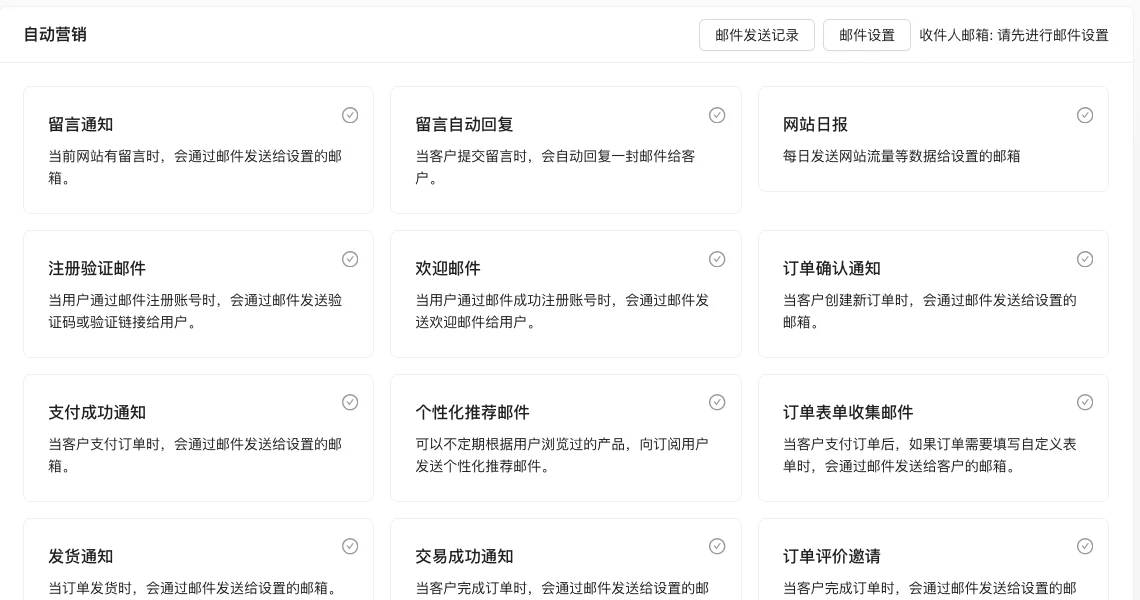
Setting item description
| Setting items | function | Value / Default | How to select / Fill in suggestions | Impact / Note |
|---|---|---|---|---|
| Email Settings | Configure the sender's email and SMTP service | Fill in the form; actual test prompt 'Please complete the email settings first' [Actual Test] | Complete this item first before enabling notifications | All emails cannot be sent if not configured |
| Various notification scenarios | Control whether to send emails for corresponding events | Enable / Disable switch for each scene [source code] | Enable only the scenes actually needed | Enabling too many can cause email harassment |
Notification scenario list
| Category | Scene |
|---|---|
| Leave a message and comment | Message notification, automatic message reply |
| Account | Registration verification email, welcome email, member level change notification |
| order | Order confirmation, payment successful, shipment notification, transaction successful, refund status, invoice push |
| Marketing | Website daily report, personalized recommendations, recall of unpaid orders, shopping cart recall, repurchase after first purchase, recall of lost users |
| Communication Order | Notification of submission, quotation notification, reply notification |
| Subscribe | Email subscription confirmation |
Detailed explanation of configuration items
Email Settings
Condition for occurrence: Configure on the page [Tested].
Page prompts 'Please set up the email first' [code+i18n] when the email setting is not completed in the source code. You need to fill in the SMTP server, port, account, password, and recipient's email address.
Consequences of filling in incorrectly: SMTP configuration error will cause all notification emails to fail to send; incorrect recipient email address will cause the administrator not to receive notifications.
Notification scenario enable strategy
Condition for occurrence: Enable as needed after completing the email setup [code].
Recall scenarios (unpaid orders, shopping carts, lost users) are more helpful for conversion, but need to be coordinated with business rhythm; transaction scenarios (order confirmation, shipping, refund) are basic service notifications.
Consequences of filling in incorrectlyThe notification content contains order and user information, please confirm the recipient is correct before enabling to avoid information leakage.
Operation steps
Enter 「Function → Reach Channel → Email Reminder」.
Click 「Email Settings」 to fill in SMTP and other sending parameters.
Check the notification scenarios to be enabled.
Check the sending results in 「Email Sending Record」.
Notification scenarios
| Category | Scene |
|---|---|
| Leave a message and comment | Message notification, automatic message reply |
| Account | Registration verification email, welcome email, member level change notification |
| order | Order confirmation, payment successful, shipment notification, transaction successful, refund status, invoice push |
| Marketing | Website daily report, personalized recommendations, recall of unpaid orders, shopping cart recall, repurchase after first purchase, recall of lost users |
| Communication Order | Notification of submission, quotation notification, reply notification |
| Subscribe | Email subscription confirmation |
Operation steps
- Enter 「Function → Reach Channel → Email Reminder」.
- Click 「Email Settings」 to fill in SMTP and other sending parameters.
- Check the notification scenarios to be enabled.
- Check the sending results in 「Email Sending Record」.
Applicable scenarios and suggestions
- Enable only the notifications that are truly needed to avoid bothering users.
- Use recall-type emails in coordination with the marketing rhythm and control the sending frequency.
Points to note
- Before the email settings are completed, the page will prompt 'Please complete the email settings first'.
- When sending fails, check the SMTP configuration first, and then look at the error information in the sending record.
- The notification content may contain order and user information, and attention should be paid to privacy compliance.