
Order Management
Order Management
Order management is used to view and process mall orders, filter by status, export orders, and configure order fields.
Entry Path
Top menu of the background →「Function」→「User/Transaction」→「Order Management」。Actual address:/system/plugin/commerce/orderrequires administrative privileges(canAdmin)
Function description
The page provides order ID, order user filtering, status tags including all, pending payment, pending shipment, pending receipt, successful, in refund, order closed, and supports exporting orders and order settings.
Screenshot of the interface
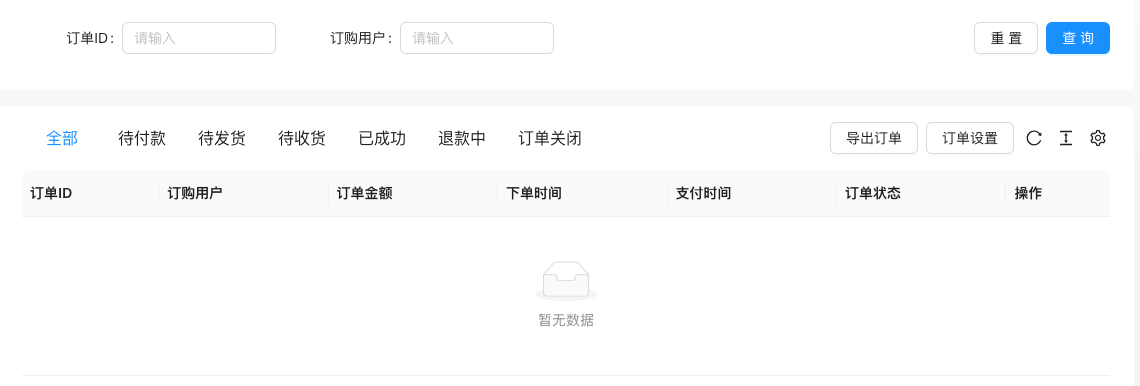
The screenshot is from the demonstration environment, the table may be in an empty data state; the position of the fields and the operation entry should be based on the current backend interface.
List field description
| field | Meaning | Value or source | Impact on the operation |
|---|---|---|---|
| Order ID | Order **Number | Back-end record, read-only | Used for identification and filtering, cannot be directly edited |
| Order user | Ordering user | Back-end record, read-only | Used for identification and filtering, cannot be directly edited |
| Order amount | Total order amount | Back-end record, read-only | Used for identification and filtering, cannot be directly edited |
| Order time / Payment time | Order timeline | Back-end record, read-only | Used for identification and filtering, cannot be directly edited |
| Order status | Pending payment / Shipment pending / Delivery pending / Successful / Refund pending / Order closed | Back-end record, read-only | Used for identification and filtering, cannot be directly edited |
| Operation | View details, shipment, refund, etc. | Back-end record, read-only | Used for identification and filtering, cannot be directly edited |
Setting item description (Order Settings)
| Setting items | function | Value / Default | How to select / Fill in suggestions | Impact / Note |
|---|---|---|---|---|
| Order without login | Whether to allow tourists to place orders | checkbox [source code] | Turn on as needed for business | — |
| Order processing method | Process after placing an order | radio: false normal transaction process / true transaction completed directly [source code] | Physical goods use normal process; virtual goods can be completed directly | — |
| Order automatically completed | Automatically confirmed after how many days | Number, default 10 days [i18n] | Set according to the logistics cycle | — |
| Order timeout closed | Close unpaid orders after how many minutes | Number, default no automatic closure [i18n] | Set when inventory needs to be released | — |
| Merchant Sales Revenue | Platform Commission Rate | Number 0-100% [Source Code] | Set according to the platform rules | — |
| Custom Order Fields | Collect additional information at the time of order | ProTable Management, 15 field types [Source Code] | Field names must comply with^[a-z][0-9a-z_]+$ |
Custom order fields for product customization are configured on the product editing page |
Order processing method
Condition for occurrenceAlways display in the order settings [Source Code].
「Normal transaction process」includes pending payment→pending shipment→pending receipt→completed;「Direct transaction completion」skips the intermediate states [source code]. Choosing incorrectly will cause the order status to not match the performance process.
Custom Order Fields
Condition for occurrence: Manage in order settings [source code].
Field name regular expression^[a-z][0-9a-z_]+$Supports 15 field types (missing timeline) [source code]. The field name is not compliant and cannot be saved; it is an independent entry from the product customization order field.
Operation steps
- Enter 「Function → User/Transaction → Order Management」.
- Filter orders by status or user.
- Click on the order to enter details, and perform operations such as shipment and refund.
- Click 'Export Order' when statistics are needed.
- Click on 'Order Settings' to maintain custom order fields.
Applicable scenarios and suggestions
- Daily processing should be carried out in the order of 'Pending Payment → Pending Shipment → Pending Receipt → Successful'.
- The custom order field for product customization and the communication order field are two different entry points, see the tutorial for custom field configuration.
Points to note
- The order list includes user and shipping information, be aware of privacy protection when screenshotting and exporting.
- Refunds and order closures will affect financial data, please confirm the status before operation.
- The mall mode needs to be enabled in 'Global Settings → Operation and SEO Status'.