
Google Merchant
📅 November 21, 2026
👁️ 0
Google Merchant
Google Merchant is used to synchronize the products of this site to Google Merchant Center, displaying products in Google search and shopping.
Entry Path
Top menu of the background → 'Marketing' → 'Google Merchant'. Actual address:/system/promotion/googlemerchantrequires administrative privileges(canAdmin)
Function description
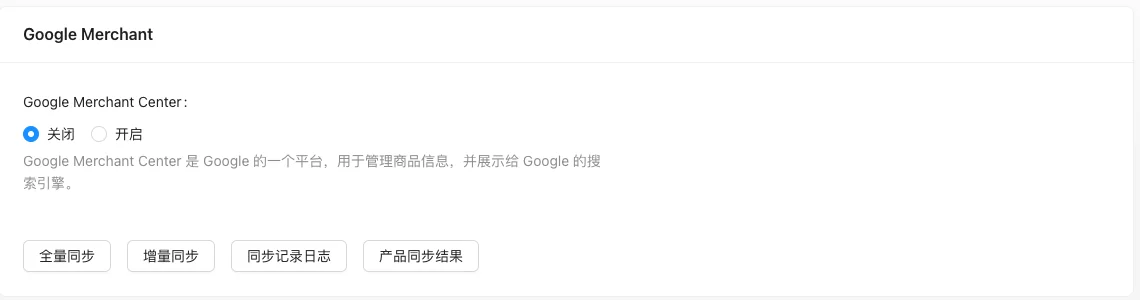
The page provides Google Merchant Center switch, full synchronization, incremental synchronization, synchronization record log, and product synchronization results.
Screenshot of the interface
Setting item description
| Setting items | function | Value / Default | How to select / Fill in suggestions | Impact / Note |
|---|---|---|---|---|
| Google Merchant Center | Enable synchronization | Close / Open | Enable or disable according to business needs | Status change immediately affects availability |
| Full synchronization | Push all products | Manual execution | Manually execute or configure an automatic strategy as needed | Check the log to locate the cause when it fails |
| Incremental synchronization | Push only changed products | Manual or scheduled execution | Manually execute or configure an automatic strategy as needed | Check the log to locate the cause when it fails |
| Log synchronization | View synchronization results | — | Manually execute or configure an automatic strategy as needed | Check the log to locate the cause when it fails |
Operation steps
- Complete account and data source configuration in Google Merchant Center.
- Go to 'Marketing → Google Merchant' and turn on the switch.
- Fill in the necessary authorization parameters.
- Perform full synchronization first, then use incremental synchronization for maintenance.
- Check the results through the synchronization log.
Applicable scenarios and suggestions
- The mall suitable for overseas markets is accessible.
- Product information (title, price, inventory, image) must be complete, otherwise synchronization may be rejected.
Points to note
- Synchronization depends on external authorization, and authorization failure will cause synchronization to fail.
- The domestic network environment cannot access Google services stably.
- When synchronization fails, first check the specific error in the log.