
Automatic marketing
📅 November 21, 2026
👁️ 0
Automatic marketing
Automated marketing is used to configure email notifications and recall strategies based on business events, which is the same function as 'Email Reminder'.
Entry Path
Top menu of the background → 'Marketing' → 'Automated Marketing'. Actual address:/system/promotion/automationrequires administrative privileges(canAdmin)
Function description
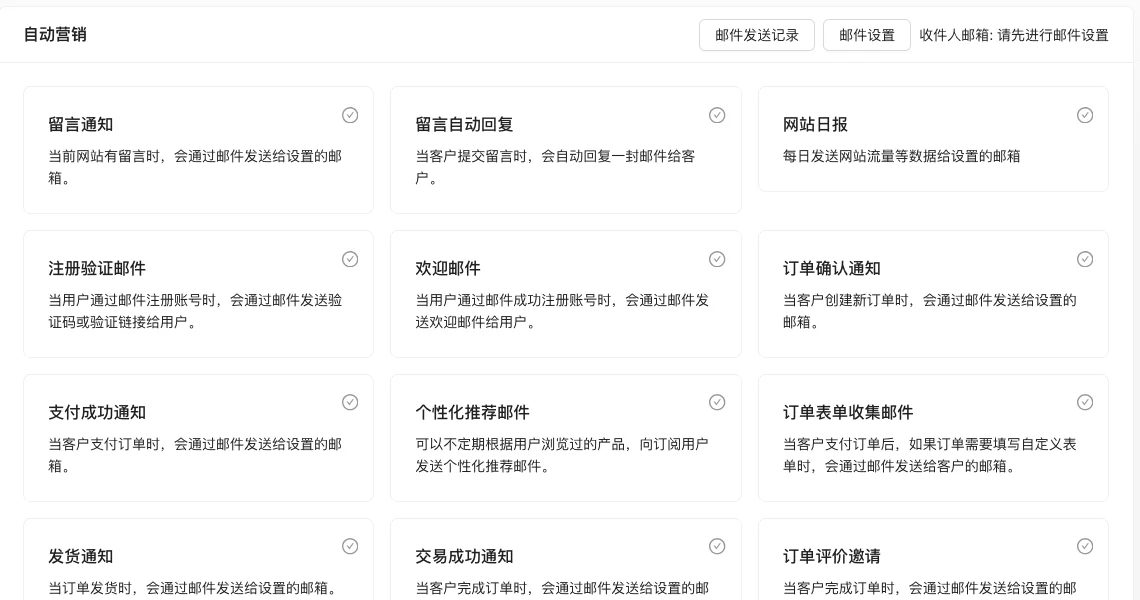
The page provides email settings, sending record entry, and can enable various scenarios such as message notifications, registration emails, order notifications, refund notifications, recall marketing, and member level changes.
Screenshot of the interface
Setting item description
| Setting items | function | Value / Default | How to select / Fill in suggestions | Impact / Note |
|---|---|---|---|---|
| Email Settings | Configure SMTP sending parameters | Fill in the form | Fill in according to the page prompt and business requirements | Configure according to the actual performance in front |
| Various notification scenarios | Control whether to send emails for corresponding events | Enable / Disable | Fill in according to the page prompt and business requirements | Configure according to the actual performance in front |
Operation steps
- Enter 'Marketing → Automated Marketing'.
- Click 'Email Settings' to complete the sending configuration.
- Check the notification scenarios to be enabled.
- Check the results at 'Email Sending Record'.
Applicable scenarios and suggestions
- Recall scenarios (unpaid orders, shopping carts, lost users) are more helpful for conversion.
- Control the frequency of emails to avoid users unsubscribing.
Points to note
- The page will prompt 'Please set up the email first' when the email settings are not completed.
- The notification content includes order and user information, pay attention to privacy compliance.