
Customers
📅 November 21, 2026
👁️ 0
Customers
Customer list under the mall mode of customer page, used to filter customers by user ID, username, and view grouped by customer type.
Entry Path
Top menu of the back end →「Customer」→「Customer」. Actual address:/system/customer/indexrequires administrative privileges(canAdmin)
Function description
The page provides categories such as「All Customers」「Subscribed Customers」「Purchased Customers」「Repeat Customers」, supports adding users and setting additional user fields. The list fields include user ID, username, phone number, email, balance, avatar, user group VIP, join time, and status.
Screenshot of the interface
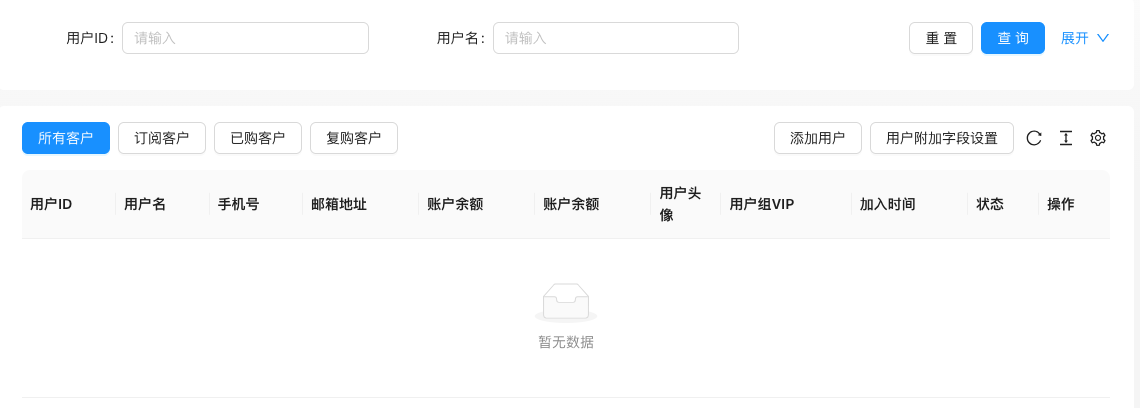
The screenshot is from the demonstration environment, the table may be in an empty data state; the position of the fields and the operation entry should be based on the current backend interface.
List field description
| field | Meaning | Value or source | Impact on the operation |
|---|---|---|---|
| User ID / Username | Customer identification | Back-end record, read-only | Used for identification and filtering, cannot be directly edited |
| Phone Number / Email Address | Contact Information | Back-end record, read-only | Used for identification and filtering, cannot be directly edited |
| Account Balance | Available balance | Back-end record, read-only | Used for identification and filtering, cannot be directly edited |
| User avatar | Profile Picture | Back-end record, read-only | Used for identification and filtering, cannot be directly edited |
| VIP user group | Member level | Back-end record, read-only | Used for identification and filtering, cannot be directly edited |
| Join Time | Registration Time | Back-end record, read-only | Used for identification and filtering, cannot be directly edited |
| Status | Normal / Disabled | Back-end record, read-only | Used for identification and filtering, cannot be directly edited |
| :— | :— | ||
| User ID / Username | Customer identification | ||
| Phone Number / Email Address | Contact Information | ||
| Account Balance | Available balance | ||
| User avatar | Profile Picture | ||
| VIP user group | Member level | ||
| Join Time | Registration Time | ||
| Status | Normal / Disabled |
Operation steps
- Enter「Customer → Customer」.
- Filter by customer type or user ID/username.
- Click 'Add User' or edit customer information in the list.
- Click 'User Additional Field Settings' to maintain extended fields.
Applicable scenarios and suggestions
- Purchased customers and repeat customers are core assets, which can be combined with email reminders for precise marketing.
- User additional fields are real database columns, see the tutorial for custom field configuration
Points to note
- The list includes phone numbers and email addresses, note privacy when screenshotting and exporting.
- This page is a different entry point for the same function as 'Function → User/Transaction → User Management'.