
Login Record
📅 November 21, 2026
👁️ 0
Login Record
Login Record is used to view the login history of the background account, including time, IP, status, and username.
Entry Path
Top menu of the back end → 'Admin' → 'Login Record'. Actual address:/system/account/logs/loginrequires administrative privileges(canAdmin)
Function description
The page displays the back end login records in a list form, convenient for finding abnormal logins.
Screenshot of the interface
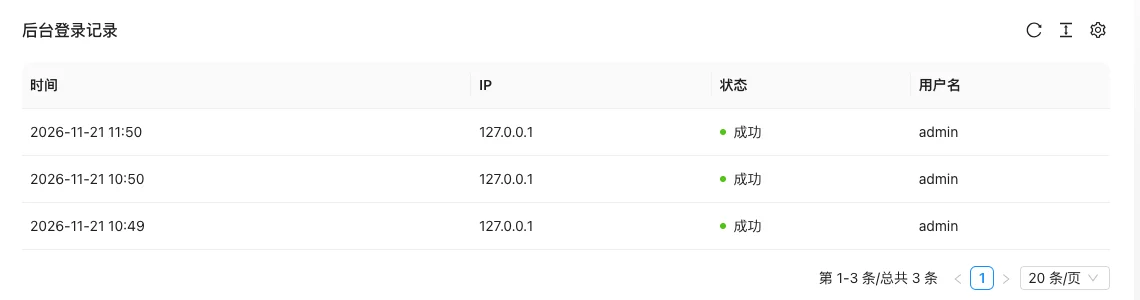
List field description
| field | Meaning | Value or source | Impact on the operation |
|---|---|---|---|
| Time | Login Time | Back-end record, read-only | Used for identification and filtering, cannot be directly edited |
| IP | Login Source IP | Back-end record, read-only | Used for identification and filtering, cannot be directly edited |
| Status | Success / Failure | Back-end record, read-only | Used for identification and filtering, cannot be directly edited |
| Username | Login Account | Back-end record, read-only | Used for identification and filtering, cannot be directly edited |
| Meaning | |||
| :— | :— | ||
| Time | Login Time | ||
| IP | Login Source IP | ||
| Status | Success / Failure | ||
| Username | Login Account |
Operation steps
- Enter 'Admin → Login Record'.
- Check the login status by time and account.
- Change the password and check the security settings in time when an abnormal IP is found.
Applicable scenarios and suggestions
- Regularly check the failed records to determine if they have been brute-forced.
- Cooperate with website security protection to limit suspicious IPs.
Points to note
- Record information containing IP, pay attention to desensitization when exporting and screenshotting.
- Login records only reflect backend login and do not include frontend user login.