
Administrator information
📅 November 21, 2026
👁️ 0
Administrator information
Administrator Information Page is used to change the password of the currently logged-in administrator.
Entry Path
Top menu of the back-end → 'Administrator' → 'Administrator Information'. Actual address:/system/account/indexrequires administrative privileges(canAdmin)
Function description
The page provides username display, as well as current password, new password input box, and submit button.
Screenshot of the interface
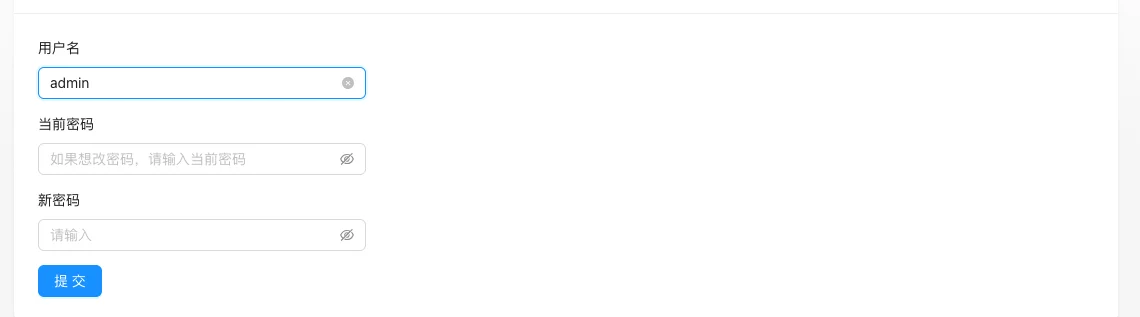
Setting item description
| Setting items | function | Value / Default | How to select / Fill in suggestions | Impact / Note |
|---|---|---|---|---|
| Username | Current login account | Read-only display | Fill in according to the page prompt and business requirements | Configure according to the actual performance in front |
| Current password | Verify identity | Must be filled in correctly | Obtained from the corresponding platform, do not use real values for demonstration | Sensitive information, leaking is equivalent to leaking privileges |
| New password | Modified login password | It is recommended to use a strong password | Obtained from the corresponding platform, do not use real values for demonstration | Sensitive information, leaking is equivalent to leaking privileges |
| function | Points to note | |||
| :— | :— | :— | ||
| Username | Current login account | Read-only display | ||
| Current password | Verify identity | Must be filled in correctly | ||
| New password | Modified login password | It is recommended to use a strong password |
Operation steps
- Go to 'Administrator → Administrator Information'.
- Enter the current password and the new password.
- Click 'Submit' to save.
- Re-login to verify with the new password.
Applicable scenarios and suggestions
- Change the password in time if you suspect account leakage or if it has been a long time since the password was changed.
- Avoid using easily guessable content such as names, birthdays, etc. for new passwords.
Points to note
- You may need to re-login for other logged-in sessions after changing the password.
- If you forget the current password, you need to handle it through the database or super administrator.