
Multi-site management
📅 November 21, 2026
👁️ 1
Multi-site management
Multi-site management is used to manage multiple independent sites in a single program and requires super administrator privileges(canSuper)
Entry Path
Top menu of the background → 「Multi-site Management」→「Multi-site Management」. Actual address:/system/website/list, requires super administrator privileges(canSuper)
Function description
The page supports filtering by website name and address, adding new sites. The list displays ID, website name, website address, site root directory, creation time, status, and provides operations such as current site, edit, default site, and so on.
Screenshot of the interface
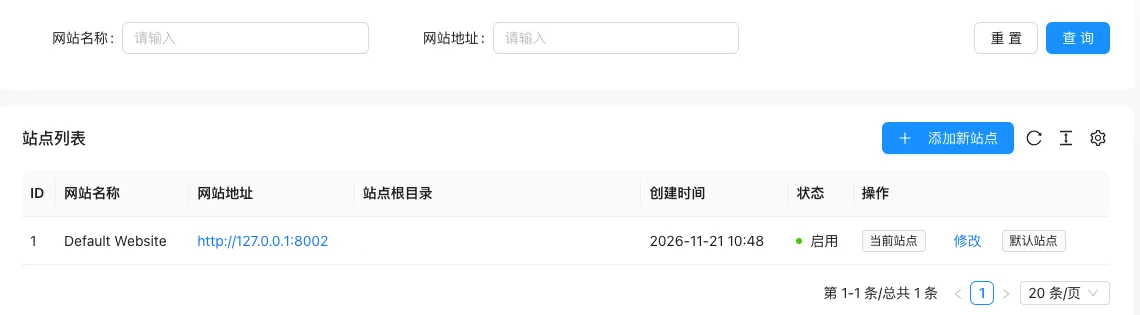
List field description
| field | Meaning | Value or source | Impact on the operation |
|---|---|---|---|
| ID | Site number | Back-end record, read-only | Used for identification and filtering, cannot be directly edited |
| Website Name | Site display name | Back-end record, read-only | Used for identification and filtering, cannot be directly edited |
| website address | Site access address | Back-end record, read-only | Used for identification and filtering, cannot be directly edited |
| Site root directory | Directory where the site files are located | Back-end record, read-only | Used for identification and filtering, cannot be directly edited |
| Creation time | Site creation time | Back-end record, read-only | Used for identification and filtering, cannot be directly edited |
| Status | Enable / Disable | Back-end record, read-only | Used for identification and filtering, cannot be directly edited |
| Operation | Current site identifier, edit, default site | Back-end record, read-only | Used for identification and filtering, cannot be directly edited |
| :— | :— | ||
| ID | Site number | ||
| Website Name | Site display name | ||
| website address | Site access address | ||
| Site root directory | Directory where the site files are located | ||
| Creation time | Site creation time | ||
| Status | Enable / Disable | ||
| Operation | Current site identifier, edit, default site |
Operation steps
- Enter 'Multi-site Management → Multi-site Management'.
- Click 'Add New Site', fill in the site name and address.
- Configure the site root directory and database information.
- After saving, switch to the managed site in the site list.
Applicable scenarios and suggestions
- Use multi-site when multiple brands or domains require independent content and templates.
- Different language versions of sites can be managed with the multi-language site feature.
Points to note
- The site root directory belongs to the server path information, and it should be obscured before sharing screenshots with others.
- The default site determines the access target for unmatched domains, and changes should be made cautiously.
- This menu is only visible to super administrators.