
Multilingual site
Multilingual site
The multilingual site is used to configure the way the site supports multilingual display and translation strategy, requiring super administrator privileges (canSuper)
Entry Path
Top menu of background →「Multi-site management」→「Multilingual site」. Actual address:/system/website/multilang, requires super administrator privileges(canSuper)
Function description
The page provides multilingual support switch, site storage and processing method, multi-site display form, main site language, and automatic translation switch.
Screenshot of the interface
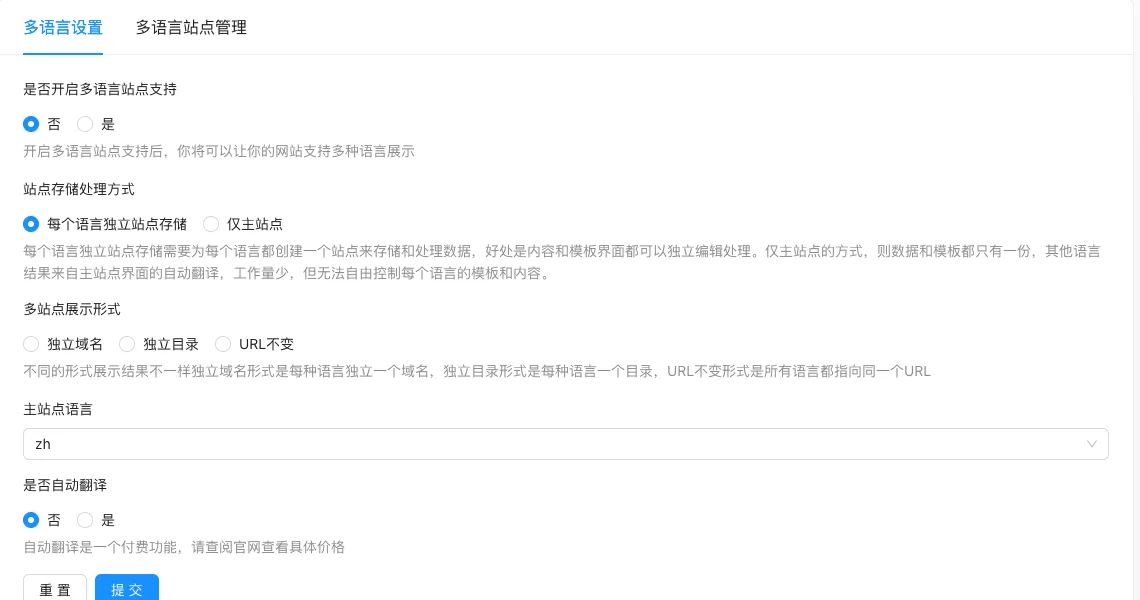
Setting item description
| Setting items | function | Value / Default | How to select / Fill in suggestions | Impact / Note |
|---|---|---|---|---|
| Whether to enable multilingual site support | Master switch | No / Yes | Select according to the actual business scope, multiple selections are allowed | The selection range determines the content ownership and display. |
| Site storage and processing method | How to store data for each language | Each language has an independent site storage / Only the main site | Select according to the actual business scope, multiple selections are allowed | The selection range determines the content ownership and display. |
| Multi-site display form | URL format for various languages | Independent domain / independent directory / URL does not change | Select according to the actual business scope, multiple selections are allowed | The selection range determines the content ownership and display. |
| Main site language | Default language | Aszh |
Select according to the actual business scope, multiple selections are allowed | The selection range determines the content ownership and display. |
| Whether to translate automatically | Whether to translate the content automatically | Paid feature, confirm the cost before enabling | Enable when the content is large, pay attention to the cost | Translation is paid per amount, confirm the cost before enabling |
Independent site storage can edit content and templates independently; only the main site has one set of data and templates, other languages are automatically translated by the main site, less workload but no freedom of control.
Detailed explanation of configuration items
Storage联动with display mode
Condition for occurrence[Source code]. After enabling multilingual support.
'Each language has its independent site storage' requires building a site for each language, content templates can be independently edited; 'Only main site' has only one set of data, other languages are automatically translated by the main site, less work but cannot be independently controlled [Source code].
Display format: independent domain/independent directory/URL remains unchanged, requires domain or directory configuration [Source code].
Recommended value[Source code].
Consequences of filling in incorrectly: Switching the storage method will change the data organization, do not switch arbitrarily when there is existing content; automatic translation is a paid feature, confirm the cost before enabling.
Operation steps
- Enter 'Multi-site Management → Multi-language Sites'.
- Enable multi-language support.
- Choose the storage and display methods.
- Set the main site language and enable automatic translation as needed.
- Click 'Submit' to save and switch to the front desk to verify the language change.
Applicable scenarios and suggestions
- If you need independent content and templates for each language, select 'Independent site storage for each language'.
- If the content is large but the translation budget is limited, select 'Only main site' + automatic translation.
Points to note
- Automatic translation is a paid feature, check the official website price before enabling.
- Changing the storage processing method will change the data organization, do not switch arbitrarily when there is existing content.
- The display format needs to be configured in conjunction with the domain/DNS layer.
Related documents
- Multi-site management
- Translation configuration
- Multilingual labels in the template tag manual