
Promotional activities
📅 November 21, 2026
👁️ 0
Promotional activities
Promotional activities are used to set promotional prices for specified products, selling at discounted prices within a specified time period.
Entry Path
Top menu of the background → 'Discount' → 'Promotion'. Actual address:/system/sale/activityrequires administrative privileges(canAdmin)
Function description
The page supports filtering by event name, click 'Add event product'. The list displays ID, event name, event introduction, event product, original price, event price, event start time and status.
Screenshot of the interface
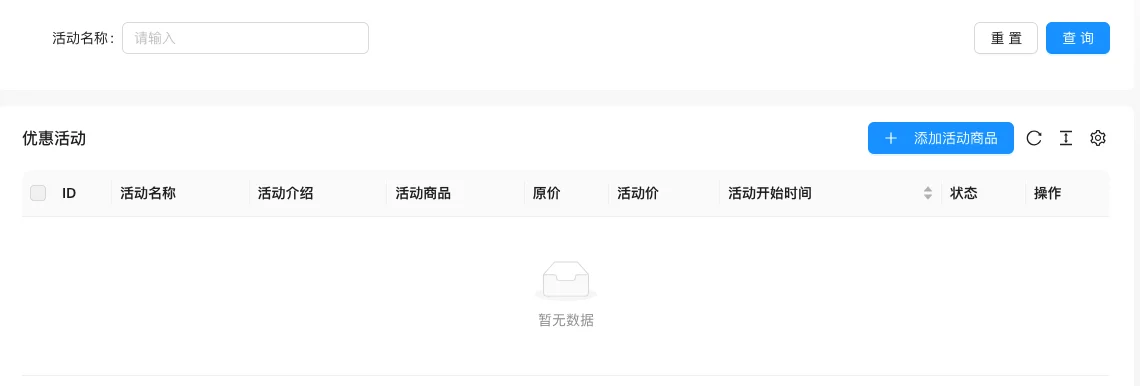
The screenshot is from the demonstration environment, the table may be in an empty data state; the position of the fields and the operation entry should be based on the current backend interface.
Setting item description
| Setting items | function | Value / Default | How to select / Fill in suggestions | Impact / Note |
|---|---|---|---|---|
| Event name / Introduction | Event identifier and description | — | Fill in a name that is easy to identify and consistent with the display on the front end | Name changes will affect display and calling, pay attention to synchronization |
| Event product | Products participating in the event | — | Select the actual business object, pay attention to the effective scope | Configuration errors will affect the front-end display and transactions |
| Original price / Event price | Price change | — | Set according to actual business and cost, pay attention to the unit | Amount errors will directly affect transactions and settlements |
| Event start time | Effective time | — | Set according to business rhythm, refer to default values | Setting it too short may affect the experience, and it may fail if it's too long. |
| Status | Enable / Disable | — | Enable or disable according to business needs | Status change immediately affects availability |
Operation steps
- Enter 'Discount → Promotion Event'.
- Click 'Add Event Product'.
- Select product, fill in the event price and start-end time.
- After saving, confirm the price display on the front desk product page.
Applicable scenarios and suggestions
- Limited-time discounts and hot-selling products are suitable for promotions.
- The event price should ensure profit margin, avoid excessive profit giving.
Points to note
- Confirm that the product inventory is sufficient before the event starts.
- Turn off the event in time after the event ends to avoid long-term low prices.
- When the same product participates in multiple promotions at the same time, confirm the actual pricing result first.