
Discount event
📅 November 21, 2026
👁️ 0
Discount event
Discount events are used to set promotional rules for automatic deductions when the consumption reaches a certain amount or quantity.
Entry Path
Top menu of the background → 'Discount' → 'Discount event'. Actual address:/system/sale/salesrequires administrative privileges(canAdmin)
Function description
The page supports filtering by name and coupon type, and provides an 'Add coupon' entry. The list displays ID, name, introduction, type, amount, effective time, validity period, and status.
Screenshot of the interface
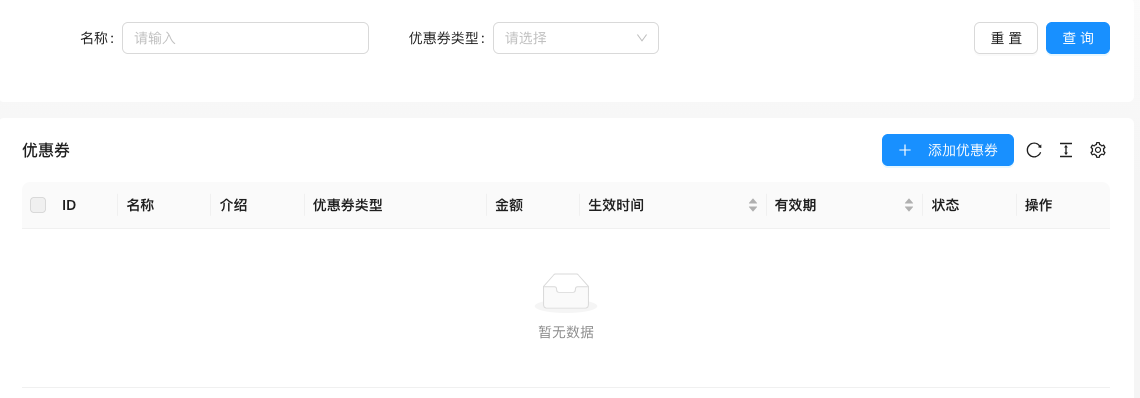
The screenshot is from the demonstration environment, the table may be in an empty data state; the position of the fields and the operation entry should be based on the current backend interface.
Setting item description
| Setting items | function | Value / Default | How to select / Fill in suggestions | Impact / Note |
|---|---|---|---|---|
| Name / Introduction | Event identifier and description | — | Fill in a name that is easy to identify and consistent with the display on the front end | Name changes will affect display and calling, pay attention to synchronization |
| Coupon Type | Discount rule type | — | Select the actual business object, pay attention to the effective scope | Configuration errors will affect the front-end display and transactions |
| Amount | Discount amount | — | Set according to actual business and cost, pay attention to the unit | Amount errors will directly affect transactions and settlements |
| Effective time / validity period | Event cycle | — | Set according to business rhythm, refer to default values | Setting it too short may affect the experience, and it may fail if it's too long. |
| Status | Enable / Disable | — | Enable or disable according to business needs | Status change immediately affects availability |
Operation steps
- Enter 'Discount → Discount event'.
- Click 'Add coupon' to create a discount rule.
- Set the threshold and deduction amount.
- After saving, verify whether it takes effect on the front desk order page.
Applicable scenarios and suggestions
- Discounts are suitable for increasing the average order value, and the threshold should be slightly higher than the current average order amount.
- When multiple discount rules coexist, pay attention to whether the叠加 rules meet expectations.
Points to note
- The discount rule will affect the actual payment amount of the order, and evaluate the impact on gross profit before modification.
- Remember to disable the activity after the expiration date to avoid long-term effectiveness.