
My Templates
📅 November 21, 2026
👁️ 0
My Templates
My Templates is used to manage the templates installed on the site, supporting enabling, managing, modifying, uploading new templates, and initialization.
Entry Path
Top menu of the back-end → 'Design' → 'My template'. Actual address:/system/design/indexrequires administrative privileges(canAdmin)
Function description
List display of template name, folder, website type, status, time. Template types include responsive, PC + mobile, etc., which determine the front-end display effect after enabling.
Screenshot of the interface
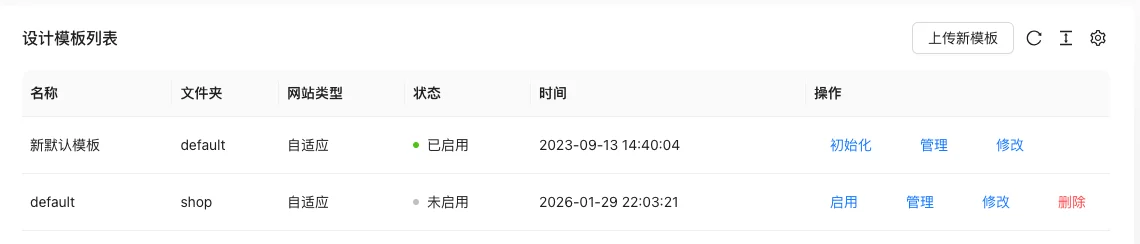
List field description
| field | Meaning | Value or source | Impact on the operation |
|---|---|---|---|
| name | Template display name | Back-end record, read-only | Used for identification and filtering, cannot be directly edited |
| Folder | Template directory name | Back-end record, read-only | Used for identification and filtering, cannot be directly edited |
| Website Type | Responsive / PC + mobile, etc. | Back-end record, read-only | Used for identification and filtering, cannot be directly edited |
| Status | Enabled / Disabled | Back-end record, read-only | Used for identification and filtering, cannot be directly edited |
| Time | Template upload time | Back-end record, read-only | Used for identification and filtering, cannot be directly edited |
| Operation | Initialize, manage, modify, enable, delete | Back-end record, read-only | Used for identification and filtering, cannot be directly edited |
| Meaning | |||
| :— | :— | ||
| name | Template display name | ||
| Folder | Template directory name | ||
| Website Type | Responsive / PC + mobile, etc. | ||
| Status | Enabled / Disabled | ||
| Time | Template upload time | ||
| Operation | Initialize, manage, modify, enable, delete |
Operation steps
- Enter 'Design → My Templates'.
- Click the 'Enable' of the target template to take effect.
- Click 'Manage' to view the template file, click 'Modify' to edit the code online.
- Click 'Upload New Template' to install a new template.
- Use 'Initialize' when you need to restore the default template data.
Applicable scenarios and suggestions
- Enable the new template first and confirm that its website type matches the site
- Backup before modifying the template code online to avoid front-end errors caused by incorrect changes
Points to note
- Only one template can be enabled at a time
- The initialization operation will overwrite the custom data within the template, please confirm before executing
- The template content set on the template may also become invalid after deleting the template