
Developer Documentation
📅 November 21, 2026
👁️ 0
Developer Documentation
Development document page summary template creation required label manual, convenient for direct review in the background.
Entry Path
Top menu of the background → 'Design' → 'Development Document'. Actual address:/system/design/docrequires administrative privileges(canAdmin)
Function description
The page lists all label manual entry groups such as 'Template Creation Help', 'Common Tags', 'Category Page Tags', 'Document Tags', 'Document Tag Tags', 'Other Tags', 'Universal Template Tags', and provides the complete manual address.
Screenshot of the interface
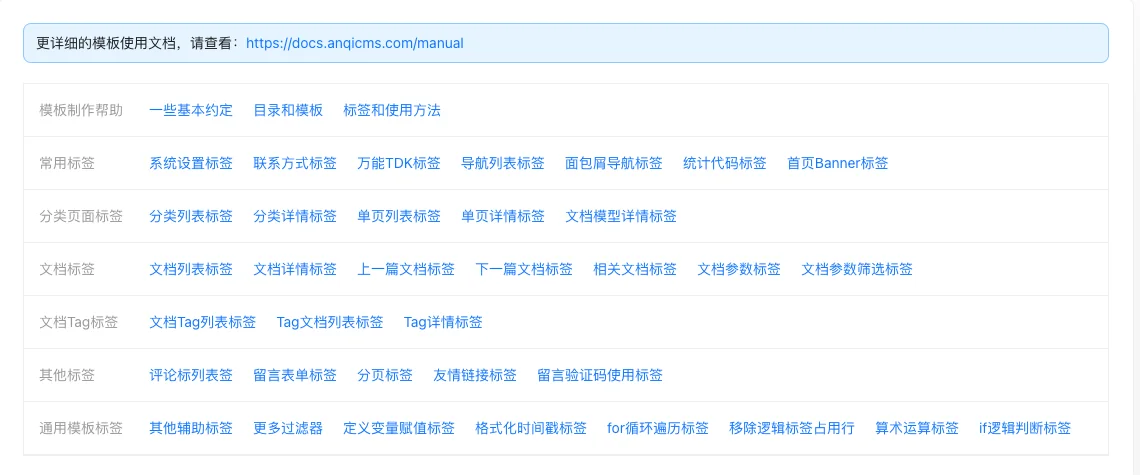
Content grouping
| Group | Contains content |
|---|---|
| Template creation help | Basic conventions, directory and template, tag usage |
| Common Tags | System settings, contact information, TDK, navigation, breadcrumbs, statistics, Banner |
| category page tag | Category list/detail, single page list/detail, model detail |
| Document Tag | List, details, previous and next articles, related documents, parameters and filters |
| Document Tag label | Tag list, Tag document list, Tag details |
| Other Tags | Comment list, message form, pagination, friend links, captcha |
| Universal Template Tag | Auxiliary tags, filters, assignment, timestamps, loops, logical judgments |
Setting item description
This page is the document navigation page, no configuration items. The content of each group is shown in the table above.
| Setting items | function | Value / Default | How to select / Fill in suggestions | Impact / Note |
|---|---|---|---|---|
| Tag group navigation | List all tag manual entry categories | Read-only link | Click the corresponding tag as needed | — |
Operation steps
- Enter the 'Design → Development Document'.
- Find the needed tag by category.
- Click the link to view the usage and field description of the tag.
Applicable scenarios and suggestions
- Use this page as a quick reference manual when writing templates, it's faster than checking external documents.
- Visit the manual address given at the top of the page for complete examples.
Points to note
- Tags are case-sensitive; spelling errors will not cause an error but will not output content.
- The usage of tags should be based on this manual, do not write field names from memory.
Related documents
- My Templates
- Template Content Settings
- The 'User Manual' section of this help station.